Keep the FDA annual report and facility events
3PL add-on For: Administrator, Compliance manager, Warehouse staff Checked on 18.0.0.2.0, 18.0.1.0.0
Keep the record of each facility's annual report to FDA, act on its reminders, print what the report contains, and record the events that FDA wants reported within 30 days. The report itself is filed outside Odoo, through FDA's CDER Direct; these records hold the date, FDA's confirmation and the evidence.
Background: the modules follow the reading that the 3PL has its own reporting duties: a per-facility annual report to FDA (as a third-party logistics provider under FD&C Act §584(b) and, for a facility that also takes title, as a wholesale distributor under §503(e)(2)), filed between 1 January and 31 March, with an update within 30 days of a new license, a significant disciplinary action or a closure (FD&C Act § 584(a), (b), (d); FDA annual licensure reporting; see Compliance background). Filing through CDER Direct is out of the software's scope.
Record a facility's FDA annual report and mark it submitted
Record the report once you have filed it in CDER Direct, or complete the draft that the reminder job made (3PL-FAC-02). Your procedure decides who files the report and who records it; the software requires the Rx Tracking Manager right to mark it submitted.
Who: Rx Tracking Manager (an Rx Tracking User can read the list and print the summary)
Requires: Rx Tracking (DSCSA): 3PL and title model. Works in Odoo Community and Enterprise, whether 3PL is on or off.
Before you start:
- The facility exists as a warehouse, with its address (Inventory ‣ Configuration ‣ Warehouses).
- You have filed the report in CDER Direct and have FDA's confirmation number and a copy of the receipt (a PDF or a screenshot).
-
Go to Inventory ‣ Rx Tracking ‣ FDA Annual Reports (in the 3PL ‣ Configuration section).
Result: the list shows the reports by Reporting Year, Facility, Capacity, Submitted On, FDA Confirmation, Valid Until and Status. The example database has last year's report of the Chico Distribution Center, capacity Both, Submitted. The year is shown with a thousands separator, for example
2,025(known issue PF-W22-01). -
Select New. If the reminder job already made a draft for the facility and year, open that draft instead and go to step 4.
Result: a form in Draft, with Reporting Year set to the current year, Capacity set to Third-party logistics provider (§584(b)) and Valid Until set to 31 March of the next year.
-
Fill in:
- Facility: the warehouse the report is for, for example Chico Distribution Center.
- Reporting Year: the year the report is due in, for example
2026. - Capacity: what you filed: Third-party logistics provider (§584(b)), Wholesale distributor (§503(e)(2)) or Both.
- Trade Names: every trade name the facility operates under, one per line, for example
Demo Rx Distribution LLCandDemo Rx Chico.
-
Select the save icon.
Result: the report is saved as Draft and named after its year, facility and capacity, for example "FDA annual report 2026, Chico Distribution Center (Both)". The header shows Mark submitted and Print summary.
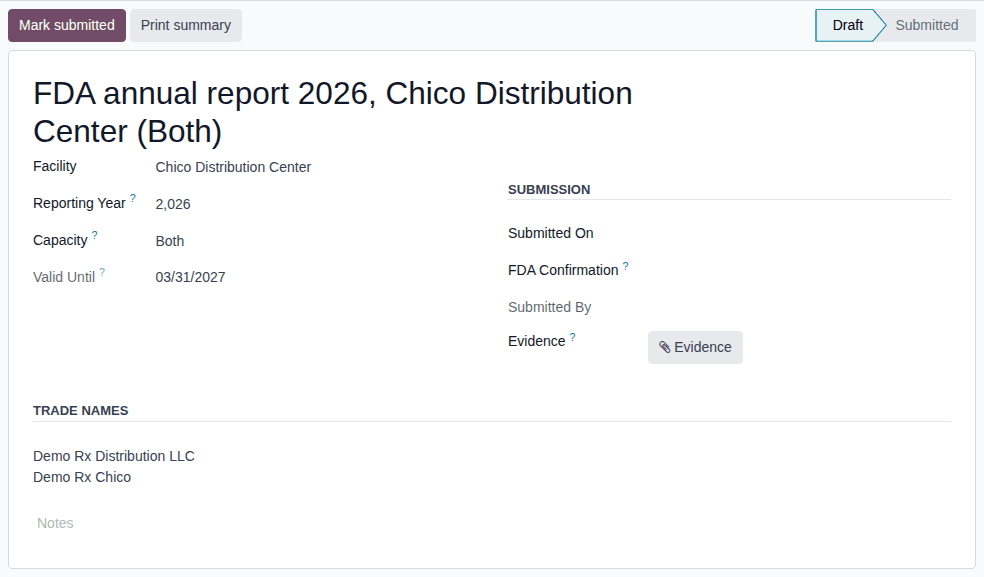
-
Under Submission, fill in Submitted On (the date you filed) and FDA Confirmation (FDA's confirmation number), then select Evidence and choose the receipt file.
-
Select Mark submitted.
Result: the status is Submitted, Submitted By shows your name, and the chatter logs "Marked submitted by YOUR-NAME (submitted on DATE, confirmation REFERENCE).". Facility, Reporting Year, Capacity, Submitted On, FDA Confirmation and Trade Names are read-only; only Evidence and the notes stay editable.
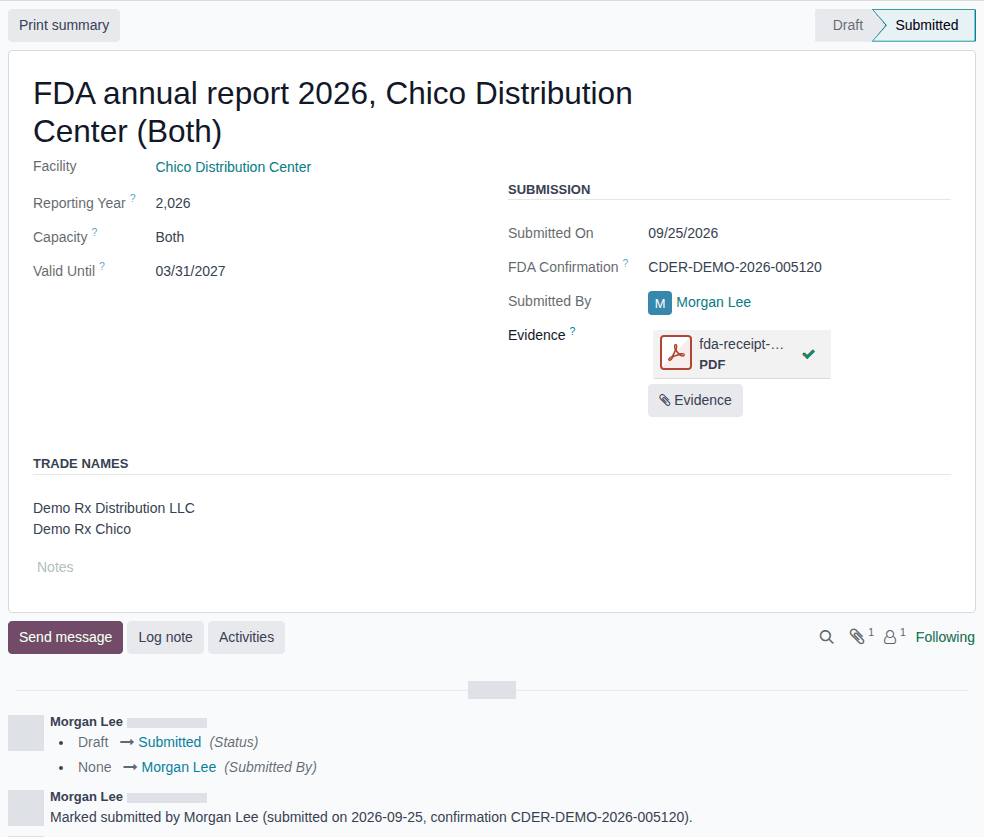
Result: the facility has a submitted report for the year. Its open FDA annual report due reminders are closed (3PL-FAC-02). Records: the FDA annual report with its evidence file and chatter history.
When a report counts:
- A report counts from its Submitted On date until its Valid Until date (31 March of the next year), while it is Submitted and not archived, for the activities its capacity covers: Both covers third-party logistics and wholesale distribution. A draft, an archived report or a report of the other capacity doesn't count.
- The owner, counterparty and facility checks read it in two cases: for a facility in a state that doesn't license 3PLs (Record that a state does not license 3PLs), and for every owner or title operation when the company's 503(e) setting is on (Set whether wholesalers and 3PLs need an FDA 503(e) report). Otherwise the report is a record, and the target of the reminders. See Get an owner transfer through the owner, counterparty and facility checks.
Correct a submitted report
A submitted report can't be edited, set back to draft or deleted. To correct it:
- Open the report, then in the ⚙ (Actions) menu, select Archive.
- Record a new report with the right facts (steps 2–6).
If it doesn't work
- "Enter the submission date and FDA's confirmation of REPORT before marking it submitted.": Submitted On or FDA Confirmation is empty. Fill both in and select Mark submitted again. See Error: "Enter the submission date and FDA's confirmation …".
- "Enter the reporting year of the FDA annual report (e.g. 2026)." (when you save): the year is outside 2000–2999. See Error: "Enter the reporting year …".
- There is no New and no Mark submitted, or Archive ends with an Access Error: you are an Rx Tracking User. Ask an Rx Tracking Manager. See Error: "Only DSCSA managers can mark …".
- The facts are read-only, or an import is refused with "… is submitted: its … can't change. Archive it and record a new report.": the report is submitted. Correct it as above. See Error: "… is submitted: its … can't change".
Known issue (PF-W22-02): nobody can delete an FDA annual report, not even a draft made by mistake; the ⚙ (Actions) menu offers only Archive and Duplicate. Archive the wrong draft. An archived draft has no effect, and the reminder job makes a new draft if the facility still has something to report.
Act on the FDA annual report reminders
The daily job DSCSA 3PL: FDA annual report reminders checks each facility of a company with 3PL on. When the facility has something to report for the current year and no submitted report of that year covers it, the job puts a draft report in place and gives each Rx Tracking Manager an FDA annual report due activity on it, due 31 March.
Background: the reminders follow the 1 January–31 March reporting window described at the top of this page (FD&C Act § 584(a), (b), (d); FDA annual licensure reporting; see Compliance background). The software keeps reminding after 31 March while the report is missing; it doesn't say what FDA expects of a late report.
Who: Rx Tracking Manager. Every active internal user with the Rx Tracking Manager right and access to the company gets the reminder.
Requires: Rx Tracking (DSCSA): 3PL and title model, with 3PL switched on.
Before you start:
- The facility has something to report: an active facility license of ours of type State license or Federal 3PL licence (future) with an activity, not expired before 1 January (Record and verify our facility licenses), or an active owner profile that names the facility in Facilities Served during the year (Create an owner profile).
- The job has run since then. It runs once a day on a normal server.
-
In the top bar, select the clock icon (Activities).
Result: the menu lists DSCSA FDA Annual Report (Facility) with its count of Late, Today and Future activities.
-
Select DSCSA FDA Annual Report (Facility).
Result: the reports that carry your reminders, for example the drafts "2,026 Chico Distribution Center Both" and "2,026 Albany Annex Both". The same drafts are in Inventory ‣ Rx Tracking ‣ FDA Annual Reports (in the 3PL ‣ Configuration section) with the filter Draft.
-
Open the draft of the facility.
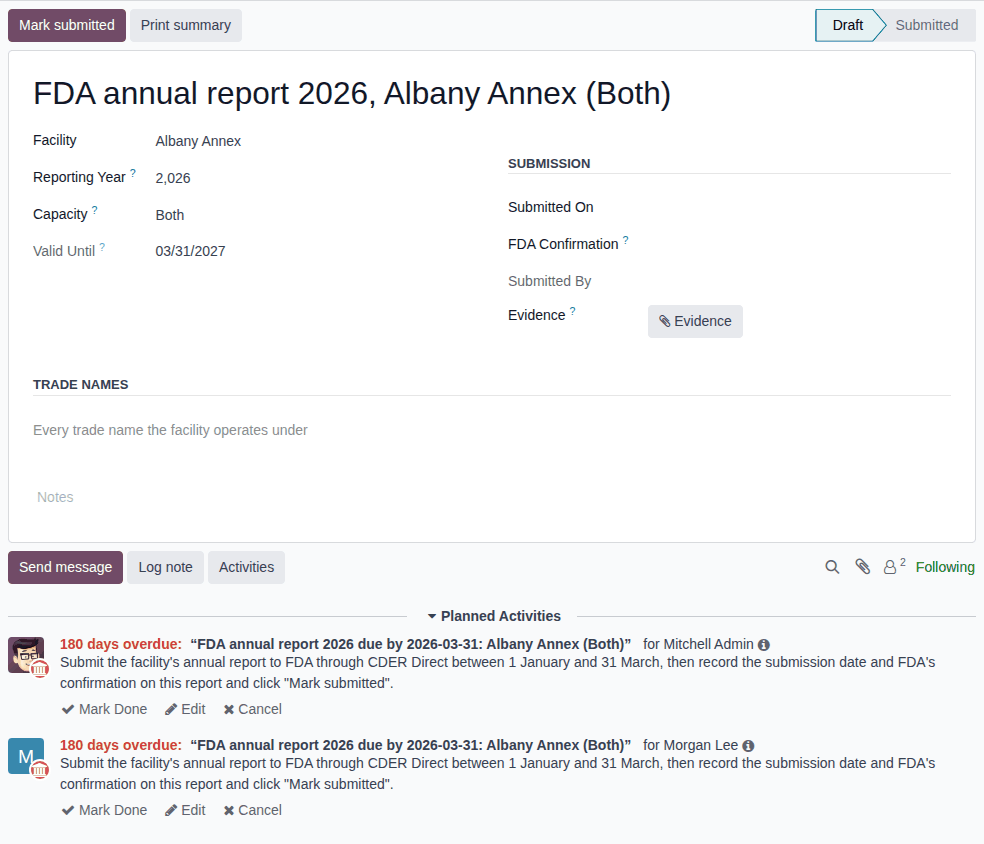
Result: under Planned Activities, one activity per Rx Tracking Manager, with this summary and note:
FDA annual report YEAR due by YEAR-03-31: FACILITY (CAPACITY)Submit the facility's annual report to FDA through CDER Direct between 1 January and 31 March, then record the submission date and FDA's confirmation on this report and click "Mark submitted".Capacity is what the facility still has to report, and Trade Names are copied from its last submitted report (empty when there is none, as for the Albany Annex).
-
File the report in CDER Direct. If you filed another capacity than the draft shows, change Capacity to what you filed.
-
Complete and submit the draft as in 3PL-FAC-01, steps 5–6.
Result: the report is Submitted and every reminder of the facility and year is marked done, with the feedback "Submitted." or "The facility's FDA annual report for YEAR is submitted.".
Result: the facility's report for the year is recorded, and the next run of the job creates nothing for that facility. Records: the report (made by the job, completed by you) and the closed activities in its chatter.
Variants:
- You mark a reminder done while the report is missing: the job gives it back to you the next day.
- You submit only part of what is due (for example Third-party logistics provider (§584(b)) when the facility also holds a wholesale license): that report's reminders close, and the next run makes a new draft of the missing capacity with its own reminders.
- Nothing to report: a facility with no facility license and no owner profile, or a company with 3PL off, gets no draft and no reminder.
If it doesn't work
- There is no reminder although the facility must report: the job hasn't run, the facility has no license or owner profile that counts, or you aren't an Rx Tracking Manager of that company. See There is no FDA annual report reminder.
- A reminder is already overdue the day it appears: see the known issue below.
Known issue (PF-A05-08): the reminder is always due 31 March of the current year, and the job runs all year. A facility that becomes reportable after 31 March (its first license, or its first owner) gets a reminder that is already overdue, next to the Report to FDA within 30 days activity of its new license (3PL-FAC-04). Treat the overdue date as the job's default, not as an FDA deadline; your procedure decides when the facility reports.
Print the FDA annual report summary
Print what a report contains, to prepare the CDER Direct entry or to keep with the confirmation.
Who: Rx Tracking User or Manager
Requires: Rx Tracking (DSCSA): 3PL and title model. Works in Odoo Community and Enterprise.
Before you start:
- The report exists, as a draft or submitted (3PL-FAC-01).
-
Go to Inventory ‣ Rx Tracking ‣ FDA Annual Reports (in the 3PL ‣ Configuration section) and open the report.
-
Select Print summary.
Result: a PDF named
FDA annual report YEAR CODEdownloads, for exampleFDA annual report 2026 WH.pdf.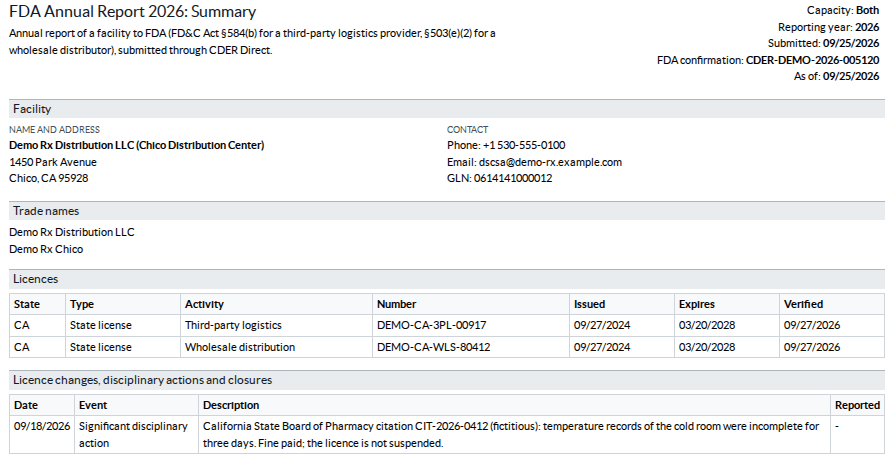
Result: the summary "FDA Annual Report YEAR: Summary" lists:
- the capacity, the reporting year, the submission date and FDA confirmation (a draft says "Draft: not yet submitted"), and As of: the submission date, or today for a draft;
- the facility's name and address, phone, email and GLN (Global Location Number);
- every trade name ("No trade name recorded on this report." when there is none);
- our licenses of that facility that are valid on the As of date, for the activities the capacity covers (state, type, activity, number, issue, expiry and verification dates); where the state doesn't license 3PLs and a verified jurisdiction record says so, the state is listed without a license number;
- the facility events since 1 January of the previous year (3PL-FAC-04), or "None recorded since 1 January of the previous year.".
Expired licenses, NABP accreditations and other facilities' licenses and events are never listed. Nothing is stored: the PDF is made each time.
To print several summaries at once, select the reports in the list, then in the ⚙ (Actions) menu select FDA Annual Report Summary.
If it doesn't work
- A license you expect is missing: it isn't valid on the As of date, has no Facility or another Activity, or is of another type than State license or Federal 3PL licence (future). See Record and verify our facility licenses.
Record a facility event and mark it reported to FDA
Record a new license of a facility, a significant disciplinary action, or a facility closing or giving up its license, then record when the facility's FDA report was updated. A new license is recorded for you when you verify it; the other events you record yourself. Your procedure decides which disciplinary actions are significant; the software records what you enter.
Background: the modules read FDA's question-and-answer guidance as asking for the annual report to be updated within 30 days of such an event (FD&C Act § 584(a), (b), (d); FDA annual licensure reporting; see Compliance background).
Who: Rx Tracking Manager (an Rx Tracking User can read the events)
Requires: Rx Tracking (DSCSA): 3PL and title model. The automatic New licence event needs 3PL switched on.
Before you start:
- For a disciplinary action or a closure: the authority's order or notice, as a file.
-
Go to Inventory ‣ Rx Tracking ‣ Facility Events (in the 3PL ‣ Configuration section).
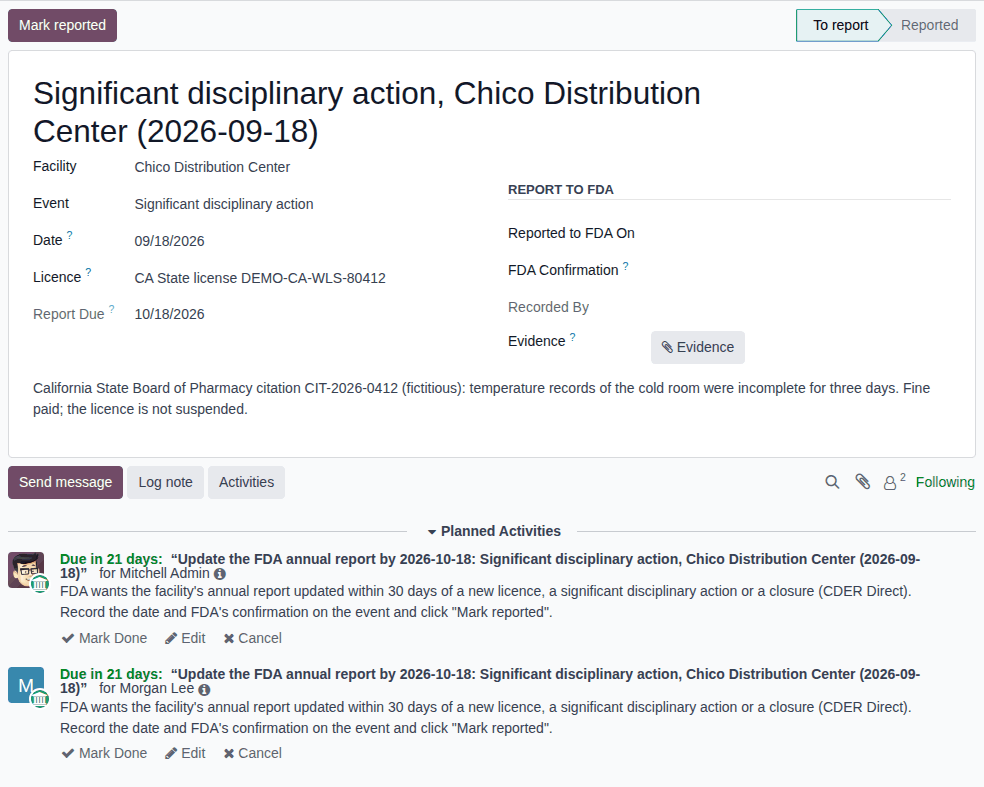
Result: the list shows the events with their Report Due date, open activities and Status. Events To report are highlighted. The example database has a Significant disciplinary action at the Chico Distribution Center, To report.
-
Select New.
-
Fill in:
- Facility: the warehouse, for example Albany Annex.
- Event: New licence, Significant disciplinary action or Facility closure or licence given up.
- Date: when it happened: the license's issue date, the date of the final disciplinary action, or the closure date.
- Licence (optional): the facility license concerned. The list offers only licenses of the selected facility.
- In the description box under the fields ("What happened: authority, order or case reference, ..."), what happened.
- Evidence: select it and choose the order or notice.
-
Select the save icon.
Result: the event is To report, Report Due is 30 days after Date, and each Rx Tracking Manager has a Report to FDA within 30 days activity: "Update the FDA annual report by DATE: EVENT, FACILITY (DATE)".
-
Update the facility's report in CDER Direct, then open the event.
-
Under Report to FDA, fill in Reported to FDA On and FDA Confirmation; select Evidence to add FDA's receipt if you have one.
-
Select Mark reported.
Result: the status is Reported, Recorded By shows your name, and the chatter logs "Marked reported by YOUR-NAME (FDA report updated on DATE, confirmation REFERENCE).". Every Report to FDA within 30 days activity is done with the feedback "Reported to FDA.". Facility, Event, Date, Licence, Reported to FDA On and FDA Confirmation are read-only.
Result: the event is reported and appears on the facility's FDA annual report summary (3PL-FAC-03). Records: the facility event with its evidence and chatter history.
Variants:
- A new license, recorded for you: when an Rx Tracking Manager first selects Mark verified on a facility license of ours of type State license or Federal 3PL licence (future) that names a facility, with 3PL on, a New licence event is recorded, dated on the license's Issue Date (else today), with the description "LICENSE verified by USER on DATE." and the same activities. Verifying the license again records no second event. Continue at step 5. See Record and verify our facility licenses.
- A wrong event: archive it (⚙ (Actions) ‣ Archive) and record a new one. Events are never deleted.
If it doesn't work
- "Enter the date the FDA report was updated and FDA's confirmation for EVENT before marking it reported.": fill in Reported to FDA On and FDA Confirmation. See Error: "Enter the date the FDA report was updated …".
- "LICENSE is not a licence of the facility FACILITY." (when you save): the Licence belongs to another facility, usually because Facility was changed after the license was chosen. Choose a license of the event's facility, or clear Licence. See Error: "… is not a licence of the facility …".
- There is no New and no Mark reported: you are an Rx Tracking User. Ask an Rx Tracking Manager. See Error: "Only DSCSA managers can mark …".
- No New licence event after a verification: 3PL was off, the license names no facility, it is of another type, or it was verified before (an event already names it). Record the event by hand (steps 1–4).