Owner checks, the gate log and the client list
3PL add-on For: Compliance manager, Warehouse staff Checked on 18.0.0.2.0, 18.0.1.0.0
When a transfer moves an owner's DSCSA units to or from a trading partner, the software checks the owner, the other party and your own facility license before it validates, and logs every result. This page explains how to get a refused transfer through, how to read and export the gate log for an inspector, and how to print the list of owners a facility serves.
Background: the add-on is built so that the owner, its supplier or customer, and the 3PL's own facility license are checked on owner movements, with every check logged and exportable (FD&C Act § 582(c)(3), § 581(2); § 584(a)–(b); see Compliance background). It also keeps a client list per facility, because the modules read FD&C Act §584(d) as saying that the licensing authority can ask for one (FD&C Act § 584(a), (b), (d); FDA annual licensure reporting; see Compliance background). This is how the modules read the law; it has not been reviewed by counsel. See the disclaimer.
Get an owner transfer through the owner, counterparty and facility checks
Validating a receipt, delivery or return of an owner's DSCSA units runs three checks. Owner orders at Confirm, nonsaleable returns to a designee and title transfers run the same checks from their own buttons. This procedure uses an owner receipt; the reading and the fixes are the same everywhere.
Who: Rx Tracking User or Manager validates. Most fixes (licenses, facility records, policies) need an Rx Tracking Manager.
Requires: Rx Tracking (DSCSA): 3PL and title model, with 3PL switched on.
Before you start:
- The transfer is held for an owner (Held for Owner is set) and holds at least one DSCSA product.
What is checked:
| Party | Checked against | When it fails |
|---|---|---|
| The owner (the company in Held for Owner) | the core rule for its DSCSA role: a valid, verified license of the right type (Record and verify a trading partner's license) | the transfer is always refused |
| The other party: the transfer's partner (Receive From, the delivery address) and the order's partners (the owner's supplier or customer, a return designee) | the same core rule | refused by default; let through with a warning when the company's Owner counterparties setting is Warn, or when the owner has a recorded counterparty attestation and Warn only for owners with a recorded counterparty attestation is selected (Choose the company's 3PL policies) |
| Our facility (the warehouse of the operation type) | our verified license for the activity the units need: Third-party logistics for an owner of type Owner (3PL client), Wholesale distribution for a Consignor (Record and verify our facility licenses); in a state that doesn't license 3PLs, a verified jurisdiction record and a submitted FDA annual report instead; with the 503(e) setting on, also a submitted FDA annual report (3PL-FAC-01) | the transfer is always refused |
Your own transfers (no owner) keep the core trading-partner check with its own messages, and nothing is logged for them. Lines of non-DSCSA products are never checked.
What isn't checked: the facility check doesn't compare a license's Jurisdiction with the facility's state, so any verified license of the right activity that names the warehouse counts (known issue PF-F06-01; see "What the check doesn't compare" in Record and verify our facility licenses). The customer's (ship-to) state is not checked either: non-resident third-party logistics licenses of the states you ship into are neither recorded nor checked. Your procedure decides which states' licenses you need and how you check them.
-
Open the owner transfer, for example the receipt from Granite State Rx Supply held for Northwind Generics, and select Validate.
Result: when a check fails, an Invalid Operation dialog lists the transfer, then one line per problem:
WH/IN/NNNNN can't be validated: it moves DSCSA products ([DEMO-FMY-250] Fictimycin 250 mg/5 mL for Oral Suspension, 100 mL) to or from a trading partner.Granite State Rx Supply LLC (wholesaler) has no valid state license: license DEMO-NH-WHL-3301 expired on 2026-09-07.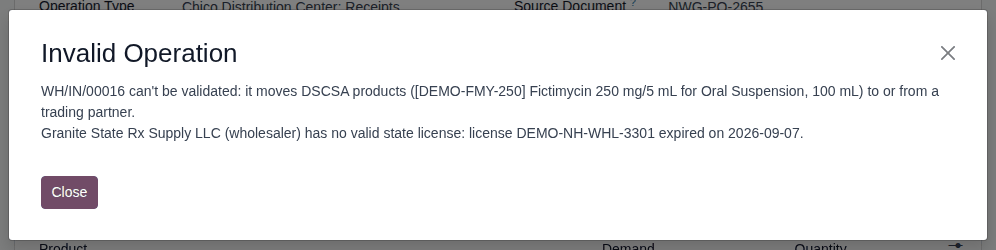
-
Select Close, then read each line and fix what it names:
The line starts with Who or what failed Fix "Owner: OWNER (ROLE) has no valid …" the owner's own license an Rx Tracking Manager records or verifies the owner's license (Check whether an owner is an authorized trading partner) "PARTNER (ROLE) has no valid …" the other party record or verify its license (Record and verify a trading partner's license); or set the right partner on the transfer; your procedure decides whether the company warns instead of refusing (3PL-SET-03) "Facility WAREHOUSE has no valid 3PL licence …" or "… no valid wholesale distributor licence …" our license for that warehouse and activity an Rx Tracking Manager records and verifies it (3PL-SET-05) "Facility WAREHOUSE has no valid FDA annual report record as a 3PL (§584(b)): STATE does not license 3PLs …" the FDA report that stands in for the state license record and submit the facility's report, capacity Third-party logistics provider (§584(b)) or Both (3PL-FAC-01) "Facility WAREHOUSE has no valid FDA annual report record as a CAPACITY for DATE, which the company's 503(e) setting requires." the company's 503(e) setting record and submit the report for that capacity (3PL-FAC-01) "… but no trading partner is set on the transfer." the transfer itself fill in Receive From (or the delivery address) -
Select Validate again.
Result: the three checks pass and the other validation checks of the transfer follow (for example the serial count).
Result: the transfer validates. The gate log has one row per check, for the owner: Owner, Supplier (or Customer) and Our facility, each Pass with what was checked, for example "Authorized Manufacturer. Checked: FDA establishment registration DEMO-FEI-3009999950" and "Checked: CA State license DEMO-CA-3PL-00917". Records: the gate log rows (3PL-FAC-06).
Variants:
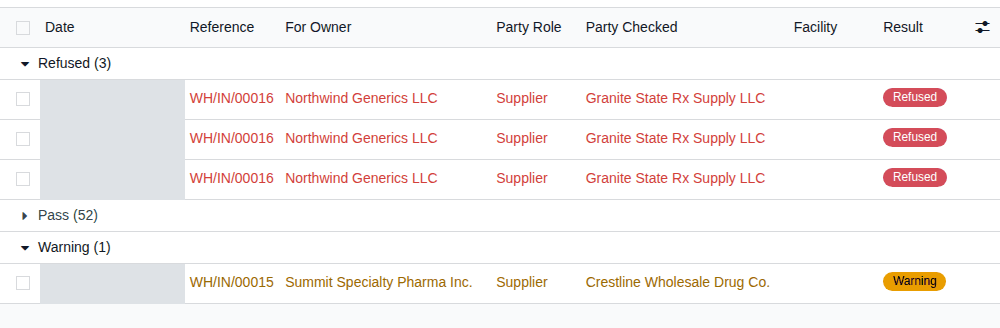
- Let through with a warning: when the other party fails and the owner's policy is to warn, the transfer validates. The gate log row is a Warning whose detail ends with "Let through: the counterparty check for this owner is set to warn (Q3-02).", and the transfer's chatter logs "Trading-partner check for owner OWNER let through with a warning:" followed by the problem. The example database shows this on Summit's receipt from Crestline Wholesale Drug Co.
- Refusals stay on record: the rows of a refused attempt (the failed check and the ones that passed) are kept although nothing else of the attempt is saved. Rows of checks that passed are written only when the transfer goes through: if another check refuses the transfer afterwards (a missing scan, for example), those rows are not kept (finding PF-W22-03).
If it doesn't work
- The dialog comes back with the same line: the license you fixed isn't valid today (unverified, not yet in force, expired), names another facility or activity, or is archived. See Error: "… can't be validated: it moves DSCSA products … to or from a trading partner.".
- Each line has its own entry: the owner, the other party, our facility license, a state that doesn't license 3PLs, the 503(e) setting and no trading partner on the transfer.
- At Confirm on an owner order, the same lines come under "… can't be confirmed: it ships DSCSA products for …": see Error: "… can't be confirmed: it ships DSCSA products for …". On a title transfer: see Error: "Facility … has no valid … licence".
Review the gate log and export it for an inspector
Find the checks made on owner operations, open the record checked, and give the rows to an inspector, an auditor or the owner as a CSV file. Nobody can change or delete a row.
Who: Rx Tracking User or Manager
Requires: Rx Tracking (DSCSA): 3PL and title model.
Before you start:
- Owner operations have been checked (3PL-FAC-05).
-
Go to Inventory ‣ Rx Tracking ‣ Gate Log (in the 3PL ‣ Reports section).
Result: the checks, newest first, with Date, Reference, For Owner, Party Role, Party Checked, Facility, Result (Pass, Warning or Refused) and Checked By. Refused rows are red and warnings orange.
-
Narrow the list from the search bar:
- filters Refused, Warnings, Passed, Our facility, Counterparties, Owners and Date;
- search by Reference, For Owner, Party Checked, Facility or Checked By (type, then choose the line);
- group by Owner, Result, Party Role or Date.
Result: for example, grouped by Result, the example database shows Refused, Pass and Warning groups.
-
Open a row.
Result: the row's form shows its facts and the detail: what was checked ("Authorized ROLE. Checked: LICENSES", "Checked: LICENSE" for our facility, "STATE does not license 3PLs (verified DATE)"), or the refusal text.
-
To see the transfer, order or title transfer checked, select Open Record.
-
Back in the list, select the rows to export with their checkboxes (the header checkbox selects every row shown).
Result: Export CSV appears above the list, with the count of selected rows.
-
Select Export CSV.
Result: a file
gate_log_FIRST-DATE_LAST-DATE.csvdownloads, for examplegate_log_20260927_20260927.csv.
Result: the CSV has one line per selected row, oldest first, with the columns date_utc, user, company, record_model, record_id, reference, owner, owner_gln, party, party_gln, party_role, facility, result, detail. Dates are in UTC, in the file name too. A copy of
the file is stored with the newest exported row and kept like the log; it isn't shown on the row's form. Records: the CSV file.
If it doesn't work
- Open Record says "REFERENCE no longer exists (its operation was refused and rolled back)." or "This check names no record that can be opened.": the operation that was refused had created the record, which was not saved. The row keeps the reference and the detail. See Error: "… no longer exists (its operation was refused and rolled back).".
- There is no Export CSV: no row is selected. Select at least one row.
- An import or integration that changes or deletes a row is refused: "The gate log is a record of checks made: its rows can't be changed." See Error: "The gate log is a record of checks made …".
Known issue (PF-A05-06): a Warning row's detail, also in the CSV, ends with "Let through: the counterparty check for this owner is set to warn (Q3-02)." The code in brackets refers to the developer's internal list of design questions: it stands for the company's Owner counterparties policy. Explain it to the inspector if asked.
Print or export the facility client list
Print or export the owners a facility served on a date, with their role, licenses and service dates, for example when a licensing authority asks for it.
Who: Rx Tracking User or Manager
Requires: Rx Tracking (DSCSA): 3PL and title model.
Before you start:
- Each owner profile names the warehouses it uses in Facilities Served, with its Service Start and, once the relationship ends, Service End (Create an owner profile).
-
Go to Inventory ‣ Rx Tracking ‣ Facility Client List (in the 3PL ‣ Reports section).
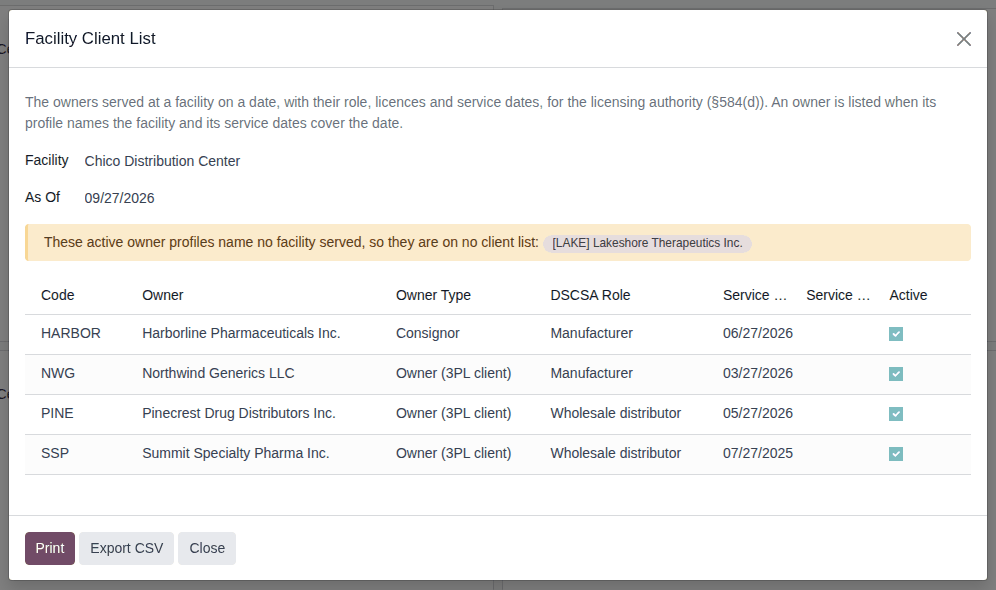
Result: the Facility Client List window opens with Facility set to the company's first warehouse and As Of set to today, and lists the owners served. A warning names the active owner profiles that name no facility: "These active owner profiles name no facility served, so they are on no client list:" followed by the owners, for example [LAKE] Lakeshore Therapeutics Inc.
-
In Facility, select the warehouse, for example Chico Distribution Center.
-
In As Of, enter the date the list is for.
Result: the list shows each owner served on that date, with Code, Owner, Owner Type, DSCSA Role, Service Start, Service End and Active. In the example database, the Chico Distribution Center today lists HARBOR, NWG, PINE and SSP; 90 days ago it also lists CEDAR, whose service ended since.
-
Choose one:
- Select Print: a PDF
Client list CODE YYYY-MM-DDdownloads, for exampleClient list WH 2026-06-29.pdf. - Select Export CSV: a file
client_list_CODE_YYYYMMDD.csvdownloads.
The window stays open, so you can print another facility or date.
- Select Print: a PDF
-
Select Close.
Result: the printed list ("Client List of the Facility", landscape) shows, per owner, its code, name, GLN (Global Location Number),
type, DSCSA role, the licenses on file with their status on the date ("… (Valid, expires DATE)"), whether it was authorized on the date (with the reason when it wasn't), its
address and service dates; an archived profile says "archived". The CSV has the columns facility, as_of, owner_code, owner, owner_gln, owner_type, dscsa_role, authorized_on_date, authorization_issue, licences, address, service_start, service_end, profile_status (active or
archived). Nothing is stored: the files are made each time. Records: the PDF or CSV file.
Who is listed: every owner profile of the facility's company that names the facility in Facilities Served and whose service covers the date: Service Start empty or on or before the date, and Service End on or after it, or empty while the profile is active. An archived profile without a Service End counts as ended and is not listed.
If it doesn't work
- An owner is missing: its profile doesn't name the facility in Facilities Served, its service dates don't cover the date, or it is archived without a Service End. See The facility client list misses an owner.
Known issue (PF-A05-07): Facilities Served keeps no history, and changing it isn't logged. A list "As Of" a past date follows today's Facilities Served: an owner moved to another warehouse disappears from the old warehouse's past lists. Before you change Facilities Served, print the lists you may need for past dates, or record the change in the owner profile's chatter.