Hold and release lots that hold owner units
3PL add-on For: Administrator, Compliance manager Checked on 18.0.0.2.0, 18.0.1.0.0
A lot on your shelves can hold your own units and units you keep for one or more 3PL owners. A quarantine always holds the whole lot, for everyone, and tells each owner with units in your custody. Releasing the lot needs each owner's release instruction, because the owner directs what happens to its stock. The core procedures are Quarantine and release lots; this page adds what changes when owners have units in the lot.
Put a lot that holds owner units on hold
Quarantine the lot as you would any lot: a suspect-product signal, a temperature excursion, a manufacturer's notice. The hold never waits for an owner's instruction. Background: the modules follow the reading that you may put owner stock on hold, that every hold touching owner units notifies each affected owner, and that the owner's instruction is needed for the release, not for the hold (FD&C Act § 582(c)(4); FDA suspect-product guidance (June 2021); Form FDA 3911; FD&C Act § 581(6), (22), (24), (26), (27); § 582(a)(1), (a)(7); § 584(d); see Compliance background). This is how the modules read the law; it has not been reviewed by counsel. See the disclaimer.
Your procedure decides when a lot is quarantined and who investigates; the software requires the Rx Tracking Manager right and a reason.
With the Suspect Product add-on (Odoo Enterprise), the quarantine also opens an investigation for each owner of the lot, and the owners' notices are Suspect product notices. See Follow the investigation a lot quarantine opens automatically and Follow the automatic investigations of a lot that holds owners' units.
Who: Rx Tracking Manager
Requires: Rx Tracking (DSCSA): 3PL and title model, with 3PL switched on.
Before you start:
- Each owner has at least one notice contact with an email address, or its notice is recorded unsent. See Set the owner's policies.
- You have the reason at hand. It is quoted word for word in every owner's notice and shown on the owners' portal: write it for the owners to read, and don't name another owner or customer in it.
-
Go to Inventory ‣ Products ‣ Lots / Serial Numbers, search for the lot, for example
BPDPZ2508K, open its group and open the lot. The list is grouped by location, with every group folded; a lot whose units are at several locations is in the group None (BPDPZ2508K is under None (1)).Result: the lot form, with Quarantine in its header. Lot BPDPZ2508K of Demoprazole holds your own units and units held for Northwind Generics LLC and Summit Specialty Pharma Inc.
-
Select Quarantine.
Result: the Quarantine Lot dialog opens: "A quarantined lot is no longer reserved for any order and can't be shipped. Its open reservations are released and its packages in stock are put on hold."
-
In Reason, enter why the lot is held, for example
Temperature excursion reported by the carrier for shipment BP-SHP-5521 (lot BPDPZ2508K); under investigation. -
Select Quarantine.
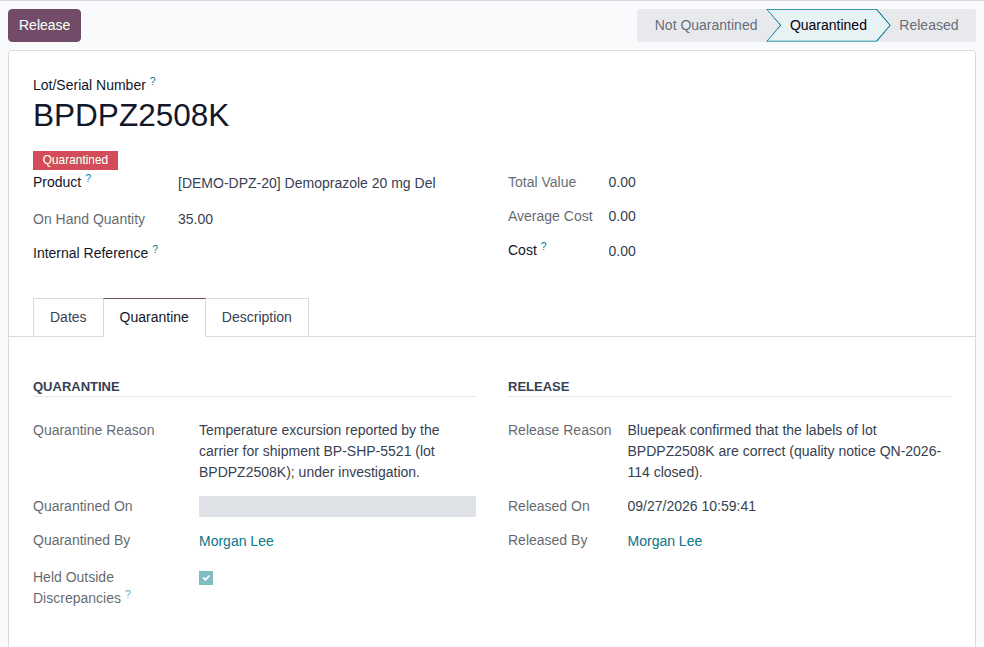
Result: the lot is Quarantined (red badge; Release replaces Quarantine). The chatter says "Lot quarantined: REASON", "35 package(s) put on hold." and "Taken off open operations: WH/OUT/00014, WH/OUT/00017." (every unit in your custody, yours and the owners', and the open deliveries of your sale and of Northwind's order). The Quarantine tab shows the reason, Quarantined On and Quarantined By; its Release block still shows the lot's earlier release (known issue PF-A04-06).
-
Go to Inventory ‣ Rx Tracking ‣ Owner Notices (in the 3PL ‣ Operations section).
Result: one new Hold notice per owner with units of the lot in your custody: Northwind Generics LLC (11 units) and Summit Specialty Pharma Inc. (10 units). None is written about your own units.
Result: the whole lot is on hold. Records: the lot (Quarantined, with the reason, the date and the manager, and its chatter lines), each unit in custody Quarantined, and one Hold notice per owner, emailed to its notice contacts. Each notice gives the lot, the reason, how many of the owner's units are held ("… they will not be shipped, returned to a supplier or change title until the hold is released.") and, when the owner's profile requires instructions, "To release your units we need your written release instruction for lot LOT (your order or approval reference)." Read them with Find and read the notices sent to an owner.
From now on the owners' units of the lot are held like yours: they are not reserved, shipped, returned to a supplier or transferred in title. What else the software does while a lot is held: Quarantine a lot so it can't be reserved or shipped.
Holds the software places by itself
The owners are told the same way when:
- a receiving discrepancy quarantines the lot (with the hold scope Whole lot; with Per owner for documentation holds, a documentation problem on an owner receipt places an owner hold instead, see Follow an owner hold placed by an owner receipt);
- a recall holds the lot: the other owners get a Recall notice as their hold notice (see Recall an owner's lots on its recall instruction);
- a further reason is added to a lot that is already on hold ("A further reason was added to the hold of lot …");
- more of an owner's units arrive in the held lot: they are held on arrival and their owner is told ("… arrived on RECEIPT in lot(s) that are on hold …: they are held from arrival.").
If it doesn't work
- There is no Quarantine button: you don't have the Rx Tracking Manager right, the lot is already Quarantined, or its product isn't a DSCSA product. See The Quarantine or Release button isn't shown.
- "Give a reason for the quarantine.": enter a reason. See Error: "Give a reason for the quarantine.".
- An owner got no notice: its notice is Not Sent, or its units of the lot are all shipped. See The owner says it got no notice.
Known issue (PF-A09-10): the owner's portal Holds page shows the lot's quarantine reason as you typed it, so every owner with units of the lot reads it. Keep the reason free of other owners' and customers' names.
Release a lot that holds owner units, with each owner's release instruction
Release the lot when its hold is cleared. For each owner with units of the lot in your custody, the Release Lot dialog asks for the owner's release instruction: pick the one you recorded, or type its reference in the dialog. Each owner is then told the lot is released. Background: the modules read the definition of a 3PL as meaning that the owner, not you, directs each disposition of its stock (FD&C Act § 581(6), (22), (24), (26), (27); § 582(a)(1), (a)(7); § 584(d); see Compliance background). This is how the modules read the law; it has not been reviewed by counsel. See the disclaimer.
Known issue (PF-W15-01): in this version the Release Lot dialog of a lot that holds owner units can't be confirmed from the screen: step 5 always ends in a Validation Error ("… a mandatory field is not set. … Model: Owner Release Instruction (Release Window) (dscsa.lot.quarantine.owner.line) Field: Lot (lot_id)"), whatever you enter, and the lot stays Quarantined, your own units included. There is no workaround in the screens. Ask your Odoo implementer to release the lot through Odoo's external API with each owner's instruction, or to install a fix. Lots that hold only your own units, and owner holds, are not affected. The steps below describe the dialog as designed.
Known issue (PF-A07-01): when the lot holds units of an owner whose profile is archived, that owner's line is Required and no instruction can be recorded for it, so the lot can't be released. Re-activate the owner's profile first (Change, end or re-open an owner relationship), release the lot, then archive the profile again.
Known issue (PF-A07-03): the refusal's advice to "Record the owner's release instruction for the lot (Rx Tracking > 3PL)" can't be followed: an instruction recorded under Owner Instructions names no lot. Pick it in the dialog instead (step 4).
Your procedure decides who may release a lot and on what evidence; the software requires the Rx Tracking Manager right, a reason and, for each owner whose profile says Required, the owner's release instruction.
Who: Rx Tracking Manager
Requires: Rx Tracking (DSCSA): 3PL and title model, with 3PL switched on.
Before you start:
- The lot is Quarantined. See Put a lot that holds owner units on hold.
- Each owner's release instruction has arrived (its order or approval reference, how and when you received it). You can record it first, with its evidence file (Record an owner's instruction, kind Release from hold), or type its reference in the dialog.
-
Open the lot (Inventory ‣ Rx Tracking ‣ Quarantined Lots), for example
BPDPZ2508K. -
Select Release.
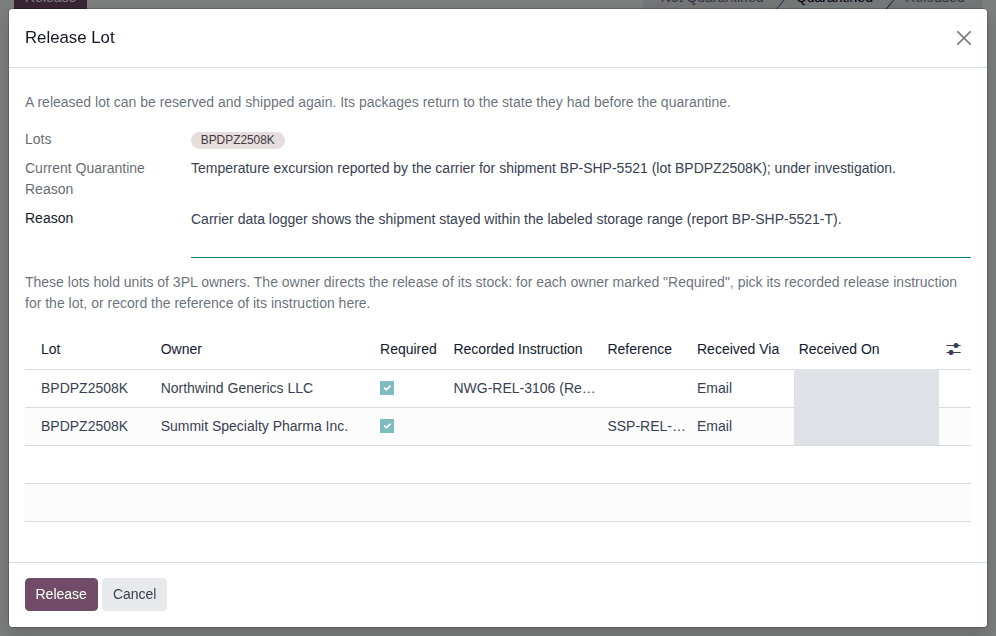
Result: the Release Lot dialog opens with the Current Quarantine Reason, and below the Reason the text "These lots hold units of 3PL owners. The owner directs the release of its stock: for each owner marked "Required", pick its recorded release instruction for the lot, or record the reference of its instruction here." and one line per owner: Lot, Owner, Required, Recorded Instruction, Reference, Received Via (default Email) and Received On (default now).
-
In Reason, enter why the lot is released, for example
Carrier data logger shows the shipment stayed within the labeled storage range (report BP-SHP-5521-T). -
On each owner's line, choose one:
- Recorded Instruction: select the owner's release instruction you recorded, for example NWG-REL-3106 (Release from hold, Northwind Generics LLC). The list offers only that owner's unused release instructions.
- Reference: enter the reference of the owner's instruction, for example
SSP-REL-80655, and check Received Via and Received On. The optional columns Received From and Note (in the optional columns menu at the right end of the header row) take the owner's contact and a remark.
An owner whose line isn't Required (its profile says Optional) may stay empty.
-
Select Release.
Result: the lot is Released. The chatter says "Lot released from quarantine: REASON" and "N package(s) back from hold."
Result: the lot can be reserved and shipped again. Records: the lot (Released, with the release reason, date and manager); each typed reference recorded as a new Release from hold instruction of its owner for this lot; every instruction used marked Used On (For Record = the lot); and one Release notice per owner whose units were held, naming its instruction, for example:
Lot BPDPZ2508K ([DEMO-DPZ-20] Demoprazole 20 mg Delayed-Release Capsules, 30 count) was released from hold at Demo Rx Distribution LLC on 2026-09-27.
Reason: Carrier data logger shows the shipment stayed within the labeled storage range (report BP-SHP-5521-T).
Released on your instruction NWG-REL-3106.
11 of your units of this lot are available again.
A release instruction releases a lot once: if the lot is held again, each owner's new instruction is needed. Open deliveries pick the lot up again when someone selects Check Availability.
Variants
- An owner's policy is Optional: its line isn't Required and may stay empty; the owner is still sent a Release notice.
- The lot holds only your own units: the dialog has no owner lines and works as in Release a lot from quarantine; no notice is written.
- An owner's units are also under an owner hold (hold scope Per owner for documentation holds): those units stay Quarantined after the release. The lot's chatter says "N package(s) stay on hold under owner holds: OWNER." and that owner's notice lists them as still held. See What an owner hold blocks.
- The hold came from a missing Transaction Statement or missing supplier data (hold scope Whole lot): recording the statement, the supplier's data or the owner's confirmation releases the lot automatically, with no instruction; each owner's notice says "The hold was released automatically: the documentation discrepancy that caused it was resolved." See Record a missing Transaction Statement after validation and release the lots.
If it doesn't work
- Validation Error "… a mandatory field is not set. … Field: Lot (lot_id)": the known issue above (PF-W15-01). See Error: "Validation Error … Owner Release Instruction (Release Window) … Field: Lot (lot_id)".
- "The release needs each owner's instruction (the owner directs the release of its stock): …": an owner marked Required has no usable release instruction for this lot (none given, or one already used). Record or pick it and release again. See Error: "The release needs each owner's instruction …".
- An owner's line can't be completed because its profile is archived ("… has no active owner profile in … : instructions are recorded for owners only."): see the known issue PF-A07-01 above.
- "Invalid fields: Reason": enter a reason. See Error: "Give a reason for the quarantine.".