Follow and release owner holds
3PL add-on For: Administrator, Compliance manager, Warehouse staff Checked on 18.0.0.2.0, 18.0.1.0.0
With the hold scope Per owner for documentation holds, a documentation problem on an owner's receipt holds only that owner's units of the lot, in an owner hold; your own units and the other owners' units of the lot stay free. A missing statement or missing supplier data is released automatically once the documentation is recorded; a mismatch between the supplier's file and what arrived is released by an Rx Tracking Manager with the owner's release instruction. How owner holds and lot-wide holds combine: What an owner hold blocks.
Owner holds exist only when the company's hold scope is Per owner for documentation holds. With Whole lot (the default), the same problems quarantine the whole lot: see Hold and release lots that hold owner units. To choose the scope, see Choose the hold scope: whole lot or per owner.
Follow an owner hold placed by an owner receipt
When someone selects Validate on an owner receipt without its Transaction Statement, without the supplier's data, or with units that don't match the supplier's file, the software places an owner hold on that owner's units of the lot and sends the owner a Hold notice. Follow the hold here until it is released.
Who: Rx Tracking User or Manager
Requires: Rx Tracking (DSCSA): 3PL and title model, with 3PL switched on and the hold scope Per owner for documentation holds.
Before you start:
- The hold scope is Per owner for documentation holds. See Choose the hold scope: whole lot or per owner.
-
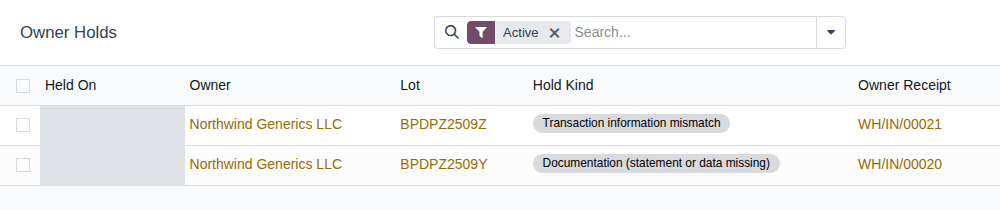
Go to Inventory ‣ Rx Tracking ‣ Owner Holds (in the 3PL ‣ Operations section). Don't confuse it with Owner Holds in the 3PL ‣ Reports section, which lists every hold that touches owner units (See which owners' units are on hold (Owner Holds report)).
Result: the list shows the active owner holds (the Active filter is set): Held On, Owner, Lot, Product, Hold Kind, Owner Receipt, Units, Open Discrepancies and Status. When there is none, it says "No owner hold".
-
Open a hold, for example the Transaction information mismatch hold of lot
BPDPZ2509Z.Result: the form's title is "Owner hold: lot BPDPZ2509Z for Northwind Generics LLC (Transaction information mismatch)", with the status Active, the Owner, Lot, Product, Hold Kind, Owner Receipt and Held On. The Reason tab gives the cause, for example "Receipt WH/IN/00021 for Northwind Generics LLC does not match the supplier's EPCIS file: 1 missing (DISC/2026/00006). Resolve by 2026-10-09." A documentation hold's reason ends "… to release the lot": only the owner's units are held, not the lot (known issue PF-W18-04).
-
Select the Discrepancies tab.
Result: the receiving discrepancies behind the hold, with Reference, Type, Serial Number, State and Resolve By, for example
DISC/2026/00006, Missing, serial600000022006, Open.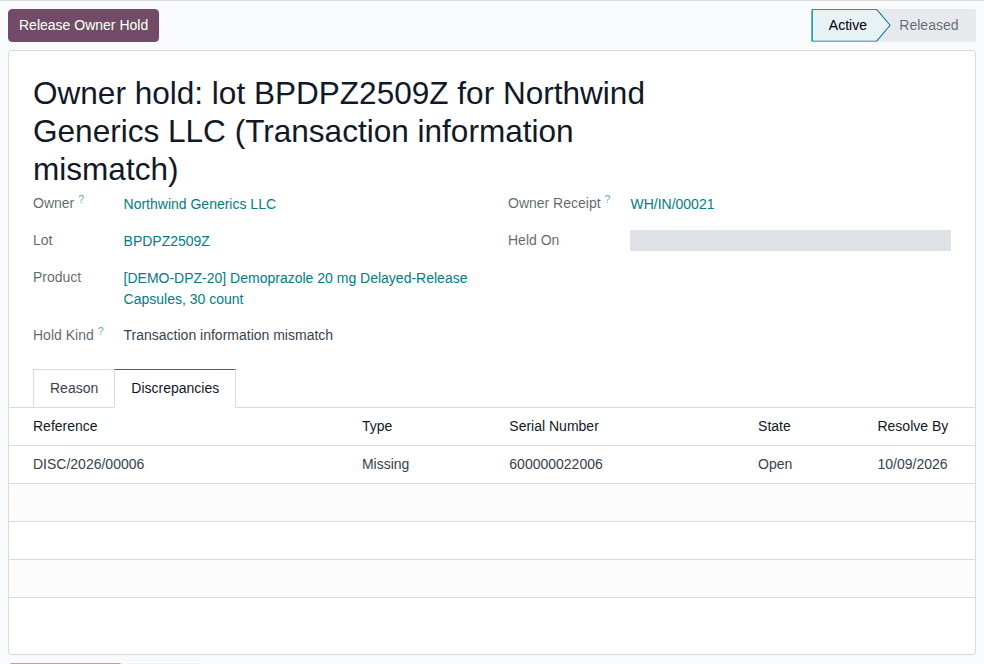
-
To see the owner's units of the lot, select the Units smart button; to open the discrepancies, select Open Discrepancies.
Result: you know which owner's units are held, why, and what releases them. Nothing is changed. Records: the owner hold, kept for good, with its chatter ("Owner hold placed: REASON", "N unit(s) of OWNER put on hold.", and "Taken off open operations: …" when units were reserved or scanned on open operations).
While the hold is Active:
- the owner's units of the lot in your custody are Quarantined; they aren't reserved, and shipping them is refused;
- the lot itself isn't quarantined: your own units and other owners' units of the lot ship as usual;
- more of the owner's units received into the lot are held on arrival, and the owner is told.
Next: for a Documentation (statement or data missing) hold, Clear a documentation owner hold by recording the missing documentation; for a Transaction information mismatch hold, Release a transaction-information mismatch owner hold.
Other ways to find owner holds:
- The lot form has an Owner Holds smart button while the lot has active owner holds.
- The search options have the filters Active, Released, Documentation and Transaction Information Mismatch, and Group By Owner, Lot or Hold Kind; search by Owner, Lot, Product or Owner Receipt.
A second problem on the same lot and owner
There is one active hold per lot, owner and kind. A later receipt of the same owner and lot with a problem of the same kind extends the hold: its reason is added, its discrepancy is linked, the chatter says "Hold extended: REASON" and the owner is told "A further reason was added to the hold of your units of lot …". Every linked discrepancy must be settled before the hold is released.
If it doesn't work
- The list is empty although an owner receipt had a problem: the hold scope is Whole lot, so the whole lot was quarantined instead, or the problem was a duplicate serial or a wrong product, which always hold the whole lot. See The Owner Holds list is empty.
- An import that tries to create or change owner holds is refused ("Owner holds are placed by the receiving flows of owner receipts, not by hand."). See Error: "Owner holds are placed by the receiving flows …".
The Units smart button and the Units column count the owner's units of the lot in your custody now, in any state; after the release they still count the same units. The notices record the units held at each hold and release.
Clear a documentation owner hold by recording the missing documentation
A Documentation (statement or data missing) hold is released automatically once the missing documentation is recorded on every discrepancy of the hold: the supplier's Transaction Statement, the supplier's EPCIS file, or the owner's confirmation that it holds the supplier's transaction information and statement. No instruction is needed: the recording is the evidence.
Who: Rx Tracking User or Manager
Requires: Rx Tracking (DSCSA): 3PL and title model, with 3PL switched on and the hold scope Per owner for documentation holds.
Before you start:
- You have one of: the supplier's EPCIS file, the supplier's Transaction Statement, or the owner's written confirmation (who confirmed, when, its reference, and the file you keep as evidence). The owner's confirmation counts only when the owner's profile allows it (Goods Before Data: Supplier file, or the owner's recorded confirmation, the default). See Set the owner's policies.
-
Go to Inventory ‣ Rx Tracking ‣ Owner Holds (in the 3PL ‣ Operations section) and open the hold, for example the Documentation (statement or data missing) hold of lot
BPDPZ2509Y.Result: a banner says "Released automatically once the missing documentation is recorded on all its discrepancies (the supplier's transaction statement or, for goods received before their data, the supplier's data or the owner's confirmation)." The Discrepancies tab lists, for example,
DISC/2026/00005Supplier Data Pending. -
Select the Owner Receipt, for example
WH/IN/00020.Result: the receipt opens with the banner "Supplier data pending: …" and the buttons Attach Supplier Data and Record Owner Confirmation.
-
Select Record Owner Confirmation.
Result: the Record Owner Confirmation dialog opens: "Record that the owner confirmed it holds the supplier's transaction information and statement for this receipt. …"
-
Fill in:
- Confirmed By: the owner's contact who confirmed, for example Dana Reyes
- Confirmed On: when
- Reference: the owner's reference, for example
NWG-TI-CONF-2207 - Evidence Files: the owner's email or letter (optional, recommended)
-
Select Record.
Result: the receipt's banner and the Record Owner Confirmation button disappear.
-
Go back to the owner hold (the breadcrumb, or Owner Holds with the Released filter).
Result: the hold is Released. The Release tab shows Released On, Released Automatically (selected) and the Release Reason, for example "Owner confirmation recorded on DISC/2026/00005 by Sam Rivera (reference NWG-TI-CONF-2207)."
Result: the owner's units of the lot are back in their earlier state (In Stock), unless another hold still applies. Records: the confirmation (with its evidence files) on the discrepancy, now Resolved; the owner hold, Released automatically; and a Release notice to the owner: "The hold of your units of lot LOT (PRODUCT) at COMPANY (receipt RECEIPT) was released on DATE." with "The hold was released automatically: the documentation discrepancy that caused it was resolved." and the count of its units available again.
With the supplier's file or statement
Instead of steps 3–5:
- the supplier's EPCIS file arrived: select Attach Supplier Data on the receipt. See Release a data-pending hold with the supplier's late EPCIS file;
- a Missing Transaction Statement discrepancy: record the statement on the discrepancy. See Record a missing Transaction Statement after validation and release the lots.
A hold linked to several discrepancies (for example a missing statement and missing supplier data, or two receipts) is released when the last one is recorded.
If it doesn't work
- The hold stays Active after its discrepancy was closed with Mark Resolved: Mark Resolved records no documentation, so it releases nothing, and the receipt no longer offers Record Owner Confirmation. Ask an Rx Tracking Manager to select Reopen on the discrepancy (in Inventory ‣ Rx Tracking ‣ Receiving Discrepancies, after removing the default Open filter) and record the documentation, or to release the hold with Release a transaction-information mismatch owner hold. See An owner hold stays active after its discrepancies are resolved.
- The owner's units stay Quarantined after the release: the lot is also quarantined for everyone, or another owner hold applies. See The owner's units stay Quarantined after a release.
- The owner's confirmation is refused, or Record Owner Confirmation isn't offered: see Troubleshooting: owner receipts and custody.
Known issue (PF-V02i-01): a discrepancy opened from the hold's Discrepancies tab opens in a read-only window that still offers Mark Resolved and Reopen: Resolution Note can't be typed there, so Mark Resolved answers "Write how the discrepancy was resolved first (…)". To resolve or reopen a discrepancy, open it from Inventory ‣ Rx Tracking ‣ Receiving Discrepancies instead.
Release a transaction-information mismatch owner hold
A Transaction information mismatch hold (a unit missing from what arrived, an extra unit, a wrong lot or a wrong expiry) is never released by the discrepancy alone. When the mismatch is settled with the supplier, an Rx Tracking Manager releases the hold with the owner's release instruction. A documentation hold can be released the same way.
Your procedure decides on what evidence a mismatch counts as settled; the software requires the Rx Tracking Manager right, a reason and, when the owner's profile says Required, the owner's release instruction.
Who: Rx Tracking Manager
Requires: Rx Tracking (DSCSA): 3PL and title model, with 3PL switched on and the hold scope Per owner for documentation holds.
Before you start:
- The mismatch is settled, and its discrepancies are worked. See Work a receiving discrepancy to resolution.
- The owner's release instruction has arrived. Record it with its evidence (Record an owner's instruction, kind Release from hold), or type its reference in the window.
-
Go to Inventory ‣ Rx Tracking ‣ Owner Holds (in the 3PL ‣ Operations section) and open the hold, for example the Transaction information mismatch hold of lot
BPDPZ2509Z. -
Select Release Owner Hold.
Result: the Release Owner Hold window opens: "Releasing the hold frees this owner's units of the lot, unless the lot is quarantined for every owner or another hold of this owner's units is still active. …" It shows the Owner Hold, Lot, Owner and Hold Kind, and Instruction Required (selected when the owner's profile requires instructions).
-
Choose one:
- Recorded Instruction: select the owner's release instruction, for example NWG-REL-3106 (Release from hold, Northwind Generics LLC). The list offers only that owner's unused release instructions.
- Reference: enter the reference of the owner's instruction, for example
NWG-REL-3215, and fill in Received Via, Received On and, if you like, Received From and Note.
-
In the box at the bottom, enter why the hold is released, for example
Bluepeak confirmed in writing that unit 600000022006 was never shipped (credit note BP-CN-7730).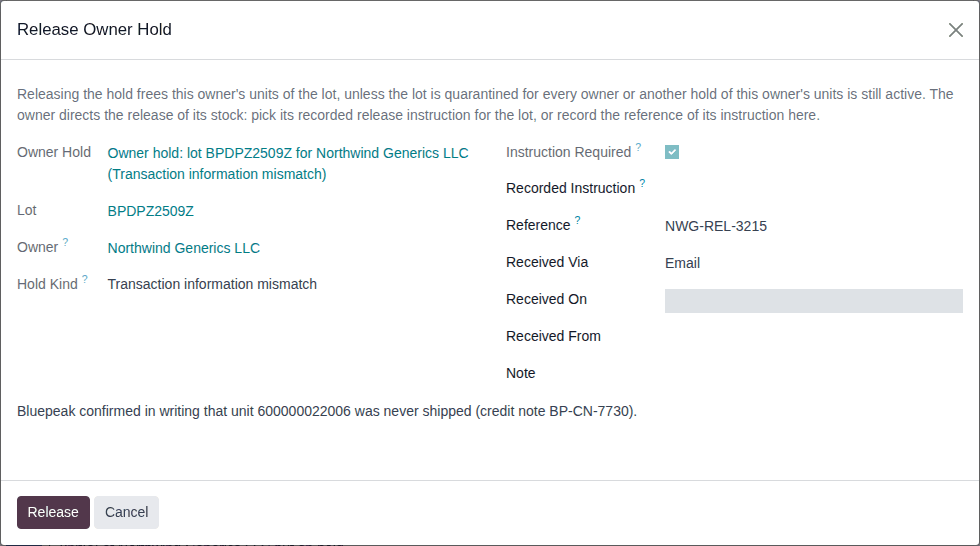
-
Select Release.
Result: the hold is Released. The Release tab shows Released On, Released By, Released Automatically (cleared), Owner's Release Instruction and Release Reason. The chatter says "Owner hold released: REASON", "Owner's instruction: REFERENCE." and "5 unit(s) back from hold."
Result: the owner's units of the lot are free again, unless another hold applies. Records: the owner hold (Released, with who, when, why and the instruction); a typed reference recorded as a new Release from hold instruction of the owner for the lot, marked used; and a Release notice to the owner naming the instruction ("Released on your instruction NWG-REL-3215."). The discrepancies stay as they are: close them in Receiving Discrepancies when they are settled.
Variants:
- The owner's policy is Optional: Instruction Required is cleared, and you may release without an instruction.
- The lot is also quarantined for everyone: the release is recorded and the owner is told, but the units stay Quarantined until the lot is released. See Release a lot that holds owner units, with each owner's release instruction.
If it doesn't work
- There is no Release Owner Hold button: you are not an Rx Tracking Manager, or the hold is already Released.
- "Invalid fields:" with Reference: Instruction Required is selected and neither Recorded Instruction nor Reference is filled in. Do step 3. See Error: "Invalid fields: Reference".
- "Invalid fields:" with Release Reason, or "Give a reason for the release.": do step 4. See Error: "Give a reason for the release.".
- "This owner hold is already released.": someone released it after you opened it. Reload the page. See Error: "This owner hold is already released.".
- "The release needs each owner's instruction …" or "Instruction … was already used …": the instruction is missing or used. See Error: "The release needs each owner's instruction …".
Known issue (PF-A07-01): an owner whose profile is archived can't be given an instruction, so its owner holds can't be released this way. Re-activate the profile first (Change, end or re-open an owner relationship).