Recall an owner's lots
3PL add-on For: Administrator, Compliance manager, Warehouse staff Checked on 18.0.0.2.0, 18.0.1.0.0
When an owner (or its manufacturer) recalls lots, the owner needs to know which customers its units of those lots went to through you, and its units still on your shelves must stop shipping. Recall Consignees lists those customers for one owner, exports the list, and, on the owner's recall instruction, holds the lots and sends the owner its recall notice with the list attached.
Background: the add-on is built so that an owner's recalled lots are held on its instruction and the 3PL gives the owner a consignee list limited to that owner's units (FD&C Act § 582(c)(4); FDA suspect-product guidance (June 2021); Form FDA 3911; see Compliance background).
List the customers an owner's units of a lot were shipped to
Build the consignee list for one owner and one or more lots, then export it or print it. Listing changes nothing, so any Rx Tracking user can do it.
Who: Rx Tracking User or Manager
Requires: Rx Tracking (DSCSA): 3PL and title model, with 3PL switched on. (The list also works after 3PL is switched off, for a company that had owners.)
Before you start:
- You know the owner and the recalled lot numbers, for example from the owner's recall request.
-
Go to Inventory ‣ Rx Tracking ‣ Recall Consignees (in the 3PL ‣ Operations section).
Result: the Recall Consignees window opens: "The customers this owner's units of the recalled lots were shipped to through us. Units we sold, or another owner sold, are not listed. …"
-
In Owner, select the owner, for example Northwind Generics LLC. The list offers the companies with an owner profile, archived ones included.
-
In Recalled Lots, select each recalled lot, for example BPDPZ2508K. Only lots of DSCSA products are offered.
Result: the Consignees list fills in, one line per shipment: Customer, Shipped To, Shipped On, Reference (the delivery), Lot, Quantity and Serials. For Northwind and lot BPDPZ2508K: Riverside Community Pharmacy,
WH/OUT/00012, 2 units, serials600000011001 600000011002.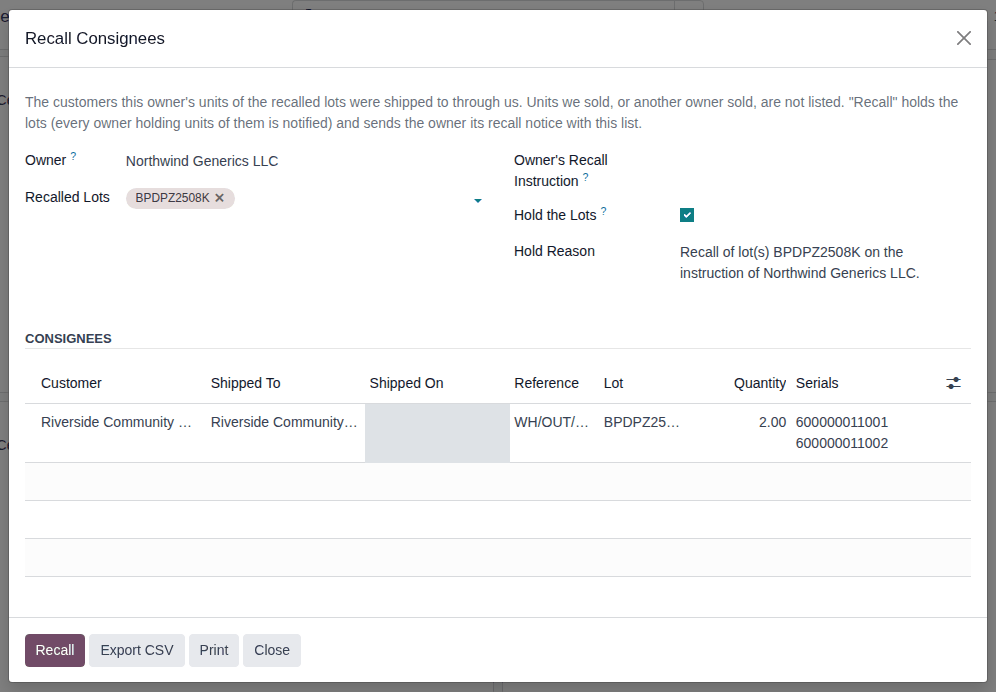
-
Choose one:
- To save the list as a spreadsheet file, select Export CSV.
- To print it, select Print.
Result: the browser downloads
recall_consignees_Northwind_Generics_LLC_BPDPZ2508K.csv, or the PDF "Recall consignees - Northwind Generics LLC". -
Select Close.
Result: you have the owner's consignee list. Nothing is changed and nothing is kept: the list is built again each time from the
shipments. The CSV has one row per shipment with the columns customer, customer_gln, ship_to, ship_to_address, shipped_on,
transfer, product, gtin, lot, expiry, quantity, serials and units_without_serial. The PDF shows the owner, the recalled
lots, the number of customers and the same shipments.
What is listed: every done delivery from your stock to a customer of units held for this owner, and the delivery of every unit whose Seller of Record is this owner. Units you sold, and units another owner sold, are never listed, even from the same lot. For Summit Specialty Pharma Inc. and the same lot, the list shows only its shipment to Mercy Valley Hospital Pharmacy. Units shipped at lot level (to a small dispenser) are counted in the optional column Units Without Serial (in the optional columns menu at the right end of the header row).
If it doesn't work
- The list stays empty: none of the owner's units of these lots were shipped through you, or the lots are not the recalled ones. Check the lot numbers.
- An owner isn't offered: it has no owner profile in this company. See Create an owner profile.
- An Access Error names "Recall Consignees (3PL Owner)", or the menu isn't there: you have no Rx Tracking right. See Error: "You are not allowed to access … (3PL) records".
- "COMPANY has no 3PL owners.", "OWNER is not a 3PL owner of COMPANY." or "Choose the recalled lots.": see Error: "… has no 3PL owners." or "… is not a 3PL owner of …".
Known issue (PF-W18-03): the CSV's shipped_on is in Coordinated Universal Time (UTC), while the window shows your local time
(for example 2026-09-27 17:59:42 in the file for 09/27/2026 10:59:42 in Los Angeles). Say so when you send the file.
Recall an owner's lots on its recall instruction
On the owner's recall instruction, hold the recalled lots and send the owner its recall notice with the consignee list. The lots are held for everyone (your units and every owner's units of those lots), and the lots' other owners are told.
Your procedure decides who runs a recall and what the owner's instruction must contain; the software requires the owner's Recall instruction (unless the owner's profile says Optional) and the Rx Tracking Manager right to hold the lots.
Who: Rx Tracking Manager
Requires: Rx Tracking (DSCSA): 3PL and title model, with 3PL switched on.
Before you start:
- The owner's recall instruction is recorded with its evidence, kind Recall. See Record an owner's instruction.
- You have checked the consignee list. See List the customers an owner's units of a lot were shipped to.
-
Go to Inventory ‣ Rx Tracking ‣ Recall Consignees (in the 3PL ‣ Operations section).
-
Select the Owner and the Recalled Lots, for example Northwind Generics LLC and BPDPZ2508K.
Result: the Consignees list fills in.
-
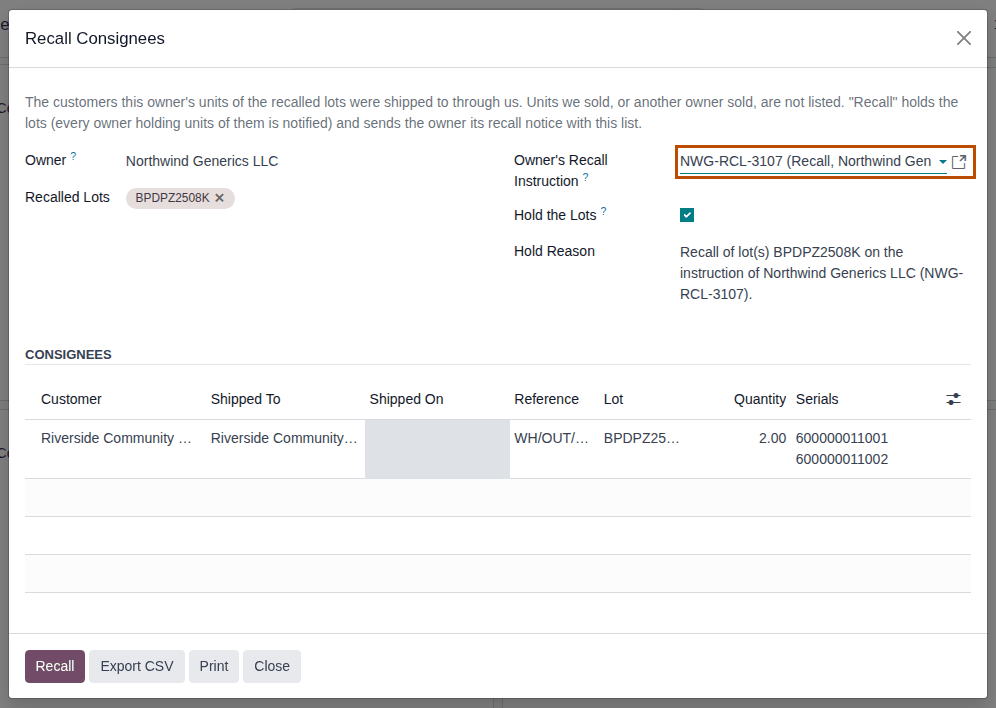
In Owner's Recall Instruction, select the owner's instruction, for example NWG-RCL-3107 (Recall, Northwind Generics LLC). The list offers only that owner's unused Recall instructions.
Result: Hold Reason reads "Recall of lot(s) BPDPZ2508K on the instruction of Northwind Generics LLC (NWG-RCL-3107)."
-
Check Hold the Lots (selected by default) and the Hold Reason. The reason is sent to the lot's other owners: rewrite it if they must not read the recalling owner's name or reference (known issue PF-W18-01, below).
-
Select Recall.
Result: a Confirmation dialog asks "Hold the lots and send the recall notice to the owner?".
-
Select Ok.
Result: the recall notice opens, for example "Recall notice to Northwind Generics LLC (lot BPDPZ2508K)", already sent. Its Notice tab says:
Recall of lot(s) BPDPZ2508K at Demo Rx Distribution LLC.Your instruction: NWG-RCL-3107.The lots are on hold: 11 of your units in our custody will not ship.Your units of these lots were shipped through us to 1 customer(s): Riverside Community Pharmacy. The attached list gives each shipment and its serials.The Files tab holds
recall_consignees_Northwind_Generics_LLC_BPDPZ2508K.csv, which was attached to the email.
Result: the recalled lots are Quarantined for everyone, with the hold reason. Records: the lots' quarantine (chatter "Lot quarantined: REASON"); the owner's Recall notice with the consignee CSV, kept for good; a Recall notice to each other owner with units of the lots (as its hold notice, quoting the hold reason); and the owner's instruction, marked used. Release the lots later, with each owner's release instruction, as in Release a lot that holds owner units, with each owner's release instruction.
Variants:
- Without holding the lots: clear Hold the Lots. The owner's notice then says "The lots were not put on hold by this recall." and nothing is quarantined. The confirmation still asks "Hold the lots and send the recall notice to the owner?" (known issue PF-A07-06).
- None of the owner's units shipped: the notice says "None of your units of these lots were shipped through us."
- The owner's policy is Optional: you may leave Owner's Recall Instruction empty.
- With the hold scope Per owner for documentation holds, a recall still holds the whole lot.
- With the Suspect Product add-on (Odoo Enterprise), the recall's quarantine also opens investigations. See Follow the automatic investigations of a lot that holds owners' units.
If it doesn't work
- "OWNER's instruction (Recall) is required for this operation: record the owner's order or approval first.": no instruction was selected. Record it and select it in step 3. See Error: "OWNER's instruction (KIND) is required for …".
- "Only a DSCSA manager can quarantine or release a lot." (after Ok): you are not an Rx Tracking Manager and Hold the Lots is selected. Nothing was held or sent. See Error: "Only a DSCSA manager can quarantine or release a lot." on a recall.
- "Instruction … was given for another record." or "Instruction … was already used.": the instruction belongs to another operation. See Error: "Instruction … was already used on …".
- "3PL is off for COMPANY.": the recall needs 3PL on; the list still works. See Error: "… has no 3PL owners." or "… is not a 3PL owner of …".
Known issue (PF-W18-01): the proposed Hold Reason names the recalling owner and its instruction reference, and it is emailed to
every other owner with units of the lots (and shown on their portal). Rewrite it in step 4, for example Recall of lot BPDPZ2508K on the manufacturer's notice., when the owners must not learn about each other. Known issue (PF-A07-06): Recall is offered to every Rx
Tracking User; with Hold the Lots selected it fails only after Ok, and with it cleared a User sends the recall notice without
any hold. Known issue (PF-W18-02): typing in Owner's Recall Instruction offers Create "…", which records a new Recall
instruction at once, with no evidence file, and it can't be deleted. Select an existing instruction instead.