Receive an owner's own goods and put owner stock away
3PL add-on For: Compliance manager, Warehouse staff, Administrator Checked on 18.0.0.2.0, 18.0.1.0.0
Some shipments are not a sale: the owner's contract manufacturer or one of its own sites sends the owner's goods to your warehouse. You receive them as a custody receipt, with the owner's instruction, and no DSCSA document is posted. Once received, an owner's units are moved inside the warehouse, or to another of your warehouses, only by the routes that keep their owner.
Receive the owner's own goods as a custody receipt
Use a custody receipt when the same owner is at both ends of the shipment: there is no transaction, so no transaction information or statement is due, and nothing is held for missing data. Background: the modules follow the reading that a shipment between two sites of the same owner is custody-only and needs no Transaction Statement (FD&C Act § 582(c)(1)(A)(i), § 582(g)(1); FDA interoperable exchange guidance (September 2023); see Compliance background).
Your procedure decides which shipments are the owner's own goods and how you check it; the software requires an Rx Tracking Manager to set the custody kind by hand, and the owner's instruction of kind Other or Return to the owner (custody), unless the owner's profile makes instructions Optional.
Who: Rx Tracking Manager
Requires: Rx Tracking (DSCSA): 3PL and title model, with 3PL switched on.
Before you start:
- The owner's instruction for this shipment is recorded and not used yet, kind Other or Return to the owner (custody). See Record an owner's instruction.
- The sending site is an address of the owner, for example
Northwind Generics LLC, Northwind Distribution Center. - The rest is as for any owner receipt. See Create a receipt held for an owner.
-
Go to Inventory ‣ Operations ‣ Receipts and select New.
-
Fill in:
- Receive From: the owner's site, for example
Northwind Generics LLC, Northwind Distribution Center - Held for Owner: the owner company, for example
Northwind Generics LLC - Owner Receipt Kind: Custody (no transaction)
- Owner Instruction: the owner's instruction; type its reference, for example
NWG-CUST-IN-3103, and chooseNWG-CUST-IN-3103 (Other, Northwind Generics LLC)
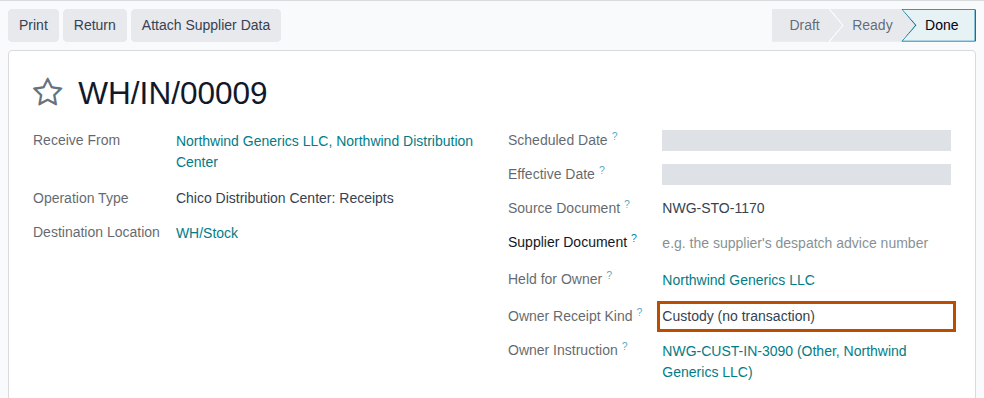
- Receive From: the owner's site, for example
-
On the Operations tab, select Add a line, choose the product and enter the Demand.
-
Select Mark as Todo.
Result: the receipt is Ready. It has no yellow banner and no Record Owner Confirmation button.
-
Select Scan Serials, scan every unit, then select Register, as in Scan units onto a receipt with Scan Serials.
-
Select Validate.
Result: the receipt is Done. It has no DSCSA Documents smart button.
Result: the owner's goods are in stock, held for the owner, without a transaction. Records: the custody receipt WH/IN/NNNNN,
Done; one package per unit, In Stock, Held for Owner the owner; the instruction, now used by this receipt (it shows Used On
and can't be used again). No DSCSA document, no Supplier Data Pending or missing-statement discrepancy, and no hold. When the owner
later ships these units, its documents don't list a supplier-to-owner step for this receipt.
With a file that names the owner as seller and buyer
When the owner's site sends an EPCIS file in which the owner is both seller and buyer, attach it to the owner's receipt as in Attach the supplier's EPCIS file to an owner's open receipt. Anyone who can attach a file can do this: the receipt becomes a custody receipt by itself.
- The receipt's chatter says "EPCIS file … names Northwind Generics LLC as both seller and buyer: this is a custody receipt (the owner's own goods, no transaction). No transaction statement is needed and no document is posted.", and Owner Receipt Kind reads Custody (no transaction).
- The file shows Custody Only selected. No instruction is needed.
- After Validate, the file is Received and its chatter says "Receipt … validated. Custody receipt (the owner's own goods): no transaction, so no DSCSA document; this file is kept as the record of the shipment."
The file is the record of the shipment and can't be deleted.
If it doesn't work
- "Only a DSCSA manager can record a receipt as custody (no transaction, no transaction statement), with the owner's instruction." (in an Oh snap! dialog when you save): you are not an Rx Tracking Manager. Select Discard changes and ask a manager. See Error: "Only a DSCSA manager can record a receipt as custody …".
- "DSCSA owner isolation (3PL): - WH/IN/00045 (custody receipt): Northwind Generics LLC's instruction (Other / Return to the owner (custody)) is required for WH/IN/00045: record the owner's order or approval first." (at Validate): no instruction is chosen, or it is of another kind ("Instruction NWG-HOLD-3113 (Quarantine, Northwind Generics LLC) is not a Other / Return to the owner (custody) instruction."), or already used. Choose an unused instruction of the right kind. See Error: "… (custody receipt): … instruction … is required …".
- "WH/IN/00047 is a custody receipt (the owner's own goods, no transaction), but the file names another seller (GLN 0399990000009): it is a sale to Northwind Generics LLC. Record the receipt as the owner's purchase.": the file is a supplier's sale, not a custody shipment. A manager sets Owner Receipt Kind to Owner's purchase, then attach the file again. See Error: "… is a custody receipt …, but the file names another seller …".
Known issue (PF-W14-04): the Owner Instruction field lists every unused instruction of the owner, whatever its kind (for example Quarantine or Title transfer), and the custody receipt also shows Attach Supplier Data, which is refused. A wrong instruction is refused only at Validate, under the heading "DSCSA owner isolation (3PL)". Check that the instruction's kind, in brackets, is Other or Return to the owner (custody).
Put away and move an owner's units inside the warehouse
Owner units move from the dock to their shelf, or between shelves, only by a route that carries the owner: the next step of a two- or three-step reception, or Odoo's Relocate. Both keep Held for Owner. A new internal transfer that you make in the form is always for your own stock (see the known issue below). Background: the add-on is built so that one owner's units never serve another owner's move.
Who: Rx Tracking User or Manager for the next step of a reception route; Inventory Administrator for Relocate
Requires: Rx Tracking (DSCSA): 3PL and title model, with 3PL switched on.
Before you start:
- The owner's units are received. See Scan and validate an owner receipt.
- Storage Locations is on (Inventory ‣ Configuration ‣ Settings, under Warehouse) and the shelves exist, for example
WH/Stock/Shelf 1. - For the reception route: Multi-Step Routes is on and the warehouse's Incoming Shipments is Receive then Store (2 steps) or Receive, Quality Control, then Store (3 steps) (Inventory ‣ Configuration ‣ Warehouses). See Odoo's receipts in two or three steps.
Put away through the reception route
-
Validate the owner's receipt into the input location, as in Scan and validate an owner receipt.
Result: Odoo creates the next step, for example
WH/STOR/00001(operation type Chico Distribution Center: Storage, from WH/Input to WH/Stock), with Held for Owner set to the same owner and Source Document the receipt. -
Go to Inventory ‣ Operations ‣ Internal and open that transfer (it is listed there while it is Ready).
-
Select Validate. The internal steps need no scan.
Result: the transfer is Done; the units are in stock, still held for the owner.
The steps are those of your own stock: see Receive through a two- or three-step route.
Move owner units to another shelf with Relocate
-
Go to Inventory ‣ Reporting ‣ Locations.
-
In the search box, type the owner's name and choose Search Owner for: …; add the lot or product the same way if needed.
Result: the list shows the owner's stock lines, with the owner in the Held for Owner column.
-
Select the lines to move, then select Relocate.
Result: a window opens with To Location and Reason for relocation.
-
Choose the To Location, for example
WH/Stock/Shelf 1, and select Confirm.Result: the window closes and Locations reopens with only its default Internal Locations filter: the owner and lot searches are gone. Search the owner or the lot again: the lines show the new location, for example
WH/Stock/Shelf 1, and the same Held for Owner.
Result: the owner's units are on their shelf and held for the owner. Records: the done internal transfer (reception route) or a done stock move Quantity Relocated (Relocate), both for the owner; the packages keep Held for Owner.
If it doesn't work
- "DSCSA owner isolation (3PL):" with a line about another owner, or "Package … would hold units of several owners (…): unpack it first, one package per owner.": see Owner isolation: what the refusals mean.
- Reporting isn't in the Inventory menu bar, or Relocate isn't shown: both are for an Inventory Administrator. Ask one to move the units, or use the reception route.
Known issue (PF-A06-06): a new transfer made with Inventory ‣ Operations ‣ Internal ‣ New has no Held for Owner field. It
is always for your own stock: it reserves only your own units (for example lots BPDPZ2508K and BPDPZ2509B) and never an owner's.
Put away owner units through the reception route or Relocate, as above.
Move an owner's units to another of our warehouses
When you keep an owner's stock in two of your warehouses, for example the Chico Distribution Center and the Albany Annex, move its units between them with Odoo's Relocate: the units keep Held for Owner. Before the owner's next shipment from the other warehouse, that warehouse needs its own 3PL facility license, and the owner's profile must name it in Facilities Served so that the owner is on that warehouse's client list. Background: the modules follow the reading that owner-stock operations at a facility need a valid 3PL license for that facility (FD&C Act § 582(c)(3), § 581(2); § 584(a)–(b); see Compliance background).
Your procedure decides when an owner's stock may move to another warehouse and whether the owner agrees; the software requires the Inventory Administrator right for Relocate and doesn't ask for an instruction.
Who: Inventory Administrator for Relocate; Rx Tracking Manager to add the warehouse to the owner's Facilities Served
Requires: Rx Tracking (DSCSA): 3PL and title model, with 3PL switched on.
Before you start:
- The other warehouse has a verified 3PL facility license. The move itself isn't checked, but the owner's next receipt or shipment at that warehouse is refused without one ("Facility Albany Annex has no valid 3PL licence …"). See Record and verify our facility licenses.
- The units to move are not reserved by an owner order's delivery (the Reserved Quantity column in step 2 shows
0.00). See the warning below.
-
Go to Inventory ‣ Reporting ‣ Locations.
-
In the search box, type the owner's name and choose Search Owner for: …; add the lot the same way, for example
BPDPZ2509G.Result: the list shows the owner's stock lines of that lot, with the owner in the Held for Owner column, for example
WH/Stock,Northwind Generics LLC,6.00. -
Select the lines to move, then select Relocate.
Result: a window opens with To Location and Reason for relocation.
-
In To Location, choose the other warehouse's stock location, for example
WH2/Stock(the Albany Annex), and select Confirm.Result: Locations reopens with its default filter. Search the owner or the lot again: the line shows
WH2/Stockand the same Held for Owner. Inventory ‣ Reporting ‣ Moves History has a Done row Quantity Relocated fromWH/StocktoWH2/Stock. -
As an Rx Tracking Manager, if the owner's profile doesn't name the other warehouse yet: go to Inventory ‣ Rx Tracking ‣ Owners (in the 3PL ‣ Configuration section), open the owner, add the warehouse to Facilities Served (for example Albany Annex) and select the save icon.
Result: Facilities Served lists both warehouses. The Facility Client List of the other warehouse now lists the owner (see Print or export the facility client list).
Relocate also moves units that a delivery has reserved, and doesn't ask. The owner's delivery that reserved them goes back to
Waiting: in the example database, relocating Northwind's 10 units of lot BPDPZ2508K sets Northwind's delivery WH/OUT/00014 back to
Waiting. Move only unreserved units, or ship the order first.
Result: the owner's units are in the other warehouse, still held for the owner, and the owner is on that warehouse's client list. Records: a done stock move Quantity Relocated for the owner (in Moves History); the owner's stock line in the new location; the owner profile's Facilities Served. The packages keep Held for Owner and In Stock.
If it doesn't work
- Reporting isn't in the Inventory menu bar, or Relocate isn't shown: both are for an Inventory Administrator. Ask one.
- The owner is missing from the other warehouse's Facility Client List: its profile doesn't name that warehouse in Facilities Served (step 5). See The facility client list misses an owner.
- The owner's next receipt or shipment at that warehouse is refused with "Facility … has no valid 3PL licence …": record and verify the warehouse's 3PL license. See Error: "Facility … has no valid 3PL licence …".
Known issue (PF-F07-01): the move between warehouses isn't in the package ledger: a moved unit's Movement History (package form) and the ledger's CSV files show its receipt at the first warehouse and, later, its shipment from the second, but no row for the move. The next step of a reception route is recorded; a Relocate is not. Keep the Moves History row (or export it) if you need to show when the units changed warehouse.
Known issue (PF-A05-07): Facilities Served keeps no history: once the owner names the new warehouse, a client list "As Of" an earlier date lists it there too.