Report on owner documents, discrepancies, returns and holds
3PL add-on For: Compliance manager, Warehouse staff Checked on 18.0.0.2.0, 18.0.1.0.0
Find the records you keep for your 3PL clients (owners) across all of them: the DSCSA documents issued in an owner's name or received for it, the receiving discrepancies of owners' receipts, returns of owners' units and the owners' units on hold. Each list opens the record, so you can act on it where it lives.
Background: the add-on gives internal reports per owner, among them documents, discrepancies, returns and holds.
Like the stock reports, these lists show owners' records only and are in the 3PL ‣ Reports section of the Rx Tracking menu. Every one of them can be sent as a CSV file: see Export the selected rows of an owner report as a CSV file.
Find the DSCSA documents issued in an owner's name or received for it
List every DSCSA document whose Owner is set: the documents you issued in an owner's name as its seller, the inbound documents received for it, and its side of a title transfer in place.
Who: Rx Tracking User or Manager
Requires: Rx Tracking (DSCSA): 3PL and title model, with 3PL switched on.
-
Go to Inventory ‣ Rx Tracking ‣ Owner Documents (in the 3PL ‣ Reports section).
Result: one row per owner document, in any state: Number, Owner, Direction, Document Date, Trading Partner, Transfer, Issuing Mode and State. For example
DSCSA/NWG/OUT/2026/00001, Northwind Generics LLC, Outbound (sent) to Riverside Community Pharmacy onWH/OUT/00012, Mode A: to the owner only, Posted.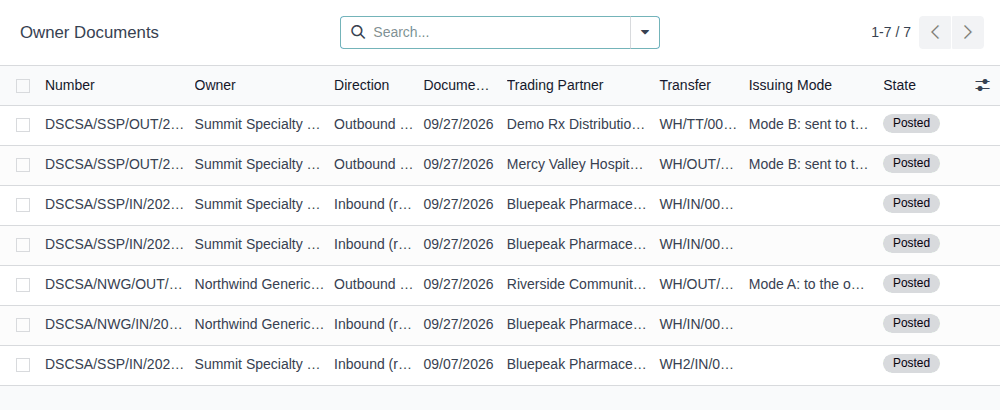
-
To see one owner's documents, enter its name in the search box and select Search Owner for: NAME.
Result: for
Northwind, two documents:DSCSA/NWG/OUT/2026/00001and the inboundDSCSA/NWG/IN/2026/00001from Bluepeak Pharmaceuticals Inc. onWH/IN/00007. -
Open a document, for example
DSCSA/NWG/OUT/2026/00001.Result: the document form opens with Download T3 and Download EPCIS, the Owner, the Issuing Mode, Visible to the Buyer, the Trading Partner, the Transfer, the Order Reference and the Invoice Reference.
Result: you have found the owner's documents and their files. Nothing is changed. Records: none.
An owner's document number carries the owner's document code (DSCSA/NWG/…). Your own documents are never listed here, not even your own
sales to a company that is also an owner: they stay in Inventory ‣ Rx Tracking ‣ Documents. The search options have the filters
Outbound, Inbound and Date, and Group By Owner, Direction or Date; the optional columns add Transfer of
Ownership in Place and Visible to the Buyer. How to read, send and publish an owner document:
Read an owner's outbound document. The owner sees the same documents on its portal, except drafts
and the in-place documents addressed to it.
If it doesn't work
- The list says "No owner documents": no document has been posted for an owner yet (an owner's custody receipt has none). See An owner report is empty or leaves an owner out.
Review the receiving discrepancies of owners' receipts
See, across all owners, the differences between what an owner's supplier said it shipped and what you received for the owner, and which of them are still open.
Who: Rx Tracking User or Manager
Requires: Rx Tracking (DSCSA): 3PL and title model, with 3PL switched on.
-
Go to Inventory ‣ Rx Tracking ‣ Owner Discrepancies (in the 3PL ‣ Reports section).
Result: the open discrepancies of owners' receipts (the Open filter is set): Reference, Owner, Type, Receipt, Supplier, Product, Lot, Detected On, Resolve By and State. For example
DISC/2026/00002, Pinecrest Drug Distributors Inc., Supplier Data Pending,WH/IN/00014, Resolve By 09/25/2026 (already past), andDISC/2026/00001, Northwind Generics LLC,WH/IN/00013. -
To include the resolved ones, remove the Open facet from the search box.
Result: resolved discrepancies are added, in grey, with the state Resolved, for example
DISC/2026/00003of Summit Specialty Pharma Inc. To see only them, select the Resolved filter instead (selecting both Open and Resolved lists both). -
Open a discrepancy to work on it, for example
DISC/2026/00001.Result: the discrepancy form opens with the buttons that resolve it, for a Supplier Data Pending discrepancy Attach Supplier Data, Record Owner Confirmation and Mark Resolved, and its Owner and Receipt.
Result: you know which owners' receipts still have open discrepancies and how late they are. Nothing is changed by the report. Records: none.
The types are those of any receipt (Missing, Extra, Duplicate Serial, Wrong Product, Wrong Lot, Wrong Expiry, Transaction Statement Missing) plus two of 3PL: Supplier Data Pending (goods received before their data) and Title Not Held (a title transfer file named a unit the seller didn't hold). Search by Owner, Reference, Receipt, Lot or Serial, or Group By Receipt or Type. A discrepancy of your own receipt is never listed. To resolve one, see Release a data-pending hold with the supplier's late EPCIS file and Work a receiving discrepancy to resolution.
If it doesn't work
- The list is empty although an owner has resolved discrepancies: the Open filter is set. Remove it (step 2). See An owner report is empty or leaves an owner out.
Review returns of owners' units
List the transfers that bring an owner's units back from a customer, or send them back to a supplier.
Who: Rx Tracking User or Manager
Requires: Rx Tracking (DSCSA): 3PL and title model, with 3PL switched on.
-
Go to Inventory ‣ Rx Tracking ‣ Owner Returns (in the 3PL ‣ Reports section).
Result: one row per return transfer held for an owner: Reference, Owner, Operation Type, Contact, Return of, Source Document, Scheduled Date, Date of Transfer and Status. For example
WH/IN/00017, Northwind Generics LLC, Chico Distribution Center: Receipts, Riverside Community Pharmacy, Return ofWH/OUT/00012, Done. -
To keep one direction, open the search options and select Customer Returns or Returns to Suppliers.
Result: for Customer Returns, only the transfers that come from a customer, here
WH/IN/00017. -
Open a return, for example
WH/IN/00017.Result: the transfer opens. Its To Verify smart button counts the returned units that still wait for their check.
Result: you know which owners' units came back and where they stand. Nothing is changed. Records: none.
A transfer is listed when it is held for an owner and is a return (Return of is set) or comes from a customer location. The search options also have the filter Done and Group By Owner or Operation Type. Your own returns are never listed. To verify the returned units, see Verify an owner's returned units for resale.
If it doesn't work
- The list says "No returns of owners' units": no owner's unit has been returned. A custody return order (the owner's goods going back to it) is a delivery, not a return, and isn't listed. See An owner report is empty or leaves an owner out.
See which owners' units are on hold (Owner Holds report)
List every owner's unit that is quarantined, whatever held it: a quarantine of the whole lot (suspect product, recall, receiving discrepancy, a manager's hold) or an owner hold of the owner's units only.
Who: Rx Tracking User or Manager
Requires: Rx Tracking (DSCSA): 3PL and title model, with 3PL switched on.
-
Go to Inventory ‣ Rx Tracking ‣ Owner Holds (in the 3PL ‣ Reports section).
The Rx Tracking menu has two Owner Holds items. This one, in the 3PL ‣ Reports section, lists units. The one in the 3PL ‣ Operations section lists owner hold records (Follow an owner hold placed by an owner receipt).
Result: the list is grouped by owner, with the number of units held in brackets, for example Northwind Generics LLC (6) and Pinecrest Drug Distributors Inc. (6).
-
Select each group row to open it.
Result: one row per unit on hold, in orange: Owner, Product, Serial Number, Lot, Expiration Date, State (Quarantined) and Received Date. Here Northwind's 6 units of lot
BPDPZ2509Nand Pinecrest's 6 units of lotBPSMS2509P, both held while their supplier data is pending.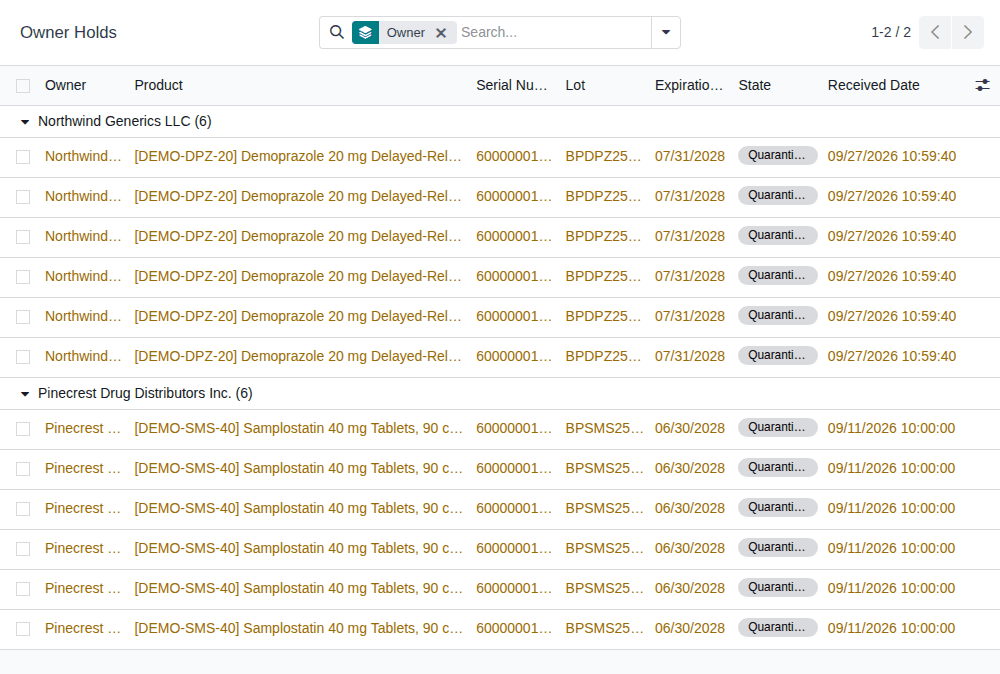
Result: you know which owners' units can't ship, by owner. Nothing is changed. Records: none.
To see why a lot is held, open Inventory ‣ Rx Tracking ‣ Quarantined Lots (Review the lots on hold, and why they are held);
the CSV file of this report also has the lot's reason in its lot_quarantine_reason column. To release a lot that holds owners' units, see
Release a lot that holds owner units, with each owner's release instruction. The search
and filters are those of Owner Serials. Units held at lot level without a serial (no package) aren't listed.
If it doesn't work
- The list says "No owner units on hold": no owner's unit is quarantined now. See An owner report is empty or leaves an owner out.
Related
- Report on owner stock
- Check and export an owner's records
- The other two lists of the 3PL ‣ Reports section: Review the gate log and export it for an inspector and Print or export the facility client list
- Troubleshooting: owner reports and exports