Take back customer returns of owner units
3PL add-on For: Administrator, Compliance manager, Warehouse staff Checked on 18.0.0.2.0, 18.0.1.0.0
A customer sends back units that an owner (one of your 3PL clients) sold through you. The units go back into the owner's stock, never into yours or another owner's, and the decision to resell or destroy them is recorded for the owner. The flow is the core one (Take back customer returns) with the owner rules added.
Background: the modules follow the reading that returned owner units come back into the owner's stock and are matched only against the owner's outbound records, and that the saleable-return verification is the owner's duty, which the 3PL carries out (FD&C Act § 582(c)(1)(B), § 582(c)(4)(D); see Compliance background). See Owner stock.
Take back a customer return of units an owner sold
Start the return from the owner's delivery the units left on, and scan each returned unit. Odoo's return copies the delivery's Held for Owner, so the return is held for the owner. The software accepts a unit only if the owner is its Seller of Record and it was shipped to that customer.
With Odoo Enterprise's Barcode app, see Scan owner stock in the Barcode app.
Who: Rx Tracking User or Manager
Requires: Rx Tracking (DSCSA): 3PL and title model, with 3PL switched on.
Before you start:
- The owner's delivery the units left on is Done. See Pick, scan and ship an owner order.
- The customer is still an authorized trading partner: a return is checked like a delivery. See Check whether a partner is an authorized trading partner.
- Each returned unit still has its DataMatrix label, and the scanner is set up. See Set up a handheld scanner for Scan Serials.
-
Go to Inventory ‣ Operations ‣ Deliveries and open the owner's delivery, for example
WH/OUT/00012(Northwind Generics LLC's order3PL/OUT/2026/00001, 2 Demoprazole to Riverside Community Pharmacy). Its Held for Owner shows the owner. -
Select Return.
Result: the Return dialog lists the delivery's products with a Quantity of 0.00 and a Serials (scan each package) column.
-
On the DSCSA product's line, select the Serials (scan each package) cell and scan the DataMatrix of each returned unit, one per line, for example
(01)00399990101300(21)600000011002(17)280331(10)BPDPZ2508K. -
Select the dialog's title to leave the cell.
Result: Lots shows
BPDPZ2508K, Scanned1, and Quantity1.00. -
Select Return.
Result: the return opens: a receipt
WH/IN/NNNNN, Ready, with the customer in Receive From, "Return of WH/OUT/00012" in Source Document, the owner order in Owner Order and the owner in Held for Owner. The chatter says "1 DSCSA package(s) scanned in the return wizard.".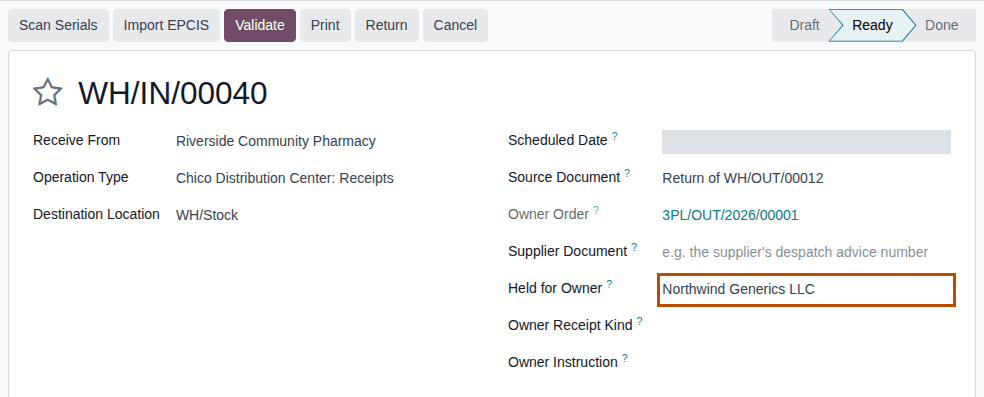
-
Select Validate.
Result: the return is Done, with a To Verify smart button.
Result: the units are in WH/Returns to Verify, still held for the owner, where no delivery can reserve them. Records: the return
WH/IN/NNNNN (Done, Held for Owner = the owner); each unit's package Returned, with its Return Transfer, Held for Owner
and Seller of Record unchanged. A customer return creates no DSCSA document and sends the owner no notice; the owner is notified when the
units are verified (3PL-RET-02).
A box with units of several sellers
A return holds the units of one seller only. When a customer sends back your own units and an owner's in one box, make one return from your delivery for your units and one from the owner's delivery for the owner's units. The Seller of Record on the unit's package (Inventory ‣ Rx Tracking ‣ Packages) tells you which delivery it left on.
Known issue (PF-W19-01): when a unit of an owner is scanned on a return that isn't held for that owner, the refusal suggests "or hold this return for OWNER ("Held for Owner") before scanning". That doesn't work: on a return made from your own delivery, setting Held for Owner is refused when you save ("… is on our sale or purchase order: its DSCSA units can't be held for …"), and a receipt made with New comes from a vendor location, so it is treated as the owner's purchase, not as a return. Use Return on the owner's delivery.
If it doesn't work
The dialog's scans are all or nothing: if one line is wrong, nothing is created. Select Close, correct or delete the line, and select Return again.
- "Serial … was sold by us: it can only come back into our own stock, not into the stock of …": the unit is one of your own sales. Take it back on the return of your delivery (Receive a saleable customer return with its serials). See Error: "Serial … was sold by …: it can only come back into …".
- "Serial … was sold by OWNER (we hold its stock as a 3PL): it can only come back into the stock of OWNER, not into ours.": you started the return from your own delivery, but the unit is an owner's. Use Return on that owner's delivery. Same entry.
- "Serial … was shipped to …, not to …", "… was never shipped …", "Serial … can't be used here: it is Returned.": the core return checks. See Troubleshooting: returns.
- Validate says "… can't be validated: it moves DSCSA products (…) to or from a trading partner.": the customer is no longer authorized. See Error: "… can't be confirmed: it contains DSCSA products …".
Next: Verify an owner's returned units for resale
Verify an owner's returned units for resale
Put the owner's returned units back into the owner's sellable stock. The software records the verification for the owner and sends the owner a Return verified notice.
Your procedure decides who may verify returned units and which checks come first (the package's condition, its label); the software requires the Rx Tracking Manager right. The owner gives no instruction for a verification.
Who: Rx Tracking Manager
Requires: Rx Tracking (DSCSA): 3PL and title model, with 3PL switched on.
Before you start:
- The return is Done. See Take back a customer return of units an owner sold.
- The owner's notice contacts are set, so the notice can be emailed. See Find and read the notices sent to an owner.
-
Go to Inventory ‣ Rx Tracking ‣ Returns to Verify.
Result: the list shows each returned unit, with a Held for Owner column next to Returned By. Your own units have it empty.

-
Select the checkbox of each owner unit you verify.
Result: Verify for Resale and Reject and Destroy appear above the list.
-
Select Verify for Resale, then Ok in the confirmation "Put the selected returned packages back in sellable stock?".
Result: the units leave the list.
Result: the units are back in WH/Stock, In Stock and still held for the owner: they count on the owner's line in Physical
Inventory and can be shipped only on the owner's orders. Records: on each package, Return Decision Verified for Resale, Decided
By and Decided On; the move "DSCSA return verified for resale", held for the owner; the chatter line on the return transfer; and one
Return verified notice per owner and return transfer, in Inventory ‣ Rx Tracking ‣ Owner Notices (in the 3PL ‣ Operations
section), emailed to the owner's notice contacts:
Saleable return verified for OWNER (FD&C Act §582(c)(4)(D)): N returned unit(s) of PRODUCT from CUSTOMER, return WH/IN/NNNNN. Each unit's
product identifier was scanned and matched to its shipment by OWNER (seller of record); the units are back in the stock we hold for OWNER.
Verified by USER on DATE (UTC).
The notice wording is the product's; it is quoted, not a legal statement of these docs. What each notice holds: Owner notices and holds. Selecting units of several owners at once verifies each unit into its own owner's stock, with one notice per owner. Your own units are verified as in core, without a notice.
If it doesn't work
- Verify for Resale isn't shown: you don't have the Rx Tracking Manager right. See Verify for Resale and Reject and Destroy aren't shown.
- "Only returned packages that are not on an open transfer can be verified or rejected:": the unit is on an open transfer. See Error: "Only returned packages that are not on an open transfer …".
- The owner says it got no notice: the notice is in Owner Notices but wasn't emailed (no notice contact with an email address), or it waits in the mail queue. See The owner says it got no notice.
Reject and destroy an owner's returned units on its destroy instruction
Destroy returned owner units that can't be resold. You never destroy an owner's stock on your own: the owner's Destroy instruction is recorded for the return first, then an Rx Tracking Manager rejects the units. Background: the modules follow the reading that a 3PL doesn't direct the disposition of owner stock, so every destruction records the owner's instruction (FD&C Act § 581(6), (22), (24), (26), (27); § 582(a)(1), (a)(7); § 584(d); see Compliance background). This is how the modules read the law; it has not been reviewed by counsel. See the disclaimer.
Who: Rx Tracking User or Manager records the instruction; Rx Tracking Manager rejects
Requires: Rx Tracking (DSCSA): 3PL and title model, with 3PL switched on.
Before you start:
- The return is Done and its units are in Returns to Verify. See Take back a customer return of units an owner sold.
- The owner has told you to destroy the units, in writing, by email or through its portal. Keep that order at hand: you record its reference and can attach it.
Record the owner's destroy instruction
-
Go to Inventory ‣ Rx Tracking ‣ Returns to Verify and open the owner's returned unit, for example serial
600000011001.Result: the package form shows Held for Owner and Seller of Record; its header has Record Destroy Instruction.
-
Select Record Destroy Instruction.
Result: the Destroy Instruction of OWNER window opens with Owner and Instruction (Destroy) filled in and read-only, Received On now, Received Via Email, Recorded By you, and under Use, For Model
stock.pickingand For Record the return transfer.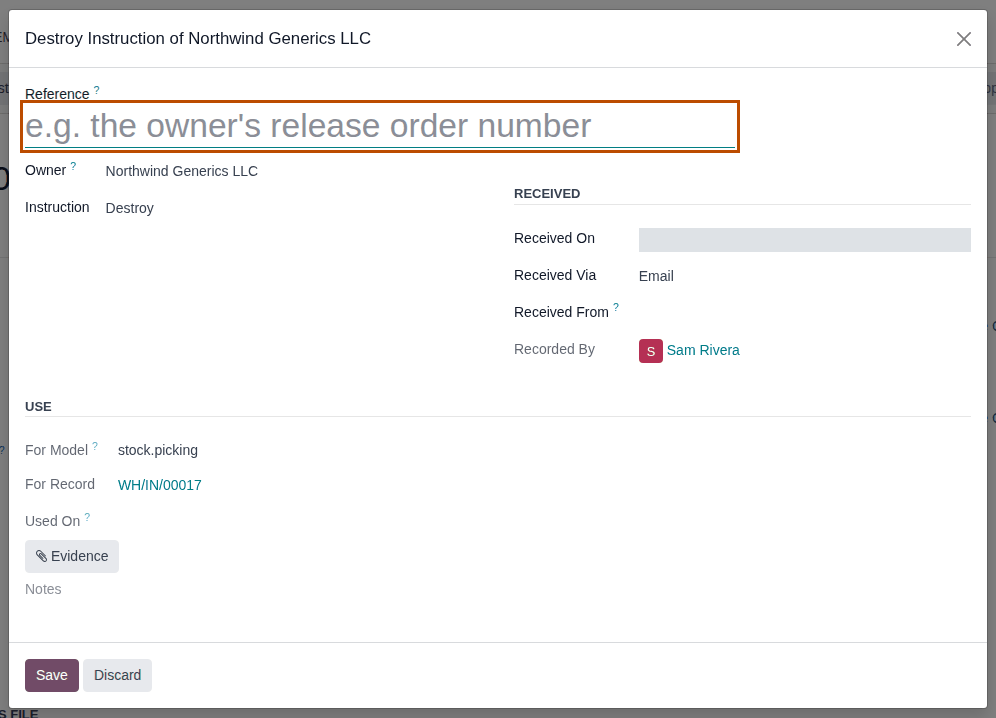
-
In Reference, enter the owner's order number, for example
NWG-DEST-3201(the placeholder speaks of a release order; PF-W19-04). Optionally change Received Via, choose Received From, attach the owner's order with Evidence, and add Notes. -
Select Save.
Result: the window closes. The instruction is listed in Inventory ‣ Rx Tracking ‣ Owner Instructions (in the 3PL ‣ Operations section) with no Used On date yet.
Reject the units
-
As an Rx Tracking Manager, go to Inventory ‣ Rx Tracking ‣ Returns to Verify and select the checkbox of each unit of that return that the instruction covers.
-
Select Reject and Destroy, then Ok in the confirmation "Move the selected returned packages to scrap? They will be recorded as destroyed.".
Result: the units leave the list.
Result: the units are in Virtual Locations/Scrap, still held for the owner, and their packages are Destroyed. Records: on each
package, Return Decision Rejected and Destroyed, Decided By, Decided On; the move "DSCSA return rejected"; the chatter line on
the return transfer; the instruction, now Used On the rejection's date for the return transfer. The owner gets no notice: it directed
the destruction.
One destroy instruction directs one rejection. To destroy several units of one return on one instruction, select them together in step 1 of "Reject the units". A unit of the same return rejected later needs a new instruction (record it again from that unit).
A Scrap instruction doesn't count here, and an unused Destroy instruction recorded in Owner Instructions without the return is not picked up: record it from the returned unit. If the owner's profile sets Owner Instructions to Optional, the units are rejected without an instruction. Your own returned units are rejected as in core, without an instruction.
Known issue (PF-A03-07): Reject and Destroy creates no scrap order, so rejected units don't appear in Inventory ‣ Operations ‣ Scrap. The package and the return transfer's chatter keep the record.
If it doesn't work
- "Returned units held for an owner are destroyed only on the owner's instruction:", with "OWNER's instruction (Destroy) is required for WH/IN/NNNNN: record the owner's order or approval first.": no destroy instruction is recorded for that return, or it was used. Record it ("Record the owner's destroy instruction") and reject again. Nothing was moved. See Error: "Returned units held for an owner are destroyed only on the owner's instruction".
- Record Destroy Instruction isn't on the package: the unit isn't Returned, is on an open transfer, or is your own unit (no Held for Owner). Own units need no instruction.
- Reject and Destroy isn't shown: you don't have the Rx Tracking Manager right. See Verify for Resale and Reject and Destroy aren't shown.
- The rejection says "… has no active owner profile …": the owner's profile was archived. See Error: "… has no active owner profile, so DSCSA stock can't be held for it …".
Take back units an owner shipped at lot level to a small dispenser
An exempt small dispenser may have received an owner's units at lot level, without serials. The software then matches a return at lot level, as in core (Take back units shipped at lot level to a small dispenser), but counts the units still out per seller: an owner's return uses only the units that owner shipped to the customer without serials, and your own returns only yours.
Who: Rx Tracking User or Manager
Requires: Rx Tracking (DSCSA): 3PL and title model, with 3PL switched on.
Before you start:
- The owner's delivery to the small dispenser became Done at lot level, without scanning, before the company's small-dispenser exemption end date. See Ship at lot level to an exempt small dispenser (the same steps on the owner's delivery).
- Each returned unit still has its DataMatrix label.
-
Go to Inventory ‣ Operations ‣ Deliveries and open the owner's lot-level delivery, for example
WH/OUT/NNNNN: 2 Demoprazole of Northwind Generics LLC toHillcrest Family Pharmacy. -
Select Return.
-
In the Serials (scan each package) cell of the line, scan the returned units, for example
(01)00399990101300(21)600000011007(17)280331(10)BPDPZ2508K, then select the dialog's title.Result: Scanned shows the number of units, and Quantity takes it.
-
Select Return.
Result: the return
WH/IN/NNNNNopens, Ready and held for the owner. -
Select Validate.
Result: the return is Done and the units are Returned, held for the owner, in Returns to Verify. Records: as in 3PL-RET-01. Returned By is empty in Returns to Verify for units taken back at lot level (Known issue PF-W08-05, see RET-03).
If it doesn't work
- "Lot LOT: N serial(s) matched at lot level (…), but only N unit(s) of this lot shipped to CUSTOMER without serials are still out.": more units than this owner shipped to the customer without serials and hasn't had back. Units your company or another owner shipped don't count. See Error: "… matched at lot level …, but only … are still out".
- "Serial … was sold by us: it can only come back into our own stock, not into the stock of …": the scanned unit is one of your own in-stock units, not the owner's. See Error: "Serial … was sold by …: it can only come back into …".