Return owner units to a supplier, the owner or a designee
3PL add-on For: Compliance manager, Warehouse staff Checked on 18.0.0.2.0, 18.0.1.0.0
An owner may tell you to send some of its units back: saleable units to its supplier, all kinds of units back to itself (custody), or units that can't be sold to itself or to a return designee such as a reverse distributor. Each of these is a return transfer held for the owner, done on the owner's instruction. The core returns work the same way for your own stock (Return product to a supplier).
Background: the modules follow the reading that a 3PL doesn't direct the disposition of owner stock, so every return to a vendor records the owner's instruction (FD&C Act § 581(6), (22), (24), (26), (27); § 582(a)(1), (a)(7); § 584(d); see Compliance background), and that nonsaleable owner returns go to the owner or its designee without transaction information or statement (FD&C Act § 582(c)(1)(B), § 582(c)(4)(D); see Compliance background). This is how the modules read the law; it has not been reviewed by counsel. See the disclaimer.
| The owner tells you to … | Instruction kind | On the return transfer | DSCSA document |
|---|---|---|---|
| return saleable units to its supplier | Return to vendor | partner = the supplier | an outbound document in the owner's name |
| give units back to itself or one of its sites | Return to the owner (custody) (or Return to vendor) | Custody Shipment selected; partner = the owner or one of its addresses | none |
| send units that can't be sold to itself or a designee | Nonsaleable return | Non-saleable return selected; partner = the owner or a return designee | none |
Known issue (PF-A07-02): the only screen path to these returns is Return on the receipt the owner's units came in on. A transfer made with New in Inventory ‣ Operations ‣ Deliveries has no Held for Owner field, so it can't take the owner's units. Goods the owner stored with you on a custody receipt usually go back on an owner order of kind Custody return to the owner instead: see Send an owner's goods back to it (custody return order).
Return an owner's units to its supplier, or to the owner in custody
Start the return from the owner's receipt, choose the owner's instruction, scan the units and validate.
Who: Rx Tracking User or Manager
Requires: Rx Tracking (DSCSA): 3PL and title model, with 3PL switched on.
Before you start:
- The owner's receipt the units came in on is Done. See Scan and validate an owner receipt.
- The owner's instruction is recorded and unused: Return to vendor for a return to its supplier, Return to the owner (custody) for a custody return. See Record an owner's instruction.
- For a return to the supplier: the supplier is still an authorized trading partner, because the owner, counterparty and facility checks run at Validate. See Get an owner transfer through the owner, counterparty and facility checks.
- Each unit still has its DataMatrix label, and the units are In Stock (not on hold).
Create the return
-
Go to Inventory ‣ Operations ‣ Receipts and open the owner's receipt, for example
WH/IN/00007(Northwind Generics LLC, source documentNWG-PO-2611, from Bluepeak Pharmaceuticals Inc.). -
Select Return.
-
Enter the Quantity to return, for example
1, and leave Serials (scan each package) empty. -
Select Return.
Result: the return transfer opens: a delivery
WH/OUT/NNNNN, Ready, with Delivery Address = the supplier, Source Document "Return of WH/IN/00007", Held for Owner = the owner, and the fields Custody Shipment and Owner Instruction.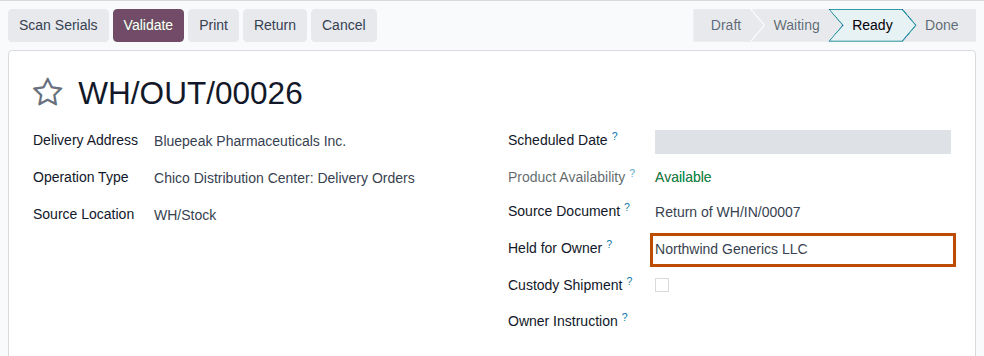
Choose the instruction, scan and validate
-
Choose one:
- To the owner's supplier: leave Custody Shipment cleared.
- Back to the owner (custody): select Custody Shipment, and in Delivery Address choose the owner or one of its addresses,
for example
Northwind Generics LLC, Northwind Distribution Center.
-
In Owner Instruction, choose the owner's instruction, for example
NWG-RTV-3110 (Return to vendor, Northwind Generics LLC)orNWG-RTN-3104 (Return to the owner (custody), Northwind Generics LLC). The list offers the unused instructions of the transfer's owner. -
Select Scan Serials, scan the DataMatrix of each unit, for example
(01)00399990101300(21)600000011003(17)280331(10)BPDPZ2508K, and select Register.Result: the chatter says "1 DSCSA package(s) scanned.".
-
Select Validate.
Result: the return is Done.
Result: the units have left, and their packages are Shipped to the partner, still showing the owner as Held for Owner and Seller of Record. Records:
- to the supplier: the return
WH/OUT/NNNNN(Done) and an outbound DSCSA document in the owner's name, numbered with the owner's code, for exampleDSCSA/NWG/OUT/2026/00002(DSCSA Documents smart button); the gate log rows of the checks (Inventory ‣ Rx Tracking ‣ Gate Log (in the 3PL ‣ Reports section)); - in custody: the return
WH/OUT/NNNNN(Done) and no DSCSA document; - in both cases the instruction, now Used On the validation date for the return transfer (or for the transfer a backorder came from).
What an outbound owner document holds: Read an owner's outbound document. Returns of your own stock need no instruction (Return saleable product to the supplier).
If it doesn't work
- "DSCSA owner isolation (3PL):" with "OWNER's instruction (Return to vendor) is required for WH/OUT/NNNNN: record the owner's order or approval first." (custody: "(Return to the owner (custody) / Return to vendor)"): Owner Instruction is empty. Choose it and validate again. See Error: "OWNER's instruction (KIND) is required for …".
- "Instruction … is not a Return to vendor instruction.": the instruction chosen is of another kind. See Error: "Instruction … is not a … instruction.".
- "…: a custody return gives units back to OWNER, so it goes to OWNER or one of its addresses, not to PARTNER.": Custody Shipment is selected but the partner is the supplier. Change Delivery Address, or clear Custody Shipment. See Error: "… a custody return gives units back to …".
- The owner, counterparty or facility check refuses the transfer: see Troubleshooting: facility checks.
- "… has no active owner profile …": the owner's profile was archived (Known issue PF-A07-01). See Error: "… has no active owner profile, so DSCSA stock can't be held for it …".
- Held for Owner isn't on a transfer you created with New: see Held for Owner is missing on a new delivery.
Next: Read an owner's outbound document
Send an owner's nonsaleable units to the owner or one of its return designees
Send units that can't be sold, such as damaged units, to the owner or to a designee the owner named, such as a reverse distributor. An Rx Tracking Manager flags the return as non-saleable. The software refuses any other partner, and records the check of the designee in the gate log.
Your procedure decides which units are nonsaleable and who approves the return; the software requires the Rx Tracking Manager right for the flag and the owner's Nonsaleable return instruction.
Who: Rx Tracking Manager to set the flag; Rx Tracking User or Manager for the other steps.
Requires: Rx Tracking (DSCSA): 3PL and title model, with 3PL switched on.
Before you start:
- The designee is in the owner profile's Return Designees, and is an authorized trading partner (its DSCSA role and a valid license). See Set the owner's policies.
- The owner's Nonsaleable return instruction is recorded and unused. See Record an owner's instruction.
- The owner's receipt the units came in on is Done.
-
Create the return from the owner's receipt: steps 1–4 of "Create the return" in 3PL-RET-05.
Result: a delivery
WH/OUT/NNNNN, Ready, held for the owner, to the supplier. -
In Delivery Address, choose the owner, or one of its return designees, for example
Clearwater Reverse Distribution LLC. -
As an Rx Tracking Manager, select Non-saleable return (§582(c)(1)(B)(ii)).
Result: Non-saleable Return Set By and Non-saleable Return Set On appear, with your name and the time.
-
In Owner Instruction, choose the owner's Nonsaleable return instruction, for example
NWG-NSR-3111 (Nonsaleable return, Northwind Generics LLC).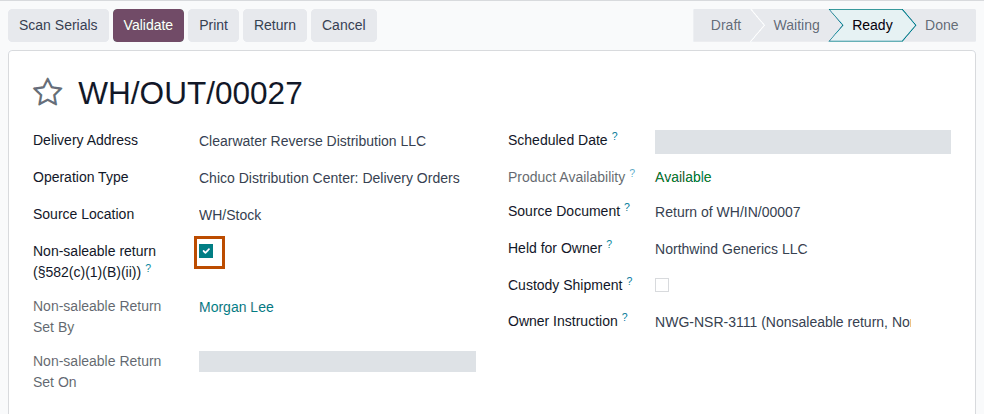
-
Select Scan Serials, scan each unit, and select Register.
-
Select Validate.
Result: the return is Done.
Result: the units are Shipped to the designee, without a DSCSA document (as in core). Records: the return WH/OUT/NNNNN
(Done) with Non-saleable Return Set By and Set On; its chatter lines; gate log rows for the owner, the facility and the
designee, with Party Role Return designee and the result Pass; the instruction, Used On the validation date.
If it doesn't work
- "…: a nonsaleable return of units held for OWNER goes to OWNER or to one of its return designees (owner profile), not to PARTNER.": the partner isn't the owner or one of its designees (the original supplier, or another owner's designee, is refused). The refusal is also written in the gate log as Refused. Change Delivery Address, or have an Rx Tracking Manager add the partner to the owner's Return Designees. See Error: "… a nonsaleable return of units held for … goes to …".
- "OWNER's instruction (Nonsaleable return) is required for …": Owner Instruction is empty. See Error: "OWNER's instruction (KIND) is required for …".
- Non-saleable return isn't on the form: you don't have the Rx Tracking Manager right. See The Non-saleable return checkbox isn't shown.
- The designee check refuses the transfer (its license lapsed): see Troubleshooting: facility checks.