Record facility licenses and jurisdictions
3PL add-on For: Administrator, Compliance manager Checked on 18.0.0.2.0, 18.0.1.0.0
Record our own licenses per facility (warehouse) and per activity, and the states that don't license third-party logistics providers. Owner stock at a facility needs our verified third-party logistics license for that facility; title transfers and consignor stock need our wholesale license there. Our own stock never needs a facility license.
Background: the modules follow the reading that a third-party logistics provider has its own licensing and reporting duties for each facility. A license record says which activity it authorizes, so that a facility's third-party logistics license and its wholesale license can be told apart (FD&C Act § 584(a), (b), (d); FDA annual licensure reporting; FD&C Act § 582(c)(3), § 581(2); § 584(a)–(b); see Compliance background). This is how the modules read the law; it has not been reviewed by counsel. See the disclaimer.
Record and verify our facility licenses
Record a facility license at go-live, for a new warehouse, and for each new or renewed license. The steps are those of any license (Record and verify a trading partner's license); a facility license also names its Activity and its Facility. Your procedure decides how a license is checked at its source; the software requires a verification source before it accepts the license as verified.
Who: Rx Tracking Manager (an Rx Tracking User can read the list)
Requires: Rx Tracking (DSCSA): 3PL and title model. Works in Odoo Community and Enterprise. The license can be recorded while 3PL is off, but only a license verified while 3PL is on records a New licence facility event (see the final Result).
Before you start:
- The warehouse exists, with its Address (Inventory ‣ Configuration ‣ Warehouses). The facility's state is taken from that address, or from the company's when the warehouse has none.
- You have looked up the license at its source (the state board) and saved the proof (a screenshot or a PDF).
-
Go to Inventory ‣ Rx Tracking ‣ Facility Licences (in the 3PL ‣ Configuration section).
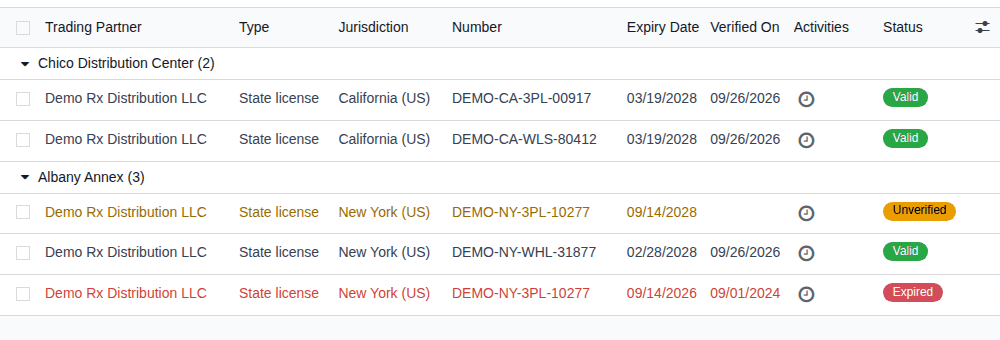
Result: the list shows our licenses that name a facility, grouped by Facility, for example Chico Distribution Center (2) and Albany Annex (3). The groups open folded: open a group to see its licenses. The menu is spelled Facility Licences (known issue PF-S01-01).
-
Select New.
Result: a license form opens with Trading Partner set to your company, for example Demo Rx Distribution LLC, and the status Unverified.
-
In Number, enter the license number, for example
DEMO-NY-3PL-10277. -
Fill in:
- Type: State license for a state license. Federal 3PL licence (future) is for a federal third-party logistics license once one exists; NABP Drug Distributor Accreditation can be recorded but never counts as a license.
- Activity: Third-party logistics (owner stock) or Wholesale distribution (title transfers and consignor stock).
- Facility: the warehouse the license covers, for example Albany Annex. Name a facility only on the license of the state the facility is in (see "What counts at a facility" below).
- Jurisdiction: the issuing state, for example New York (US).
- Issue Date, Expiry Date and Responsible (the person who gets the renewal reminder), as for any license.
-
Under Verification, in Verification Source, enter where and how you checked it, then select Evidence and choose the proof file.
-
Select the save icon.
Result: the license is saved as Unverified and listed under its facility. It doesn't count yet.
-
Select Mark verified.
Result: the status is Valid. Verified By, Verified On and Keep Evidence Until are filled in, the chatter logs "License verified by YOUR-NAME on DATE. Source: …", and the header shows Record re-verification. Activity, Facility and the other licensed facts are now read-only.
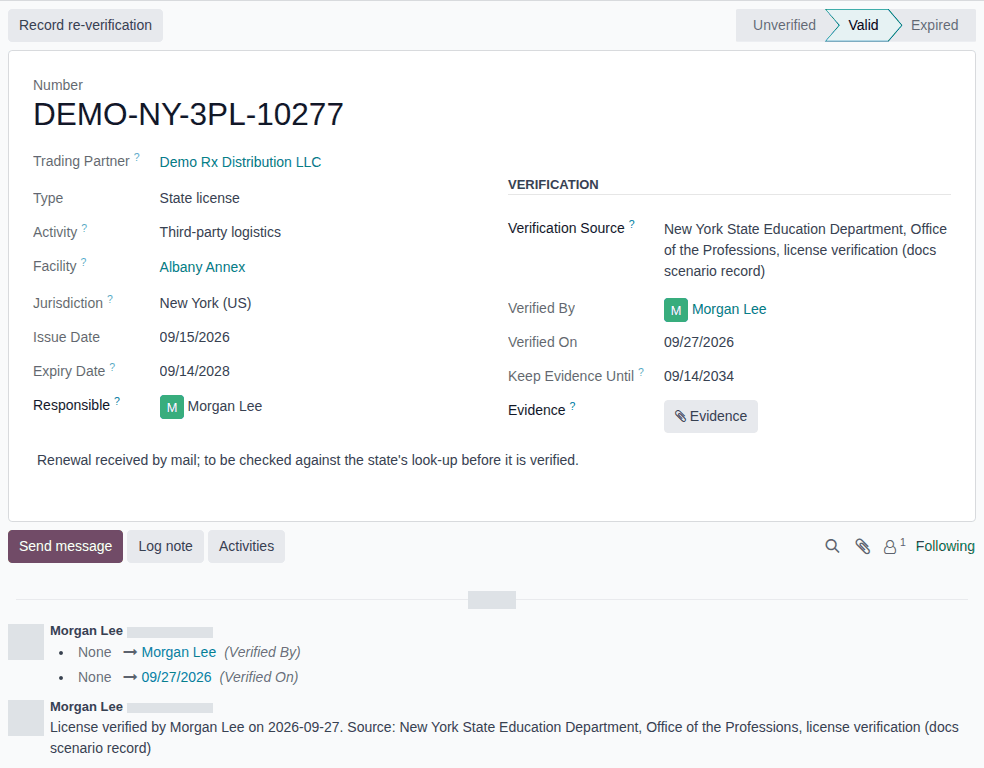
Result: the facility passes our facility check for the license's activity while the license is valid, and owner transfers there are no longer refused for a missing license. With 3PL on, the first verification of a State license or Federal 3PL licence (future) that names a facility also records a New licence event in Inventory ‣ Rx Tracking ‣ Facility Events (in the 3PL ‣ Configuration section), status To report, due 30 days after the license's Issue Date, with a Report to FDA within 30 days activity for each Rx Tracking Manager. Records: the license with its evidence and verification, and the facility event. The facility event is handled in Record a facility event and mark it reported to FDA.
What counts at a facility:
| Activity | License types that count | Needed for |
|---|---|---|
| Third-party logistics | State license, Federal 3PL licence (future) | owner stock (receipts, deliveries, returns of an owner's units) |
| Wholesale distribution | State license | title transfers in place and consignor stock |
A license never counts when it has no Activity or another one, names another facility, is unverified, expired, not yet in force or archived. NABP Drug Distributor Accreditation never counts. In a state that doesn't license third-party logistics providers, a verified jurisdiction record and the facility's FDA annual report record can stand in for the 3PL license (3PL-SET-06). When the company's 503(e) setting is on, the facility also needs its FDA annual report record (Record a facility's FDA annual report).
What the check doesn't compare:
- Jurisdiction is recorded, but it isn't compared with the facility's state (taken from the warehouse's address, or the company's). Any verified license of the right type and Activity that names the facility counts, whichever state issued it (known issue PF-F06-01). So record under Facility only the license of the state the facility is in; a non-resident license that another state issued to you for this facility is recorded without a Facility, or it would satisfy the check while the home-state license is missing.
- The states you ship into are not checked. For an owner's shipment, the software doesn't record or check a non-resident third-party logistics license of the customer's (ship-to) state; that check is optional, and this version doesn't build it. Your procedure decides which states' licenses you need and how you check them before shipping.
Our facility licenses of activity Third-party logistics, NABP accreditations and federal 3PL licenses are never printed on our own documents; our wholesale licenses are printed as before (Record our own company's licenses).
To renew or correct a verified facility license, record and verify the new one, then archive the old one, as in Renew, correct or retire a verified license. The Albany Annex in the example database shows this: its expired New York license and its renewal, not yet verified.
If it doesn't work
- "Licence … names the facility …, which belongs to …: only that company's own licences are recorded per facility." (when you save): Trading Partner is not your company. Only your company's licenses name a facility; a partner's license leaves Facility empty. See Error: "Licence … names the facility …".
- Activity and Facility can't be edited, or "… is verified: the verification is evidence for its Activity, which can't change. …" (when importing changes): the license is verified. Record a new license and archive the old one. See Error: "… is verified: the verification is evidence for its …".
- "Enter where … was verified (Verification Source: …) before marking it verified.": fill in Verification Source. See Error: "Enter where … was verified".
- There is no New button and no Mark verified: you are an Rx Tracking User. Ask an Rx Tracking Manager.
- Owner transfers at the facility are still refused with "Facility … has no valid 3PL licence …": the license lacks Facility or Activity, has another type, or isn't valid today. See Get an owner transfer through the owner, counterparty and facility checks.
Known issue (PF-A05-04): Facility and Activity are optional on the form. A license saved from Facility Licences without a Facility is kept as a license of your company, but it disappears from Facility Licences (find it in Inventory ‣ Rx Tracking ‣ Licenses); without an Activity it stays listed but never counts. Check both fields before you select Mark verified: once verified, they can't be added.
Known issue (PF-F06-01): the facility check doesn't compare a license's Jurisdiction with the state of the facility it names, so a license of another state recorded under the facility passes the check. Before you select Mark verified, check that Jurisdiction is the state of the warehouse's address.
Record that a state does not license 3PLs
Some states have no license for third-party logistics providers. Record such a state once you have checked its rule. Until a record is verified, every facility and every third-party logistics trading partner needs a state license, as the core rule says. Your procedure decides whether the company relies on this record; the software requires a verification source before it counts.
Background: the modules follow the reading that FD&C Act §582(a)(7) deems a third-party logistics provider in such a state licensed until FDA's national licensing rule applies (FD&C Act § 582(c)(3), § 581(2); § 584(a)–(b); see Compliance background). This is how the modules read the law; it has not been reviewed by counsel. See the disclaimer.
Who: Rx Tracking Manager (an Rx Tracking User can read the list)
Requires: Rx Tracking (DSCSA): 3PL and title model. Works in Odoo Community and Enterprise, whether 3PL is on or off.
Before you start:
- You have checked the state's rule at its source (the board's page, the statute or FDA's database) and saved the proof.
-
Go to Inventory ‣ Rx Tracking ‣ Jurisdictions (in the 3PL ‣ Configuration section).
Result: the list shows the jurisdiction records; unverified ones are highlighted in orange.
-
Select New, or open the state's unverified record if one exists (the example database has one for New York (US)).
Result: the form shows the Unverified ribbon.
-
In State, select the state, for example New York (US).
-
Select Does Not License 3PLs.
-
Under Verification, in Verification Source, enter where you checked the rule, then select Evidence and choose the proof file. Add any Notes below.
-
Select the save icon.
-
Select Mark verified.
Result: the Unverified ribbon is gone, Verified By and Verified On are filled in, and the chatter logs "Jurisdiction verified by YOUR-NAME on DATE. Source: …". State and Does Not License 3PLs are read-only, and the header shows Record re-verification.
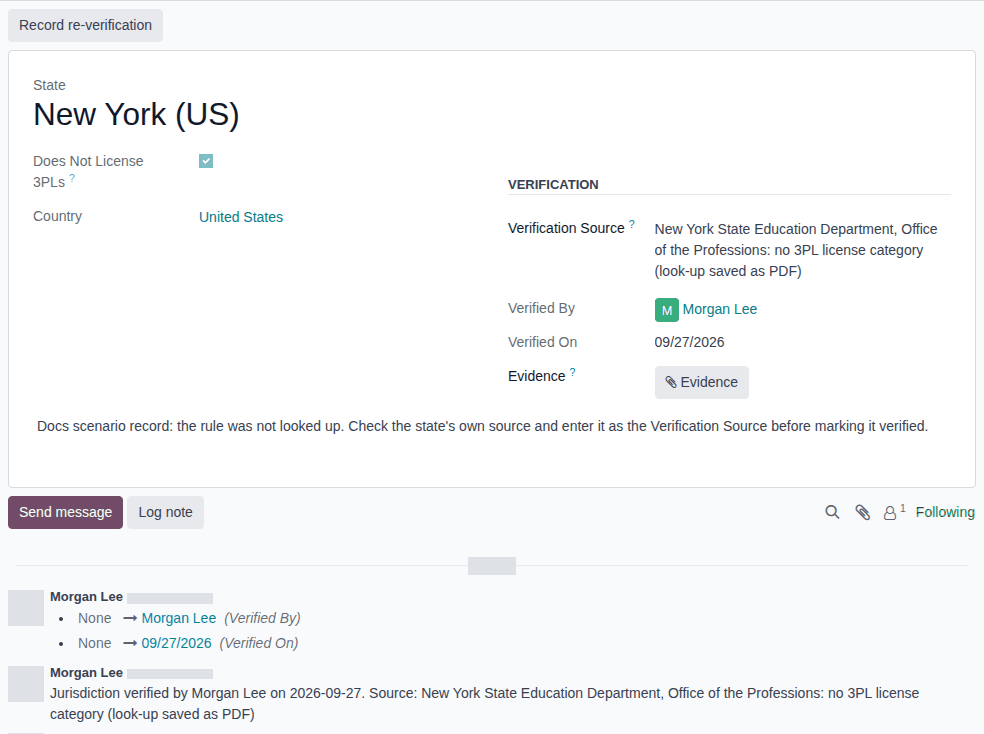
Result: while the record is verified, active and flagged:
- our facility in that state passes the 3PL facility check with a valid FDA annual report record as a 3PL instead of a state 3PL license (Record a facility's FDA annual report); the gate log cites "STATE does not license 3PLs (verified DATE)";
- a trading partner whose DSCSA role is third-party logistics and whose address is in that state is authorized with a valid, verified FDA annual report (§503(e) / §584(b)) license instead of a state license.
The wholesale activity has no such path. Records: the jurisdiction record, its evidence file (kept for good) and the verification line in its chatter. In a database with several companies, each company has its own jurisdiction records, and users see those of the companies they work in.
Later:
- To record another check of the same rule, update Verification Source if needed and select Record re-verification.
- To correct a verified record, or to record that the state now licenses 3PLs, archive it (the ⚙ (Actions) menu, Archive) and record a new one. The effect stops as soon as the record is archived.
- A record with Does Not License 3PLs cleared says that the state does license 3PLs; it changes nothing.
If it doesn't work
- "Enter where the rule of … was verified (Verification Source) before marking it verified.": fill in Verification Source and select Mark verified again. See Error: "Enter where the rule of … was verified".
- "… already has a jurisdiction record in …: archive it before recording a new one." (when you save): the state already has an active record. Open it instead, or archive it first. See Error: "… already has a jurisdiction record in …".
- State or Does Not License 3PLs can't be edited, or a change is refused when importing: the record is verified. Archive it and record a new one. See Error: "The jurisdiction record of … is verified …".
- There is no New button and no Mark verified: you are an Rx Tracking User. Ask an Rx Tracking Manager.
- There is no Delete in the ⚙ (Actions) menu: nobody can delete a jurisdiction record, even an unverified one (PF-W12-02). Archive a record made by mistake.