Record owner instructions
3PL add-on For: Compliance manager, Warehouse staff Checked on 18.0.0.2.0, 18.0.1.0.0
An owner instruction is the owner's order or approval for one operation on its stock: ship to a customer, return, scrap, destroy, release from hold, recall, a title transfer or publishing a document to its buyer. Record each one as it arrives, with its evidence; the operation then names it, and it can be used only once.
Background: the modules follow the reading that, under the definition of a third-party logistics provider, the owner, not you, directs every sale or disposition of its stock, so each such operation keeps the owner's order or approval (FD&C Act § 581(6), (22), (24), (26), (27); § 582(a)(1), (a)(7); § 584(d); see Compliance background). This is how the modules read the law; it has not been reviewed by counsel. See the disclaimer.
Record an owner's instruction
Record the instruction when the owner's email, order or approval arrives, before you start the operation it asks for. An instruction is frozen once saved: nobody can change or delete it, so check it before you leave the form.
Who: Rx Tracking User or Manager
Requires: Rx Tracking (DSCSA): 3PL and title model, with 3PL switched on.
Before you start:
- The owner has an active owner profile. See Create an owner profile.
- The owner's email, order or approval is saved as a file on your computer (for example a PDF of the email), with its reference.
- You know which kind of instruction the operation needs. See Which owner instruction each operation needs.
-
Go to Inventory ‣ Rx Tracking ‣ Owner Instructions (in the 3PL ‣ Operations section) and select New. (Or, on the owner's profile, select the Instructions smart button, then New: Owner is filled in for you.)
Result: a new instruction form opens with Received On set to now, Received Via set to Email and Recorded By set to you.
-
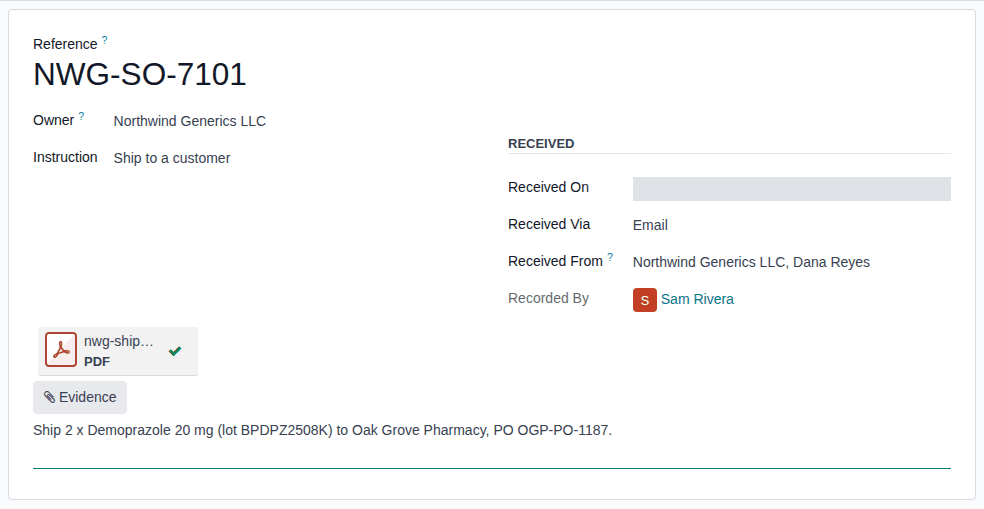
In Reference, enter the owner's order, approval or ticket number, for example
NWG-SO-7101. -
Fill in:
- Owner: the owner company, for example Northwind Generics LLC.
- Instruction: the kind, for example Ship to a customer.
- Received On: when the owner's instruction reached you, if not now.
- Received Via: Email, Portal, EDI, Phone or Other.
- Received From: the owner's person who gave it, for example Northwind Generics LLC, Dana Reyes. Only the owner and its own contacts are offered.
-
Select Evidence and choose the file.
Result: the file is listed above the Evidence button with a green check mark.
-
In Notes, write what the owner asked for, for example "Ship 2 x Demoprazole 20 mg (lot BPDPZ2508K) to Oak Grove Pharmacy, PO OGP-PO-1187."
-
Check every field and the evidence file: nothing can be changed or added after the next step.
-
Select the breadcrumb Owner Instructions above the form. The form has no save icon: leaving it saves the instruction.
Result: the list opens with the new instruction at the top, and Used On empty.
Result: the instruction is recorded and frozen. Records: the instruction, shown in the operations' Owner Instruction fields as "REFERENCE (KIND, OWNER)", for example "NWG-SO-7101 (Ship to a customer, Northwind Generics LLC)", with Recorded By you and its evidence file, kept for good. It is offered on the owner's operations until one of them uses it; then it is marked used for that record (Find an owner's instructions and see which are used).
If it doesn't work
- "OWNER has no active owner profile in COMPANY: instructions are recorded for owners only.": the partner has no owner profile, or it is archived. Choose the owner company itself, or ask an Rx Tracking Manager to create or re-activate its profile. See Error: "… has no active owner profile in …: instructions are recorded for owners only.".
- You can't leave the form and Owner or Instruction is red: a required field is empty. Fill it in, or, to abandon the new instruction, reload the page in your browser before the fields are complete.
- You saved a wrong instruction: record a new, correct one, and say in its Notes which one it replaces. The wrong one can't be changed or deleted. See Error: "Owner instructions are frozen once recorded …".
Known issue (PF-W13-03, PF-W13-04, PF-A05-05): the form has no save or discard icon, and leaving it with every required field filled saves the instruction for good. The ⚙ (Actions) menu of a saved instruction offers Duplicate, which at once saves an unused copy with the same reference and date but without the evidence, even of an instruction already used; don't use it. A wrong or duplicated instruction stays under Not used yet and stays selectable: take care to pick the right reference in the operation.
Next: use the instruction in its operation, for example Confirm an owner order.
Find an owner's instructions and see which are used
Find the instruction before an operation, or answer the question "on whose order did you ship, scrap or release this?" after it. An instruction is Not used yet until an operation uses it; then it names that operation.
Who: Rx Tracking User or Manager
Requires: Rx Tracking (DSCSA): 3PL and title model, with 3PL switched on.
-
Go to Inventory ‣ Rx Tracking ‣ Owner Instructions (in the 3PL ‣ Operations section).
Result: every instruction of the company is listed, newest first, with Received On, Owner, Instruction, Reference and Used On.
-
Open the search options (the arrow at the end of the search box). Under Filters, select Not used yet (or Used); under Group By, select Owner (or Instruction).
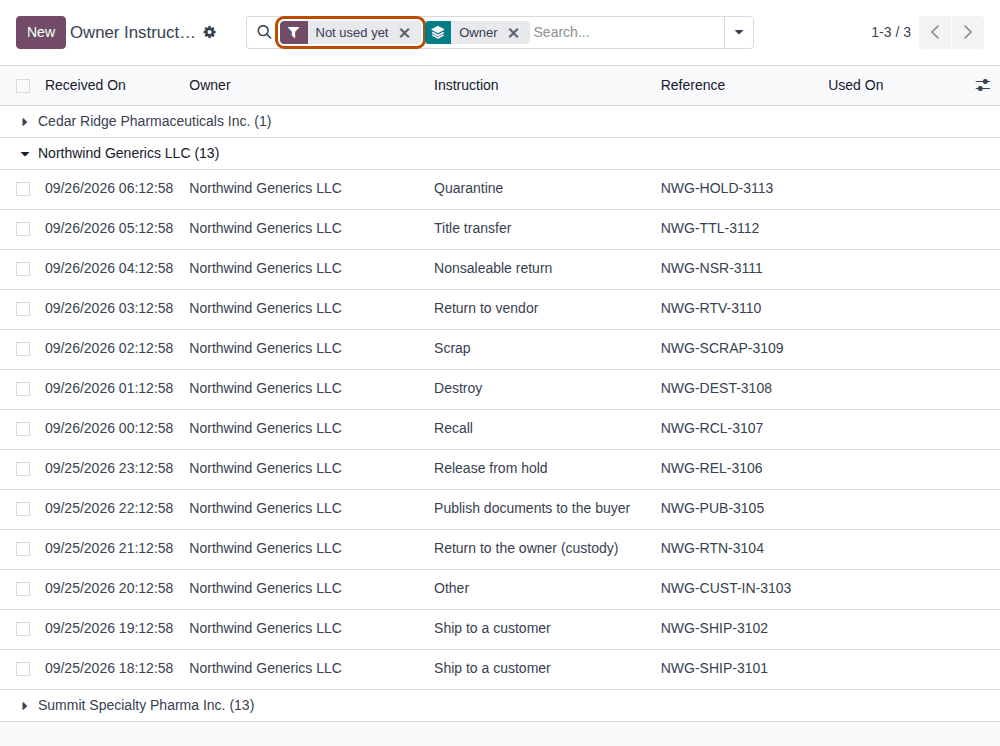
Result: the list shows one group per owner with its count, for example Northwind Generics LLC (13). Open a group to see its instructions.
-
To find one instruction, type its reference, owner or kind in the search box and select the matching search line.
-
Open an instruction.
Result: for a used instruction, the Use group shows For Model, For Record (for example
3PL/OUT/2026/00001) and Used On. An unused instruction has no Use group.
For one owner only, open its profile and select the Instructions smart button: it lists that owner's instructions in the profile's company, and its number is the count.
For Model shows the technical name of the record that used the instruction (known issue PF-W13-05):
| For Model | The operation |
|---|---|
dscsa.owner.order | an owner order (a sale, or a custody return to the owner) |
stock.picking | a transfer: a custody receipt, an owner delivery without an owner order, a return to vendor, a nonsaleable return |
stock.scrap | a scrap of the owner's units |
stock.lot | a lot released from hold, or recalled |
dscsa.title.transfer | a title transfer |
dscsa.document | a document published to its buyer |
Result: you found the instruction and, if it is used, the operation that used it. Nothing is changed.
If it doesn't work
- The instruction you need isn't offered in an operation's Owner Instruction field: it is already used, it is of another owner, or it is of a kind the operation doesn't accept. Check it here, and record a new instruction if needed. See Which owner instruction each operation needs.
Related
- Which owner instruction each operation needs
- Set the owner's policies (whether instructions are required)
- Troubleshooting: owner profiles and instructions