Check, change or end an owner relationship
3PL add-on For: Administrator, Compliance manager, Warehouse staff Checked on 18.0.0.2.0, 18.0.1.0.0
An owner profile stays in use for as long as you hold the owner's stock. Check that the owner is still an authorized trading partner, keep the profile up to date, and archive it when the relationship ends. Profiles are never deleted.
Check whether an owner is an authorized trading partner, and fix it
Check the owner's status when you onboard it, when one of its licenses is about to expire, or when a receipt, shipment or return of its stock is refused with a reason that starts "Owner:". The profile shows the status as of today, for the profile's company, with the reason when it fails.
Background: the modules follow the reading that you receive, ship, return or transfer an owner's stock only while the owner is authorized under the same role rule as any trading partner, with its licenses verified and in force (FD&C Act § 582(c)(3), § 581(2); § 584(a)–(b); see Compliance background). This is how the modules read the law; it has not been reviewed by counsel. See the disclaimer.
Who: Rx Tracking User or Manager to check; Rx Tracking Manager to fix the owner's licenses.
Requires: Rx Tracking (DSCSA): 3PL and title model, with 3PL switched on.
Before you start:
- The owner profile exists. See Set up an owner profile.
- To fix: the owner's new or renewed license, with its evidence, is at hand.
-
Go to Inventory ‣ Rx Tracking ‣ Owners (in the 3PL ‣ Configuration section) and open the owner. For a former owner, first select the Archived filter in the search options.
-
Look at Authorized Trading Partner in the Owner as trading partner group.
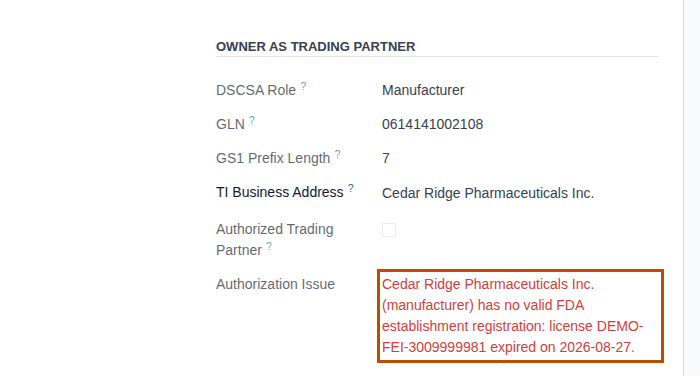
Result: either Authorized Trading Partner is selected (nothing to fix), or it is cleared and Authorization Issue shows the reason in red, for example "Cedar Ridge Pharmaceuticals Inc. (manufacturer) has no valid FDA establishment registration: license DEMO-FEI-3009999981 expired on 2026-08-27."
-
To fix it, select the owner's name at the top of the profile.
Result: the owner's contact form opens.
-
Select the Licenses smart button and open the license the reason names.
-
Renew, verify or record the license the reason asks for: follow Renew, correct or retire a verified license for an expired license, or Record and verify a trading partner's license for a missing or unverified one.
Result: the new license is Valid and its Mark verified button has become Record re-verification.
-
Go back to the owner profile: in the breadcrumb above the form, select … (its first item), then the profile, whose name starts with the owner's code, for example [CEDAR] Cedar Ridge Pharmaceuticals Inc.
Result: Authorized Trading Partner is selected and the red reason is gone.
Result: the owner is an authorized trading partner again. Records: the new or updated license with its verification (by you, today) and its evidence. The owner's next receipt, shipment, return or title transfer passes the owner check; what else that check looks at (the owner's supplier or customer, your facility license) is in Get an owner transfer through the owner, counterparty and facility checks.
Which license an owner needs depends on its DSCSA Role, with the same rule as any trading partner: a manufacturer or repackager needs a verified FDA establishment registration, a wholesale distributor a verified state license (and, when the company setting for the FDA annual report is on, that report's license). See Check whether a partner is an authorized trading partner, and why not. The status on the profile is today's; the facility client list shows it on a chosen date (Print or export the facility client list).
If it doesn't work
- The reason says the license is unverified, expired, missing or not yet in force: see the matching entry under Error: "… can't be confirmed: it contains DSCSA products …" (the reasons are the same for an owner).
- The reason says the owner has no DSCSA role: set DSCSA Role on the owner's contact (the DSCSA tab). See Onboard a trading partner: DSCSA role, GLN and address.
- You can't open or change the license: you have the Rx Tracking User right. Ask an Rx Tracking Manager.
Change, end or re-open an owner relationship
Edit the profile when the service agreement changes, archive it when the owner leaves, and re-activate it if the owner comes back. The profile, the owner's documents, instructions and gate log entries are kept for good in every case. Your procedure decides when a relationship ends and what the former client may still see; the software requires the owner's stock to be gone before its profile is archived, but doesn't check it (known issue PF-A05-02, below).
Who: Rx Tracking Manager
Requires: Rx Tracking (DSCSA): 3PL and title model, with 3PL switched on.
Before you start:
- The owner profile exists. See Set up an owner profile.
- To end the relationship: none of the owner's units are left in your custody. Check See the stock we hold for each owner (Owner Stock), then ship the rest back (Send an owner's goods back to it (custody return order)) or buy it (Create and approve a title purchase order).
Change the profile
-
Go to Inventory ‣ Rx Tracking ‣ Owners (in the 3PL ‣ Configuration section) and open the owner.
-
Change what the new agreement says, on the form or its tabs, for example Facilities Served or the Policies tab.
-
Select the save icon.
Result: the profile is saved, and the chatter lists each tracked change (code, type, dates, policies, authorization, title options) with who made it.
Owner and Company can't be changed once the profile is saved. For another company or partner, archive this profile and create a new one (Create an owner profile).
End the relationship
-
Make sure the owner's stock is gone (see Before you start).
-
Open the owner's profile, set Service End to the last day of service and select the save icon.
Result: Service End is saved; after that date the owner no longer appears on the facility client list.
-
Make the owner's export, so that the owner or an inspector can have everything you keep about it. See Export everything we keep about one owner as one zip.
-
Select the ⚙ (Actions) menu next to the profile's name, then Archive.
Result: a Confirmation dialog asks "Are you sure that you want to archive this record?"
-
Select Archive.
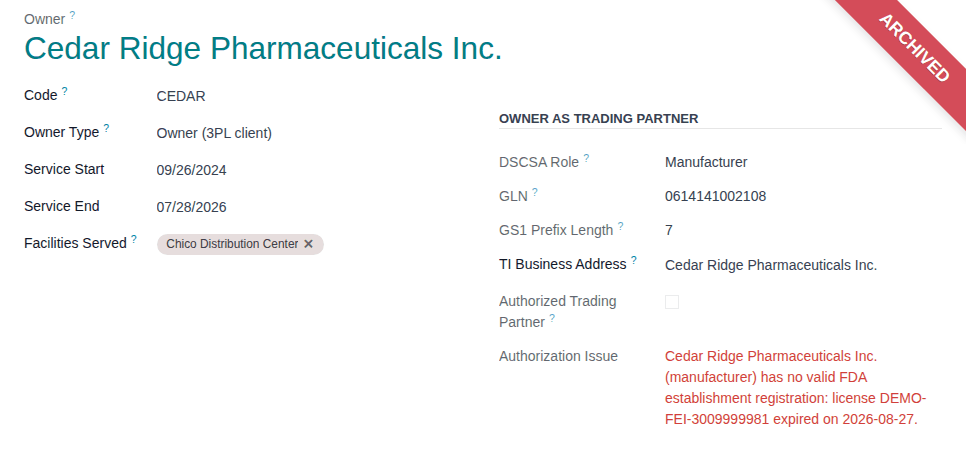
Result: the profile shows the Archived ribbon and leaves the Owners list (the Archived filter shows it). The chatter records "Yes → No (Active)".
-
If the former client's people should stop reading its records on the owner portal, take their access away: Take the owner portal away from a contact.
What changes once the profile is archived:
- No new instruction can be recorded for the owner, no one can be given its owner portal, and no owner order can be confirmed for it.
- Its portal users keep reading its stock, documents, holds and discrepancies until you revoke their access. Uploads of supplier data are refused (known issue PF-A09-02, below).
- Its documents, instructions, notices and gate log entries stay.
Re-open the relationship
-
Go to Inventory ‣ Rx Tracking ‣ Owners (in the 3PL ‣ Configuration section), open the search options and select the Archived filter.
-
Open the owner's profile.
-
Select the ⚙ (Actions) menu, then Unarchive.
Result: the Archived ribbon disappears and the profile is back in the Owners list.
-
Clear or change Service End, and select the save icon.
Result: the relationship is active, ended or re-opened. Records: the profile (never deleted) with its tracked changes: Service End, "Yes → No (Active)" when archived, "No → Yes (Active)" when re-activated.
If it doesn't work
- "OWNER has no active owner profile, so DSCSA stock can't be held for it (Rx Tracking > 3PL)." when you validate a transfer of the owner's stock, or "OWNER has no active owner profile in COMPANY." when you confirm its owner order: the profile was archived while its stock was still with you. Re-activate it, finish the shipment, then archive it again. See Error: "… has no active owner profile, so DSCSA stock can't be held for it …".
- "Turn on third-party logistics for COMPANY before re-activating [CODE] OWNER.": 3PL is off. See Error: "Turn on third-party logistics …".
- "Consignor owners are turned off for COMPANY (Inventory settings, 3PL)." when you re-activate a consignor: see Error: "Consignor owners are turned off …".
- Archive ends with "Access Error" and "You are not allowed to modify 'DSCSA Owner Profile (3PL Client)' (dscsa.owner.profile) records.": you have the Rx Tracking User right, which reads owner profiles only. Ask an Rx Tracking Manager.
- There is no Delete in the ⚙ (Actions) menu: owner profiles are never deleted. Archive the profile instead. See Error: "Owner profiles are never deleted …".
- Duplicate in the ⚙ (Actions) menu always ends with "This partner already has an owner profile in this company (it may be archived).": a partner has one profile per company (known issue PF-W13-02). Use New for another owner.
Known issue (PF-A05-02, PF-A07-01, PF-A09-02): archiving is accepted while the owner's units are still with you. After that, every transfer, scrap or return of those units is refused, and a lot holding them can't be released, until you re-activate the profile. A former client's portal still offers Upload supplier data on its pending receipts, but every upload ends on an Error 404 page. Ship the owner's stock back and settle its pending receipts before you archive the profile.