Turn third-party logistics on or off
3PL add-on For: Administrator Checked on 18.0.0.2.0, 18.0.1.0.0
Third-party logistics (3PL) is switched on per company. While it is off, the 3PL add-on changes nothing and no owner can be set up. Once it is on, the company can hold DSCSA stock for owners (its 3PL clients), keep each owner's units apart, issue documents in the owner's name and buy an owner's units in place.
Background: the modules follow the reading that a third-party logistics provider is not a party to its owners' transactions, and that its own duties are a license for each facility and a yearly report to FDA (FD&C Act § 581(6), (22), (24), (26), (27); § 582(a)(1), (a)(7); § 584(d); see Compliance background). This is how the modules read the law; it has not been reviewed by counsel. See the disclaimer.
With Odoo Enterprise's Quality app, a quality point on the Title Transfer operation type blocks every title transfer. See Use Quality Control checks alongside DSCSA operations.
Turn on third-party logistics for a company
Switch 3PL on when the company starts to hold stock for owners. The switch sets up what 3PL needs (a title-transfer location and operation types) and shows Odoo's owner fields, relabelled Held for Owner, to every internal user. Your own stock is handled as before.
Who: Administrator with Administration: Settings, who is also Inventory Administrator and Rx Tracking Manager
Requires: Rx Tracking (DSCSA): 3PL and title model. Works in Odoo Community and Enterprise.
Before you start:
- The 3PL add-on is installed. See Install the 3PL add-on.
- No DSCSA stock of the company is held for another partner through Odoo's own Consignment setting (stock received with an owner before 3PL was on). If there is, the switch is refused; see "If it doesn't work" below.
- For the order of the whole 3PL setup (facility licenses, the switch, policies, owners), see Go live as a 3PL.
-
Go to Inventory ‣ Configuration ‣ Settings.
Result: the Inventory settings open.
-
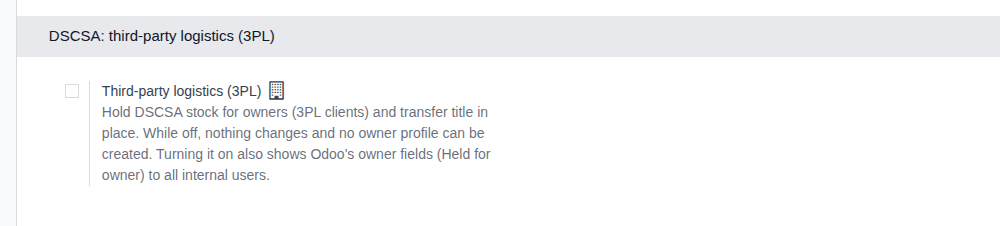
Scroll down to the DSCSA: third-party logistics (3PL) block, below DSCSA (Rx Tracking).
Result: while 3PL is off, the block shows only the Third-party logistics (3PL) checkbox.
-
Select Third-party logistics (3PL).
-
Scroll up to the Traceability block and select Consignment ("Set owner on stored products"), if it isn't selected yet. Without it, saving clears Odoo's owner fields again and no one sees Held for Owner (known issue PF-W12-03, below).
-
Select Save.
Result: the settings reload. Under the checkbox, Title location shows Virtual Locations/DSCSA Title Transfer, and the block now lists the 3PL policies: Owner counterparties, Issue documents as the owner's agent, Consignor owners, Hold scope and Owner isolation for non-DSCSA products, each at its default.
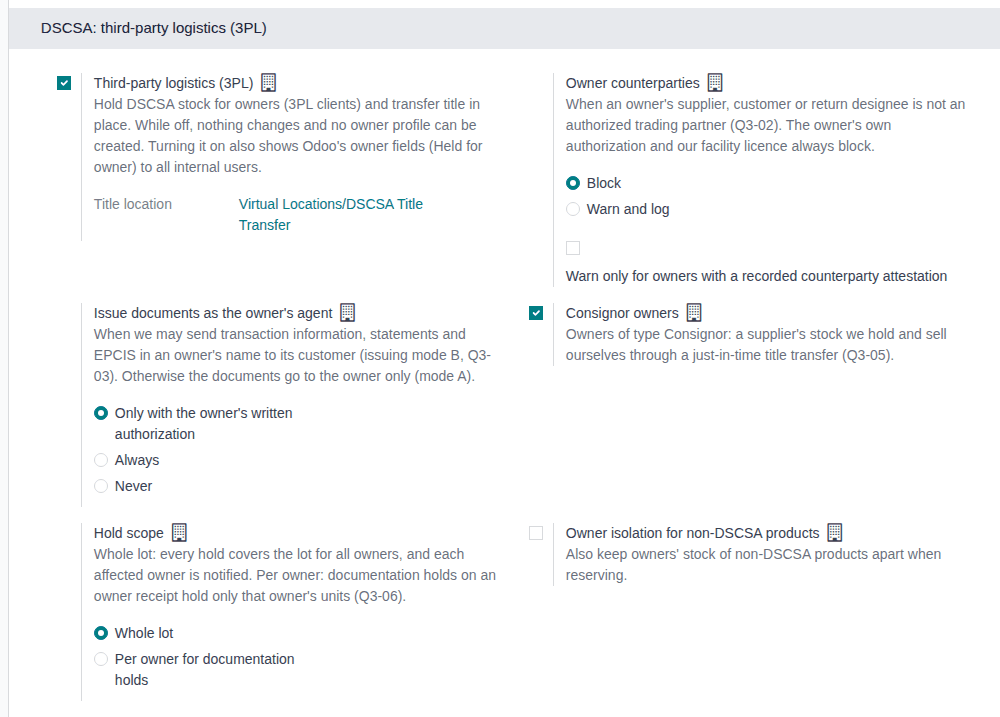
Result: 3PL is on for the company. Records and changes:
-
the company's virtual location DSCSA Title Transfer (location type Inventory Loss), listed in Inventory ‣ Configuration ‣ Locations once you remove the list's default Internal filter;
-
a Title Transfer operation type for each warehouse of the company (in the example database: Chico Distribution Center and Albany Annex), listed in Inventory ‣ Configuration ‣ Operations Types and shown as a card on Inventory ‣ Overview. A warehouse created later, while 3PL is on, gets its own at once;
-
Odoo's Consignment setting (block Traceability of the same page) is selected for the whole database: every internal user, in every company, now sees Held for Owner on transfers, detailed operations and stock (Inventory ‣ Reporting ‣ Locations).

Your own stock, orders and documents are unchanged. No owner exists yet: set up the policies, facility licenses and owners next.
If it doesn't work
- "3PL can't be turned on for … DSCSA stock is already held for … through Odoo's consignment owner, without an owner per serial. …": DSCSA stock was received for another partner through Odoo's own owner field before 3PL was on. That stock has no owner per serial, and the add-on doesn't migrate it. Ship it out of the warehouse (for example, return it to the supplier), then select Save again. See Error: "3PL can't be turned on …".
- The DSCSA: third-party logistics (3PL) block isn't there: you are not an Rx Tracking Manager (the block is hidden from everyone else), or you lack Inventory Administrator (then no Inventory setting is shown). See The 3PL settings block is missing.
- "Only DSCSA managers can change the third-party logistics (3PL) settings." (when importing company settings): the same rule for imports. Ask an Rx Tracking Manager.
Known issue (PF-W12-03): the help text says that turning 3PL on shows the owner fields, but when you save the settings page with Consignment cleared, the page clears Odoo's owner setting again in the same save: 3PL is on, and no one sees Held for Owner. That is why step 4 selects Consignment. If you already saved without it, select Consignment and select Save again.
Known issue (PF-A05-01): for the same reason, if an administrator later clears Consignment, every Held for Owner field (and the 3PL fields next to it) disappears for every user, with no warning, while 3PL stays on. Leave Consignment selected while 3PL is on.
Known issue (PF-A08-07): each Title Transfer operation type has a card on Inventory ‣ Overview, and a transfer started from it is refused at Validate when it holds DSCSA products. Start title transfers from Inventory ‣ Rx Tracking ‣ Title Transfers (in the 3PL ‣ Operations section) instead; see Buy an owner's units in place.
Next: Record and verify our facility licenses, then Choose the company's 3PL policies and Create an owner profile.
Turn third-party logistics off again
Switch 3PL off when the company stops holding stock for owners, or when it was switched on by mistake. The software refuses as long as an owner relationship is active or an owner's DSCSA stock is still in your custody. The company's owner data stays apart for good.
Who: Administrator with Administration: Settings, who is also Inventory Administrator and Rx Tracking Manager
Requires: Rx Tracking (DSCSA): 3PL and title model, with 3PL switched on.
Before you start:
- No owner's DSCSA units are in your custody (units In Stock, Returned, Quarantined or Missing): ship them back to their owner or buy them in place first. See Send an owner's goods back to it and Buy an owner's units in place.
- Then every owner profile is archived. See Change, end or re-open an owner relationship. Move the stock out before you archive the profile: an archived owner's remaining stock can't be moved until its profile is re-activated (known issue PF-A05-02, on that page).
-
Go to Inventory ‣ Configuration ‣ Settings and scroll down to the DSCSA: third-party logistics (3PL) block.
Result: if the company ever had an owner profile, the block says "The company has owner data: it stays segregated even if 3PL is turned off."
-
Clear Third-party logistics (3PL).
-
Select Save.
Result: the settings reload, and the block shows only the Third-party logistics (3PL) checkbox again. If an owner profile is still active, or an owner's units are still in your custody, an Invalid Operation dialog names it instead, and 3PL stays on.

Result: 3PL is off for the company. Owner operations stop, and no owner profile can be created or re-activated until 3PL is on again. What stays:
- owner documents, histories, owner reports and what owners can read in the owner portal: the company's owner data is kept apart for good (its owner-data flag is never reset);
- the DSCSA Title Transfer location, the Title Transfer operation types and Odoo's Consignment setting, so Held for Owner stays visible. Turning 3PL on again creates nothing new.
Records: the company's settings only; nothing is deleted.
Owner stock of non-DSCSA products, and owner units that were already shipped, don't stop the switch.
If it doesn't work
- "3PL can't be turned off for … while owner profiles are active (…): archive every owner profile first.": an owner relationship is still active. Ship its stock back, then archive its profile, and select Save again. See Error: "3PL can't be turned off … while owner profiles are active …".
- "3PL can't be turned off for …: DSCSA stock is still held for …. Ship it back or transfer its title first.": the profiles are archived, but units of that owner are still in your custody. See Error: "3PL can't be turned off …: DSCSA stock is still held for …".
Known issue (PF-A08-04): a request for quotation shows Title Transfer in Place next to Vendor Reference even while 3PL is off (and for vendors that are not owners). Selecting it only fails when the order is confirmed. Leave it cleared unless you buy an owner's units in place.