Return goods to an owner, or ship without an owner order
3PL add-on For: Compliance manager, Warehouse staff Checked on 18.0.0.2.0, 18.0.1.0.0
Most owner shipments are sales to the owner's customers (Ship owner orders). Two other cases: the owner asks for its goods back at one of its own sites, which is a custody return, and a delivery held for an owner exists without an owner order, for example after an import.
Send an owner's goods back to it (custody return order)
Send an owner's units back to the owner itself, for example to its distribution center. Nothing is sold: the goods stay the owner's, so no DSCSA document is issued. Background: the modules follow the reading that a movement between two sites of the same owner is custody without a transaction (FD&C Act § 582(c)(1)(A)(i), § 582(g)(1); FDA interoperable exchange guidance (September 2023); see Compliance background).
Who: Rx Tracking User or Manager
Requires: Rx Tracking (DSCSA): 3PL and title model, with 3PL switched on.
Before you start:
- The owner's instruction of kind Return to the owner (custody) is recorded, unless its profile makes instructions optional. See Record an owner's instruction.
- If the goods go to another address than the owner's main one, the address is recorded on the owner company as a contact of type
Delivery Address, for example
Northwind Distribution Center. See Odoo's contacts documentation. - The owner holds the units in your warehouse, and your warehouse has a verified 3PL facility license. See Get an owner transfer through the owner, counterparty and facility checks.
-
Go to Inventory ‣ Rx Tracking ‣ Owner Orders (in the 3PL ‣ Operations section) and select New.
-
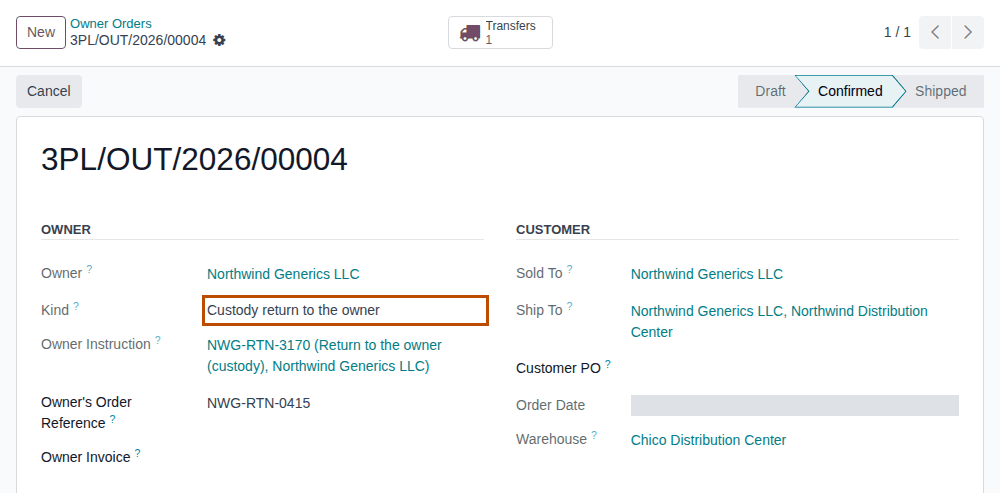
Under Owner, fill in:
- Owner: the owner company, for example
Northwind Generics LLC. - Kind: Custody return to the owner.
- Owner Instruction: the owner's return instruction, for example
NWG-RTN-3104 (Return to the owner (custody), Northwind Generics LLC). - Owner's Order Reference (optional): the owner's own reference, for example its stock transfer number.
- Owner: the owner company, for example
-
Under Customer, choose the owner company in Sold To.
Result: Ship To shows the owner's delivery address, for example
Northwind Generics LLC, Northwind Distribution Center. Change it to another address of the owner if needed. -
On the Lines tab, select Add a line and fill in Product, Lot (optional) and Quantity, for example
Demoprazole,BPDPZ2507Cand2. -
Select the ☁ (Save manually) icon.
Result: the order is numbered, for example
3PL/OUT/2026/00018, in Draft. -
Select Confirm.
Result: the order is Confirmed, with a Transfers smart button.
-
Select the Transfers smart button, then scan and validate the delivery as in Pick, scan and ship an owner order, steps 3–4.
Result: the delivery shows Custody Shipment selected and no yellow GLN banner. After Validate it is Done, with no DSCSA Documents smart button and no "DSCSA document … posted" note.
Result: the owner's goods are on their way back to the owner. Records: the custody return order, Shipped; the delivery, Done, held for the owner and marked Custody Shipment; each package Shipped, with Seller of Record and Shipped To the owner; the return instruction, used by the order. No DSCSA document, sales order or invoice is created.
If it doesn't work
- "A custody return goes to Northwind Generics LLC or one of its addresses (sold-to and ship-to), not to another company." (when you save): Sold To or Ship To is another company. To ship to a customer, use Owner's sale instead (Record an owner order). See Error: "A custody return goes to …".
- "… is not a Return to the owner (custody) instruction." (at Confirm): Owner Instruction is a Ship to a customer instruction. See Error: "Instruction … is not a … instruction".
- "…'s instruction (Return to the owner (custody)) is required for …": select the owner's return instruction. See Error: "…'s instruction (…) is required for …".
- "… can't be confirmed: it ships DSCSA products for …" followed by "Owner: …", "Sold-to: …" or "Facility …": for a custody return every line blocks. See Error: "… can't be confirmed: it ships DSCSA products for …".
Next: Find an owner's instructions and see which are used
Ship an owner's units without an owner order
Use an owner order whenever you can: it holds the owner's references and keeps the shipment to what the owner ordered. A delivery held for an owner that no owner order created (usually one imported from a file) ships too, but it needs the owner's instruction on the delivery itself, in Owner Instruction.
Who: Rx Tracking User or Manager
Requires: Rx Tracking (DSCSA): 3PL and title model, with 3PL switched on.
Before you start:
- The owner's instruction is recorded: Ship to a customer, or Return to the owner (custody) for a custody shipment. See Record an owner's instruction.
- The owner holds the units, and the customer is an authorized trading partner. See Get an owner transfer through the owner, counterparty and facility checks.
Create the delivery in the form
Skip this part when the delivery already exists (for example, it was imported): open it from Inventory ‣ Operations ‣ Deliveries and go to step 5.
-
Go to Inventory ‣ Operations ‣ Deliveries and select New.
Result: a New Delivery form opens in Draft. It has no Held for Owner field.
-
In Operation Type, select the warehouse's receipt type, for example
Chico Distribution Center: Receipts.Result: Held for Owner appears.
-
In Held for Owner, choose the owner, for example
Northwind Generics LLC. -
In Operation Type, select the warehouse's delivery type again, for example
Chico Distribution Center: Delivery Orders.Result: the form is a delivery again, and shows Held for Owner, Custody Shipment and Owner Instruction.
-
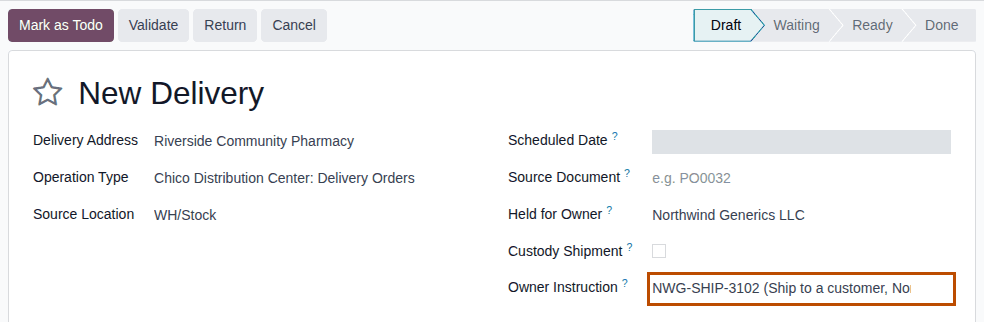
Fill in:
- Delivery Address: the customer, for example
Riverside Community Pharmacy. - Owner Instruction: the owner's instruction for this shipment, for example
NWG-SHIP-3102 (Ship to a customer, Northwind Generics LLC). The list shows the owner's unused instructions of every kind: choose one of kind Ship to a customer.
- Delivery Address: the customer, for example
-
On the Operations tab, select Add a line and fill in the Product and the Demand, for example
Demoprazoleand1. -
Select Mark as Todo.
Result: the delivery gets its number, for example
WH/OUT/00034, and is Ready (or Waiting when the owner has no free units).
Scan and validate
-
Select Scan Serials, scan every unit, then select Register, as in Scan the serials of a delivery and validate it.
Result: the chatter says "1 DSCSA package(s) scanned.".
-
Select Validate.
Result: the delivery is Done, and the chatter says "DSCSA document DSCSA/NWG/OUT/2026/00005 posted for this transfer.".
Result: the owner's units are shipped in the owner's name. Records: the delivery, Done; each package Shipped, with Seller of Record the owner; the owner's outbound DSCSA document, with the delivery's own references (there is no order to take a customer PO or owner invoice from); the instruction, used by the delivery (For Record = the delivery).
Return the goods to the owner without an order
Select Custody Shipment in step 5, choose one of the owner's addresses in Delivery Address (for example Northwind Distribution Center) and an instruction of kind Return to the owner (custody). The delivery then gets no DSCSA document, as in
3PL-OUT-05.
Backorders
A backorder of the delivery takes the instruction of the delivery it came from, so it validates without a new one.
If it doesn't work
- "Northwind Generics LLC's instruction (Ship to a customer) is required for WH/OUT/00034: record the owner's order or approval first." (at Validate, under "DSCSA owner isolation (3PL):"): Owner Instruction is empty. Choose the owner's instruction, save, and validate again. See Error: "…'s instruction (…) is required for …".
- "… is not a Ship to a customer instruction.": the instruction is of another kind, for example Scrap. Choose a Ship to a customer instruction. See Error: "Instruction … is not a … instruction".
- "WH/OUT/00035: a custody shipment goes to Northwind Generics LLC or one of its addresses, not to Riverside Community Pharmacy.": clear Custody Shipment, or ship to the owner's address. See Error: "… a custody shipment goes to …".
- "… is held for Summit Specialty Pharma Inc., not for Northwind Generics LLC …" (in Scan Serials): see Error: "… is held for …, not for …".
- Held for Owner isn't on the new delivery: follow steps 2–4. See Held for Owner doesn't show on a new delivery.
Known issue (PF-W16-02): a new delivery shows Held for Owner only after you select a receipt operation type (steps 2–4), and a delivery made this way gets no GLN warning at all (PF-A06-07). Prefer an owner order (3PL-OUT-01), which warns about missing GLNs when it is confirmed.