Take in and sell consignment stock
3PL add-on For: Administrator, Compliance manager, Warehouse staff Checked on 18.0.0.2.0, 18.0.1.0.0
A consignor is a supplier that places its stock with you for you to sell yourself: the stock stays the consignor's until your sale, and you buy each unit from the consignor when your delivery is validated, just in time. This page also covers stopping just-in-time buying for an owner and ending a consignment.
Background: the modules treat consignment-in as an owner of type consignor whose stock you receive under your wholesale role and sell through a just-in-time transfer; there is no separate consignment feature, and consignment-out and bill-and-hold are not supported (FD&C Act § 581(6), (22), (24), (26), (27); § 582(a)(1), (a)(7); § 584(d); see Compliance background). The word "Consignment" in Odoo's Inventory settings is Odoo's owner feature, not this arrangement.
Take in and sell consignment stock
Set the consignor up, receive its goods without a transaction, then sell them through your own sales orders. Each unit you ship is bought from the consignor at that moment.
Who: Rx Tracking Manager for the profile and the custody receipt; Rx Tracking User or Manager to scan and ship.
Requires: Rx Tracking (DSCSA): 3PL and title model, with 3PL switched on.
Before you start:
- The company setting Consignor owners is selected (the default). See Choose the company's 3PL policies.
- Your wholesale facility license for the warehouse is valid: consignment units are wholesale stock from the day you receive them. See Record and verify our facility licenses.
- The consignor has an owner profile in issuing mode B. See Create an owner profile and Set how the owner's documents are issued.
- The consignor's price for each product, as a vendor price on the product's Purchase tab (vendor = the consignor).
-
Go to Inventory ‣ Rx Tracking ‣ Owners (in the 3PL ‣ Configuration section) and open the consignor's profile, for example
Harborline Pharmaceuticals Inc. -
Check the three conditions that make a consignor ready for just-in-time sales:
- Owner Type is Consignor;
- on the Title Transfer tab, Title Transfers Allowed is selected (Just-in-Time Transfers is not needed);
- on the Documents tab, Issuing Mode is Mode B: we send the owner's documents to its customer.
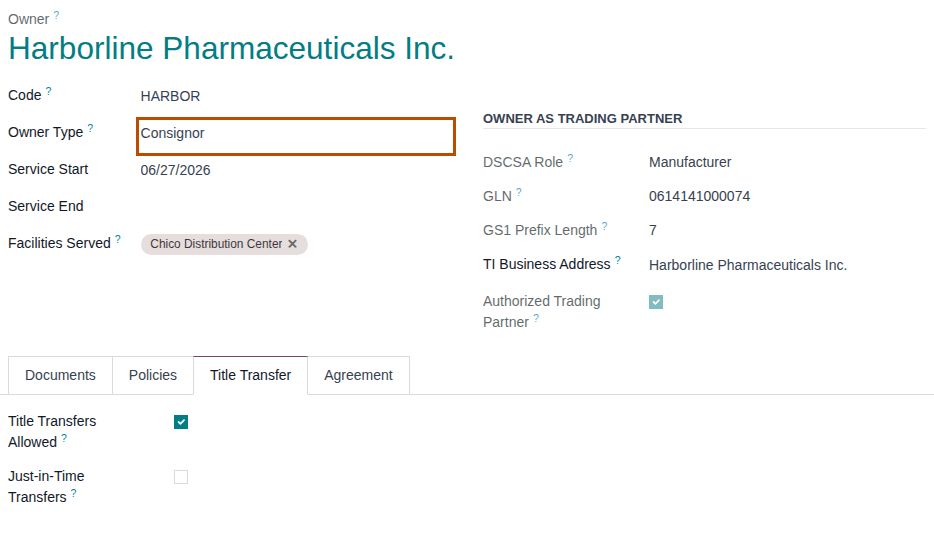
-
If you changed anything, select the save icon.
Result: the profile is saved. A consignor that misses one of the three conditions also saves without a message, but your sales never take its units (Known issue below).
-
Receive the goods on a custody receipt held for the consignor, with its instruction: no transaction, no document. See Receive the owner's own goods as a custody receipt.
Result: the units are in stock, held for the consignor (for example 6 Tidalapril of lot
HLTDL2509AonWH/IN/00019). -
Sell the product through an ordinary sales order and confirm it. See Confirm a sales order for DSCSA products.
Result: the delivery reserves the consignor's units (after your own units of the product, if you have any).
-
On the delivery, scan each unit and select Validate, as in Ship our own sale that takes a just-in-time owner's units steps 3–5.
Result: the delivery is Done. The chatter says "Just-in-time title transfer TT/YYYY/NNNNN: 1 unit(s) held for Harborline Pharmaceuticals Inc. bought in place (PNNNNN) before this delivery."
Result: you bought the consignor's unit and shipped it as your own sale. Records: the title transfer (Done, trigger Just in
time); the purchase order to the consignor, priced at its vendor price (for example 21.40 for Tidalapril) with Vendor Reference
"Standing JIT approval, owner profile HARBOR (HARBOR-CONSIGN-2026-07)"; the in-place documents; your outbound document. When the
consignor's profile has Direct-Purchase Basis Manufacturer or repackager (as Harborline's), your outbound document has Direct
Purchase selected. The consignor keeps its unsold units.
If it doesn't work
- "TT/YYYY/NNNNN can't be validated:" with "- Facility WAREHOUSE has no valid wholesale distributor licence: …": see Error: "TT/… can't be validated:" when you validate a delivery.
- "Consignor owners are turned off for COMPANY (Inventory settings, 3PL).": you saved a profile as Consignor while the setting is cleared. See Error: "Consignor owners are turned off …".
- The delivery stays Waiting although the consignor holds the product: one of the three conditions of step 2 is missing. See The owner's units are never taken by our sales.
Known issue (PF-A08-09, PF-A08-02): a consignor profile saves without Title Transfers Allowed, or in issuing mode A, with no message, and its units are then never offered to your sales. Check the three conditions of step 2 after every change. The consignor's Transfer Price is hidden: its orders always use its vendor price, or the product's Cost without one; correct the price on the vendor bill.
Stop just-in-time buying or end a consignment
Stop taking an owner's units for your sales, or end a consignment. Units already bought stay yours; units still held for the owner stay the owner's.
Who: Rx Tracking Manager for the profile. Clearing Consignor owners needs an Administrator (Administration: Settings) with Inventory Administrator and Rx Tracking Manager.
Requires: Rx Tracking (DSCSA): 3PL and title model, with 3PL switched on.
Before you start:
- To end a consignment: the consignor's unsold units have left your custody, or you have bought them. Send them back with a custody return (Send an owner's goods back to it (custody return order)), or buy them in place (Buy an owner's units in place).
- The open deliveries and picks of your own sales that reserved the owner's units. They are refused at validation once the owner stops being a just-in-time owner.
-
Go to Inventory ‣ Rx Tracking ‣ Owners (in the 3PL ‣ Configuration section) and open the owner, for example
Summit Specialty Pharma Inc.orHarborline Pharmaceuticals Inc. -
Choose one:
- To stop just-in-time buying: on the Title Transfer tab, clear Just-in-Time Transfers, then select the save icon.
- To end a consignment: in the ⚙ (Actions) menu, select Archive, then Archive in the Confirmation window.
Result: the change is saved (Transfer Price disappears), or the profile is archived. From the next reservation on, your sales take only your own units of the products this owner holds.
-
For each open delivery or pick of yours that reserved the owner's units: on its DSCSA Packages tab, select Remove this scan for the owner's units, then in the ⚙ (Actions) menu select Unreserve. When your own stock is enough, select Check Availability.
Result: the transfer reserves only your own units; without enough of your own stock it waits (Waiting), or validates with a backorder for the rest.
-
Optionally, when no active consignor is left, clear the company setting: as an administrator, go to Inventory ‣ Configuration ‣ Settings, and in the block DSCSA: third-party logistics (3PL) clear Consignor owners, then select Save. Keep Consignment selected in the same save (see Choose the company's 3PL policies).
Result: just-in-time buying is stopped, or the consignment is over. Records: the owner profile (changed or archived, with the change in its chatter) and, for step 4, the company setting. Earlier just-in-time transfers, purchase orders and documents stay as they are.
If it doesn't work
- At Validate, "DSCSA owner isolation (3PL):" with "…: a line (lot LOT) takes units held for OWNER, but the move is for our own stock." and "…: serial SERIAL is held for OWNER, not for our own stock.": the transfer reserved the owner's units before you stopped just-in-time buying. Do step 3. See Error: "… takes units held for …, but the move is for our own stock.".
- "Consignor owners can't be turned off while [CODE] OWNER is an active consignor: archive its profile or change its type first.": do step 2 first. See Error: "Consignor owners can't be turned off …".
- "This document-issuance setting would put OWNER in issuing mode A, but just-in-time title transfers need mode B: turn JIT off on its profile first.": you changed Issue documents as the owner's agent while an owner uses just-in-time transfers. Stop its just-in-time buying first (step 2). See Error: "This document-issuance setting would put … in issuing mode A …".
Known issue (PF-A05-02, PF-A08-09): archiving a consignor's profile is accepted while its units are still in your stock; those units then can't be shipped or confirmed until the profile is re-activated (Error: "… has no active owner profile, so DSCSA stock can't be held for it …"). Clear the stock first. Changing Issue documents as the owner's agent so that a consignor falls into mode A is accepted without a message, and silently ends its just-in-time sales.