Answer trace requests while holding owner stock
3PL add-on For: Compliance manager, Warehouse staff Checked on 18.0.0.2.0, 18.0.1.0.0
When you hold owners' stock, every trace request has a scope: your own records, or the records you hold for one owner. The search, the results and the response zip cover that scope only, so one owner's documents never reach a requester who asked about another owner's units or about yours. This page covers only what the scope changes; logging, searching, responding and sending are the core steps of Answer trace requests.
Background: a request about an owner's stock concerns the owner's records, the response is prepared in the owner's name with its approval recorded, and one owner's transaction information stays out of another's response (FD&C Act § 582, requests for information; see Compliance background). This is how the modules read the law; it has not been reviewed by counsel. See the disclaimer.
Answer a trace request about an owner's records
Use this when the FDA, a state or a trading partner asks about units or documents you hold or shipped for an owner, or when the owner itself asks. The response is prepared on the owner's behalf and records the owner's approval.
Your procedure decides how you obtain the owner's approval of a response and who at the owner may give it; the software requires the approver, the approval's reference and its date before it builds the response.
Who: Rx Tracking User or Manager
Requires: Rx Tracking (DSCSA): 3PL and title model, with 3PL switched on.
Before you start:
- The company has an owner profile for the owner (Owner Concerned appears on trace requests once the company's first owner profile exists). See Create an owner profile.
- The request is logged, or you have what the requester asked for. See Log a trace request from the FDA, a state or a trading partner.
- The owner's approval of the response: who gave it, their reference (an email, a letter, a ticket) and the date.
-
Go to Inventory ‣ Rx Tracking ‣ Trace Requests and open the request, or select New and fill in Requested By, Requester, Their Reference and the question as in EXC-06.
-
In Owner Concerned, choose the owner company, for example
Northwind Generics LLC. Choose the company, not one of its contacts.Result: a blue banner says "This request concerns the records we hold for the owner concerned: the search and the response cover that owner's records only, and the response is prepared on the owner's behalf. Record the owner's approval before responding.", and the Owner's Approval group appears.
-
Fill in the Query group, for example Lots
BPDPZ2508K, then select Search.Result: the request is In Progress. The Documents tab lists only documents issued in the owner's name or received for it (
DSCSA/NWG/OUT/2026/00001,DSCSA/NWG/IN/2026/00001); the Packages tab only the owner's units (12 for Northwind's lot BPDPZ2508K: 10 In Stock, 1 Shipped, 1 Returned). When units of other scopes match the query, the chatter has an internal note, for example "Left out by this request's owner scope (Northwind Generics LLC): 36 unit(s) matching the query, of our own stock (24); Summit Specialty Pharma Inc. (12). The response doesn't cover them; log a request for their owner if they were asked about." -
In the Owner's Approval group, fill in:
- Approved By (Owner): name and role, for example
Dana Reyes, QA Director - Approval Reference: for example
NWG-TR-APPROVAL-0433 - Approval Date: the date of the approval (today or earlier)
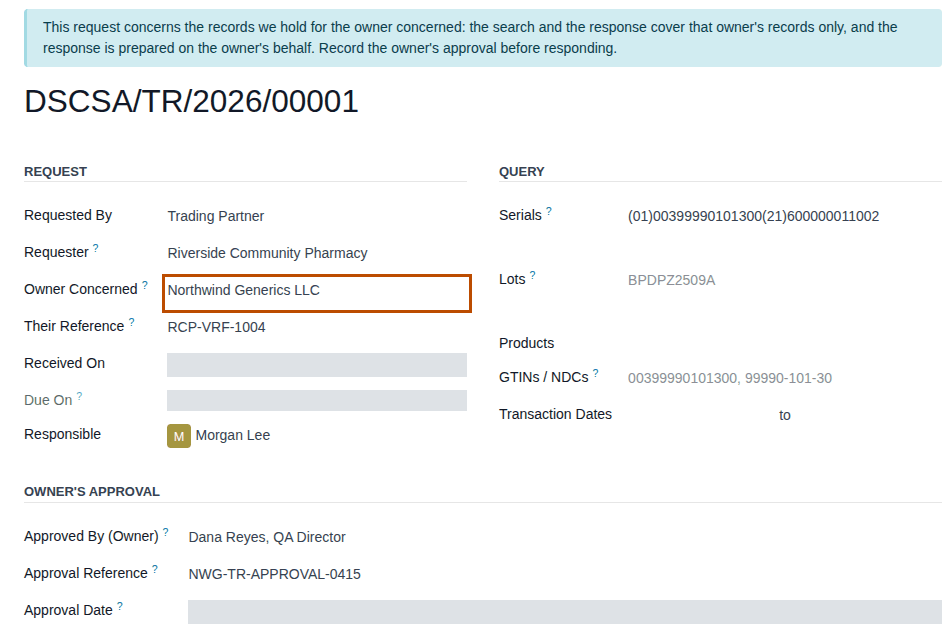
- Approved By (Owner): name and role, for example
-
Save, then select Respond and Ok in the confirmation "Build the response zip from these results? The request is then closed and can't be changed.".
Result: the request is Responded and Download Response appears. The chatter says "Response DSCSA-TR-YYYY-NNNNN-response.zip built by … : 2 document(s), 12 package(s). SHA-256 …".
-
Select Download Response.
Result: the browser downloads
DSCSA-TR-YYYY-NNNNN-response.zip. Itsrequest.txthas two lines under the company line: "Prepared by Demo Rx Distribution LLC as third-party logistics provider on behalf of Northwind Generics LLC" and "Owner's approval: Dana Reyes, QA Director, reference NWG-TR-APPROVAL-0433, on YYYY-MM-DD".
Result: the response holds the owner's records only, and the owner's approval is frozen with it. Records: the request in the Responded state with the approval, the response zip (on the Response tab with its SHA-256, and in the chatter), and the tracked changes in the chatter. Send the zip as in Respond to a trace request with the response zip, and send it. What the zip contains: What an owner-scoped trace response contains.
Due On is still the core's 24-hour internal target from Received On; the software has no per-owner response time. An archived owner (a former client, for example Cedar Ridge Pharmaceuticals Inc.) can still be the Owner Concerned, so its records can be asked for after the relationship ends.
If it doesn't work
- "Trace request … concerns the records we hold for …: the response is prepared on the owner's behalf and needs its approval. …": an approval field is empty. Fill in the three fields and select Respond again. See Error: "Trace request … concerns the records we hold for …".
- "… is not an owner of …: a trace request concerns our own records (leave the owner empty) or those of a partner with an owner profile.": Owner Concerned is not an owner, often the requester chosen by mistake. See Error: "… is not an owner of …".
- "The owner's approval of trace request … can't be dated in the future.": correct Approval Date. See Error: "The owner's approval … can't be dated in the future.".
- After a change of Owner Concerned, the request is back to New and the approval is empty: the results of the previous scope were thrown away. Select Search again. See The results and the owner's approval disappeared.
- Owner Concerned isn't on the form: the company has no owner profile yet. See Owner Concerned isn't shown.
Known issue (PF-A08-06): Owner Concerned offers every company, customers and suppliers included, not only owners. Choosing one that isn't an owner is refused when you save; choose the owner company named by the request.
Find the requests about owners' records
In Inventory ‣ Rx Tracking ‣ Trace Requests, open the search options: the filters Our Own Records and Owners' Records, and the Group By option Owner Concerned, split the list by scope. To show the Owner Concerned column, open the optional columns menu at the right end of the list header and select it.
Answer a trace request about our own records while we hold owners' stock
A request about your own stock or sales is answered with your records only, even when owners' units of the same product or lot are in the warehouse. The search tells you when it left out units that belong to an owner, so you can log a separate request for that owner.
Who: Rx Tracking User or Manager
Requires: Rx Tracking (DSCSA): 3PL and title model, with 3PL switched on.
Before you start:
- The request is logged. See Log a trace request from the FDA, a state or a trading partner.
-
Go to Inventory ‣ Rx Tracking ‣ Trace Requests and open the request, for example
DSCSA/TR/2026/00002(a state inspector's question about Prototamol lotBPPTM2509A). -
Leave Owner Concerned empty: the field shows "Our own records".
-
Fill in the Query group and select Search (EXC-07).
Result: the request is In Progress with your documents and units only: for lot
BPPTM2509A, your inbound documentDSCSA/IN/2026/00001(the unit you bought from Summit Specialty Pharma Inc. in place) and your unit600000023001. Summit's two units of the same lot are left out, and the chatter has an internal note. -
Read the note in the chatter:
Left out by this request's owner scope (our own records): 2 unit(s) matching the query, of Summit Specialty Pharma Inc. (2). The responsedoesn't cover them; log a request for their owner if they were asked about.
-
If the requester asked about those units too, log a separate request with Owner Concerned = that owner and answer it with the owner's approval (3PL-TRC-01).
-
Respond and send the zip as in EXC-08.
Result: the response covers your records only. Records: the request, Responded, with its response zip. The zip never contains an
owner's documents; its packages.csv has an empty owner column, and a unit you bought from an owner in place shows only your movement
(title_in) and your inbound document, whose stored file carries the owner's side of the sale. Details:
What an owner-scoped trace response contains.
Variants:
- A query naming the serial of a unit held for an owner finds nothing in your scope: the request shows "Not found: serial SERIAL" and the note names the owner (for example "… of Northwind Generics LLC (1)").
- Before the company's first owner profile, trace requests work exactly as without 3PL: no Owner Concerned, no note.
If it doesn't work
- A unit you hold is "Not found", or the note says units were left out: they are an owner's. See A unit we hold is "Not found" ….
- "Trace request … concerns our own records: there is no owner approval to record.": an approval field was filled in while Owner Concerned was cleared. See Error: "Trace request … concerns our own records …".
- "The package ledger rows of trace request … can't be matched to their movements …" at Respond: a safety stop. See Error: "The package ledger rows … can't be matched …".