DSCSA documents: T3, EPCIS file and transaction history
Core module For: Compliance manager Checked on 18.0.0.2.0
What an outbound DSCSA document holds, and how its T3 report (Transaction Report, PDF), its EPCIS file (Electronic Product Code Information Services, XML) and its transaction history are built. The tables use GLN (Global Location Number), GTIN (Global Trade Item Number), NDC (National Drug Code) and SSCC (Serial Shipping Container Code); every term is in the glossary. The documents are listed in Inventory ‣ Rx Tracking ‣ Documents; to open, download or send one, see Open the DSCSA document a delivery posted and Find, view, download and print DSCSA documents.
A delivery of DSCSA products to a customer, and an unflagged return to a supplier (Return saleable product to the supplier), post one outbound document when they become Done. Its content is frozen at that moment, its two files are rendered once from the frozen content and stored with a checksum, and it is added to the company's hash chain. Nothing regenerates the files later. A customer return, a non-saleable return to the supplier and a delivery of non-DSCSA products only post no document.
| Document | When it is created | Where to find it | Who receives it |
|---|---|---|---|
T3 Report (DSCSA), T3-DSCSA-OUT-YYYY-NNNNN.pdf | when the delivery or return to the supplier becomes Done | the document's Files tab, Download T3, ⚙ (Actions) ‣ T3 Report (DSCSA), and the chatter's 📎 (Attach files) list, where selecting the file opens it in Odoo's file viewer | the buyer: in the customer portal, by a document link, or attached to the delivery email (Send the DSCSA files with delivery confirmation emails) |
EPCIS file, EPCIS-DSCSA-OUT-YYYY-NNNNN.xml | at the same moment; none for a lot-level document or when data is missing (OUT-10) | the Files tab and Download EPCIS | the buyer, the same ways |
The T3 report, and why a validated delivery can't be edited
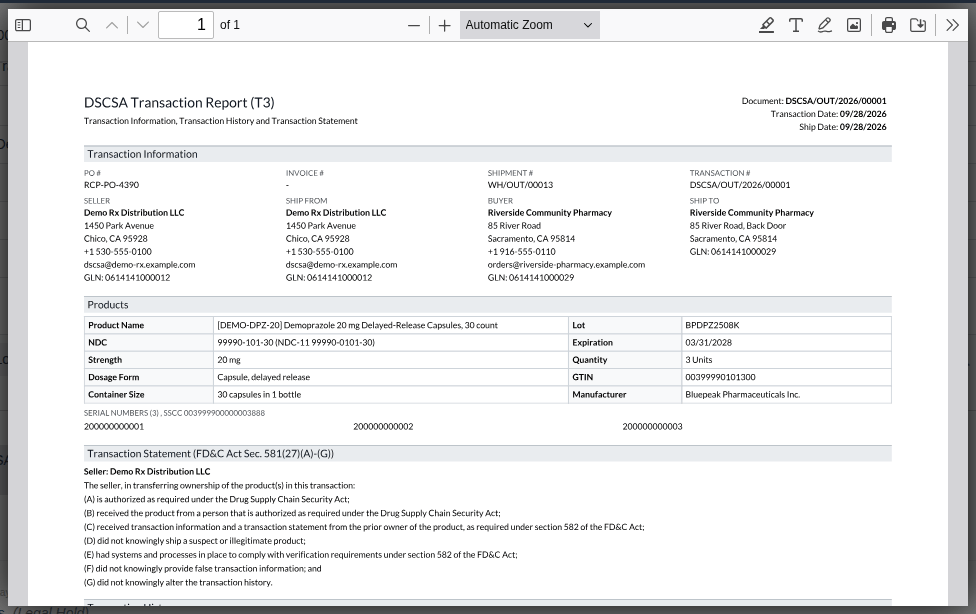
The T3 report is a US Letter PDF. Its sections, in order:
| Section | What it shows |
|---|---|
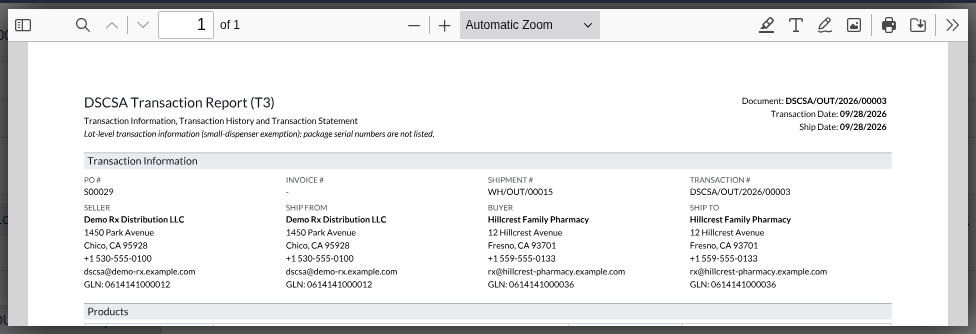
| Heading | "DSCSA Transaction Report (T3)", "Transaction Information, Transaction History and Transaction Statement"; at the right the Document number, the Transaction Date and the Ship Date (the day the delivery became Done) |
| Transaction Information | PO #: the customer's purchase order (the order's Customer Reference), else the sales order number; for a return to a supplier, your purchase order. Invoice #: the order's customer invoices posted before the delivery became Done, else "-". Shipment #: the delivery. Transaction #: the document number. Then Seller (your company), Ship From (the warehouse), Buyer (the company of the delivery address) and Ship To (the delivery address), each with its address, phone, email and GLN |
| Products | one block per product and lot: Product Name, Lot, NDC (with the NDC-11 form when it differs), Expiration, Strength, Quantity, Dosage Form, GTIN, Container Size, Manufacturer; then "Serial numbers (N)", with the SSCC of the case the units were received in, and the serial numbers |
| Transaction Statement (FD&C Act Sec. 581(27)(A)-(G)) | "Seller:" and your company's name, then the statement as set in the settings when the document was posted (Review the Transaction Statement and the EPCIS legal notice); for a direct purchase, a Direct purchase statement |
| Transaction History | a table with Date, Seller, Buyer, References (PO #, Invoice #, Transaction #) and Notes (the kind of each sale, and "Direct purchase"), oldest sale first, ending with this document's sale (OUT-14). With several chains, one table per chain, headed "History N: applies to lot LOT" |
| Licenses | the seller's and the buyer's licenses in force on the transaction date: Type, Number, State, Expires. DEA registrations are not listed |
| Last line | "Document NUMBER of DATE, frozen when the shipment was validated and stored unchanged." |
A lot-level document, for an exempt small dispenser (Ship at lot level to an exempt small dispenser), adds "Lot-level transaction information (small-dispenser exemption): package serial numbers are not listed." to the heading, and its products have no serial numbers.
⚙ (Actions) ‣ T3 Report (DSCSA) and Download T3 serve the stored file; downloading it twice gives the same file. On a supplier's (inbound) document the print is refused (Known issue PF-A03-04, see Find, view, download and print DSCSA documents).
Known issue (PF-W08-04): the T3 report is rendered when the delivery becomes Done, with the report styles that Odoo loads from
its own web address. If Odoo can't reach that address at that moment (for example when deliveries are made Done by a script while the
web server is stopped), the report is stored with a plain serif font and without bold text. Its content is complete, but it keeps that
look, because the file is never generated again. If your stored T3 reports look plain, ask your Odoo administrator to check Odoo's
report address setting (Odoo's report.url system parameter) before more deliveries become Done.
Why a validated delivery can't be edited
When a delivery (or a receipt, or a return) with DSCSA products is Done, its DSCSA lines are history: the package ledger and the DSCSA document record them. Even after an Inventory Administrator unlocks the transfer (⚙ (Actions) ‣ Lock/Unlock), saving a change to a DSCSA line's quantity, lot, locations or product is refused, and so is adding a DSCSA line:
PRODUCT: this done DSCSA operation can't be edited (quantity, lot, locations or product): the package ledger and the DSCSA documents record it as validated. Use a return, a scrap or an inventory count instead.
PRODUCT can't be added to TRANSFER-NUMBER: it is done, and DSCSA units must go through the checks of a validation (serials, trading partner, quarantine, documents). Put the extra units on a new transfer instead.
Lines of other products stay editable as in standard Odoo. To correct a shipment, take the units back (Receive a saleable customer return with its serials) and ship them again on a new delivery, or use a scrap or an inventory count. The document itself can't be edited or deleted by anyone. For the error entry, see Error: "… this done DSCSA operation can't be edited …".
The outbound EPCIS 1.2 file
The EPCIS file carries the same sale as the T3 report in the GS1 EPCIS 1.2 format, following the GS1 US DSCSA guideline R1.3, so that the buyer's system can read it. Its parts:
| Part | Content |
|---|---|
| Header (SBDH) | Sender: your company's GLN. Receiver: the buyer's GLN. InstanceIdentifier: the document number |
| Master data: products | one entry per product (by its GTIN): NDC-11, product name, manufacturer, dosage form, strength and container size |
| Master data: locations | one entry per site (by its SGLN, the GLN of a site): your warehouse or company and the buyer's, with name and address |
| Transaction statement | guidelineVersion "GS1 US DSCSA R1.3", affirmTransactionStatement true and the legalNotice from the settings (CFG-05) |
| Commissioning events | one per lot: the units (SGTINs) with their lot number and expiry date |
| Shipping event | every shipped unit (SGTIN), listed loose (no case aggregation); the event time is the time the delivery became Done, with its time-zone offset; the ship-from site; the source (you) and destination (the buyer and the ship-to site) |
| Business transactions | po: the customer's purchase order (the order's Customer Reference) with the buyer's GLN, only when the order has one; for a return to a supplier, your purchase order with your GLN. inv: customer invoices posted before the delivery became Done. desadv: your delivery number. The sales order number is never sent |
| Qualifiers | dropShipment false; directPurchase true only for a direct purchase (OUT-14) |
An excerpt of the file of DSCSA/OUT/2026/00001 (3 Demoprazole to Riverside Community Pharmacy, customer PO RCP-PO-4390); … marks
lines left out:
<epcis:EPCISDocument xmlns:epcis="urn:epcglobal:epcis:xsd:1" … schemaVersion="1.2" creationDate="2026-09-27T06:15:34.000Z">
  <EPCISHeader>
    <sbdh:StandardBusinessDocumentHeader>
      <sbdh:Sender><sbdh:Identifier Authority="GS1">0614141000012</sbdh:Identifier></sbdh:Sender>
      <sbdh:Receiver><sbdh:Identifier Authority="GS1">0614141000029</sbdh:Identifier></sbdh:Receiver>
      <sbdh:DocumentIdentification>
        <sbdh:InstanceIdentifier>DSCSA/OUT/2026/00001</sbdh:InstanceIdentifier>
        …
    </sbdh:StandardBusinessDocumentHeader>
    <extension><EPCISMasterData><VocabularyList>
      <Vocabulary type="urn:epcglobal:epcis:vtype:EPCClass">
        <VocabularyElement id="urn:epc:idpat:sgtin:0399990.010130.*">
          <attribute id="urn:epcglobal:cbv:mda#additionalTradeItemIdentification">99990010130</attribute>
          <attribute id="urn:epcglobal:cbv:mda#regulatedProductName">Demoprazole 20 mg Delayed-Release Capsules, 30 count</attribute>
          …
    </VocabularyList></EPCISMasterData></extension>
    <gs1ushc:guidelineVersion>GS1 US DSCSA R1.3</gs1ushc:guidelineVersion>
    <gs1ushc:dscsaTransactionStatement>
      <gs1ushc:affirmTransactionStatement>true</gs1ushc:affirmTransactionStatement>
      <gs1ushc:legalNotice>Seller has complied with each applicable subsection of FDCA Sec. 581(27)(A)-(G).</gs1ushc:legalNotice>
    </gs1ushc:dscsaTransactionStatement>
  </EPCISHeader>
  <EPCISBody><EventList>
    <ObjectEvent>                                   <!-- commissioning: one per lot -->
      …
      <bizStep>urn:epcglobal:cbv:bizstep:commissioning</bizStep>
      <extension><ilmd>
        <cbvmda:lotNumber>BPDPZ2508K</cbvmda:lotNumber>
        <cbvmda:itemExpirationDate>2028-03-31</cbvmda:itemExpirationDate>
      </ilmd></extension>
    </ObjectEvent>
    <ObjectEvent>                                   <!-- shipping -->
      <eventTime>2026-09-27T06:15:34.000Z</eventTime>
      <eventTimeZoneOffset>-07:00</eventTimeZoneOffset>
      <epcList>
        <epc>urn:epc:id:sgtin:0399990.010130.200000000001</epc>
        <epc>urn:epc:id:sgtin:0399990.010130.200000000002</epc>
        <epc>urn:epc:id:sgtin:0399990.010130.200000000003</epc>
      </epcList>
      <action>OBSERVE</action>
      <bizStep>urn:epcglobal:cbv:bizstep:shipping</bizStep>
      <disposition>urn:epcglobal:cbv:disp:in_transit</disposition>
      <readPoint><id>urn:epc:id:sgln:0614141.00001.0</id></readPoint>
      <bizTransactionList>
        <bizTransaction type="urn:epcglobal:cbv:btt:po">urn:epcglobal:cbv:bt:0614141000029:RCP-PO-4390</bizTransaction>
        <bizTransaction type="urn:epcglobal:cbv:btt:desadv">urn:epcglobal:cbv:bt:0614141000012:WH%2FOUT%2F00013</bizTransaction>
      </bizTransactionList>
      <extension>
        <sourceList>…urn:epc:id:sgln:0614141.00001.0…</sourceList>
        <destinationList>…urn:epc:id:sgln:0614141.00002.0…</destinationList>
      </extension>
      <gs1ushc:dropShipment>false</gs1ushc:dropShipment>
    </ObjectEvent>
  </EventList></EPCISBody>
</epcis:EPCISDocument>
A direct purchase adds <gs1ushc:directPurchase>true</gs1ushc:directPurchase> after dropShipment.
A document has no EPCIS file when it is lot level, or when data the file needs was missing when the delivery became Done (a GLN, an address field, an NDC, a GS1 company prefix length): see Handle a document posted without an EPCIS file.
How the transaction history and the direct-purchase flag are built
The transaction history lists every sale of the shipped units back to the manufacturer, as far as your records go. It is built when the document is posted, and then frozen with it. It is on the document's Transaction History tab (columns Chain, Position, Kind, Seller, Buyer, Transaction Date, PO Number, Invoice Number, Transaction Number and the lots), and in the T3 report's Transaction History section.
Each row (a hop) is one sale. Position 1 is always your own sale. The rows before it come from where the shipped units were received:
| Kind | Where it comes from | What it records |
|---|---|---|
| This Document's Transaction | this document | your sale to the buyer: the document number as Transaction Number, the customer's PO |
| Received from Trading Partner | the supplier's posted inbound document (its EPCIS file) that lists the unit, else the inbound document of the receipt the unit came in on | the supplier's own history, copied: its sale to you (your PO, the supplier's document reference as Transaction Number) and any earlier sales it recorded |
| Reconstructed from Receipt | the receipt, when it has no inbound document (the goods were received without a supplier file) | one sale from the receipt's vendor to you: the receipt's validation date, your purchase order, and the supplier document reference (or the receipt number) as Transaction Number. Without a vendor, the seller is "Unknown supplier (receipt WH/IN/NNNNN)" |
- Several sources, several chains. When the shipped units came from different receipts or supplier files, the history has one chain per source, each listing the lots it applies to. The tab then says "The product of this document came through different prior owners: each chain is one complete history and lists the lots it applies to.", and the T3 report heads each table "History N: applies to lot LOT".
- Lot-level documents take every receipt of the shipped lots, since their units can't be told apart.
- Order. The tab lists your own sale first (position 1); the T3 report lists the oldest sale first.
Direct Purchase is selected on the document only when, in every chain, the sale to you (position 2) was a direct purchase: a
reconstructed hop is a direct purchase when the vendor's DSCSA role is Manufacturer, and a copied hop when the supplier's file says
so. The T3 report then adds the Direct purchase statement ("This wholesale distributor, or a member of the affiliate of such wholesale
distributor, purchased the product directly from the manufacturer, exclusive distributor of the manufacturer, or the repackager that
purchased the product directly from the manufacturer.") and the EPCIS file directPurchase true. Background: the modules follow
the reading that a seller's transaction statement carries the direct-purchase statement when it bought directly from the manufacturer
(FD&C Act § 582(c)(1)(A)(i), § 582(g)(1); FDA interoperable exchange guidance (September 2023); see Compliance background).
The direct-purchase statement is fixed in the modules (no setting changes it) and has not been reviewed by counsel. See the
disclaimer.
Examples from the example database:
| Document | Shipped units came from | History | Direct Purchase |
|---|---|---|---|
DSCSA/OUT/2026/00001 (Riverside) | P10001, received with Bluepeak's EPCIS file | 1 chain: This Document's Transaction, Received from Trading Partner (Bluepeak, transaction BP-ASN-20260910-0388) | not selected: Bluepeak's file doesn't state a direct purchase |
| a delivery of 1 Samplostatin to Mercy Valley Hospital Pharmacy | P10003, received from Bluepeak (manufacturer) without its file | 1 chain: This Document's Transaction, Reconstructed from Receipt (WH/IN/00009) | selected |
| a delivery of 2 Samplostatin to Mercy Valley Hospital Pharmacy | one unit of P10007 (with file) and one of P10003 (without) | 2 chains, "applies to lot BPSMS2508B" and "applies to lot BPSMS2509C" | not selected: one chain isn't a direct purchase |
The history is part of the frozen document: its rows can't be edited, and an Rx Tracking Manager's integrity check reports any change (Verify the integrity of the DSCSA documents).