DSCSA settings
Core module For: Administrator Checked on 18.0.0.2.0
Every company-level Rx Tracking setting, as the DSCSA (Rx Tracking) block of Inventory ‣ Configuration ‣ Settings shows it, the other settings Rx Tracking relies on, and how DSCSA records are numbered.
DSCSA settings and record numbering
Every setting in the block is per company (the building icon next to its name, tooltip "Values set here are company-specific."). Only a
user with Administration: Settings who is also Inventory Administrator and Rx Tracking Manager sees the block and can change it
(Open the DSCSA settings of a company). The block also opens from
Inventory ‣ Rx Tracking ‣ Settings (in the Configuration section); typing DSCSA in the settings' Search... box shows it alone.
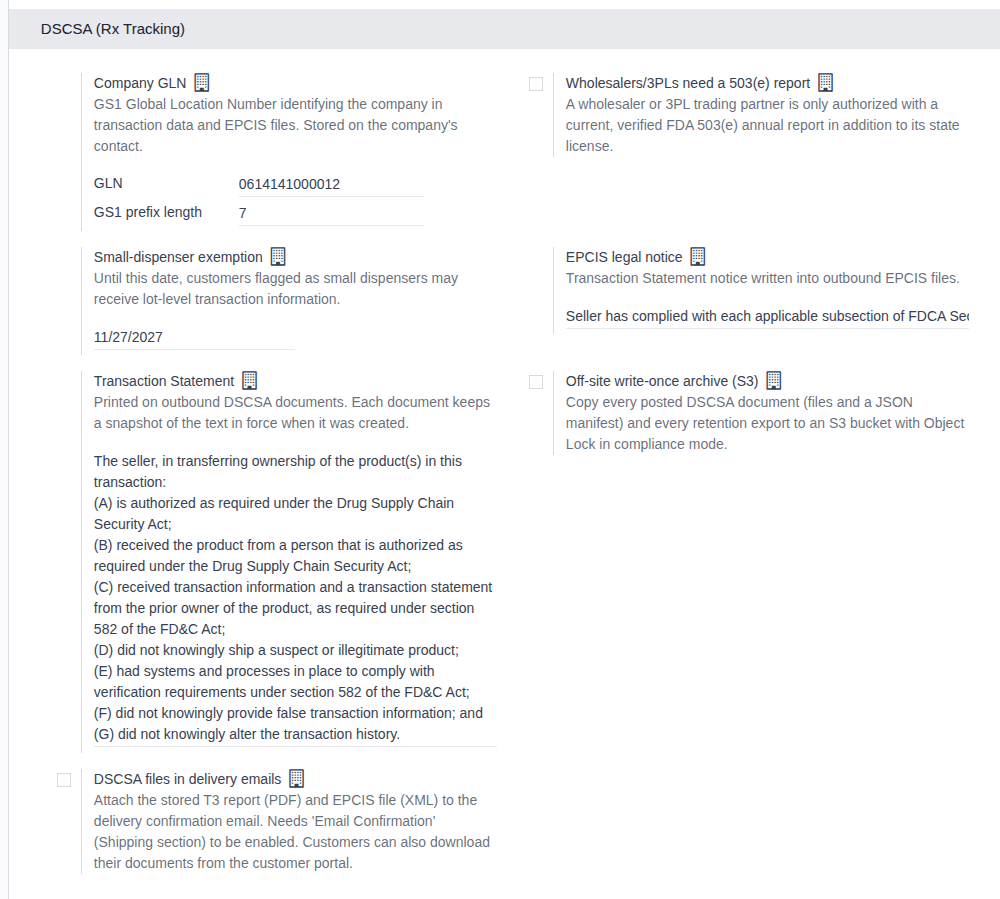
The DSCSA (Rx Tracking) block
In on-screen order (row by row, left to right):
| Setting | What it does | Default | Stored as | Related procedure |
|---|---|---|---|---|
| Company GLN: GLN | The company's 13-digit GLN. It names the company in outbound DSCSA documents and EPCIS files, and is the location of every warehouse without its own GLN. Typed spaces are removed; a wrong check digit, length or character is refused. | empty | the company contact's GLN (also on the company form) | Set the company's address, GLN and GS1 prefix length |
| Company GLN: GS1 prefix length | Shown once a GLN is entered. The length of the GS1 Company Prefix inside the GLN, which decides how the GLN is split in EPCIS location identifiers (SGLN). 0 means the default of 7; otherwise 6 to 12. | 0 (7 digits) | the company contact's GS1 Prefix Length | Set the company's address, GLN and GS1 prefix length |
| Wholesalers/3PLs need a 503(e) report | When selected, a partner whose DSCSA role is wholesale distributor or 3PL is an authorized trading partner only with a valid, verified FDA 503(e) annual report in addition to its state license. Applies at once to every order and transfer. | cleared | Wholesalers/3PLs Need a 503(e) Report | Set whether wholesalers and 3PLs need an FDA 503(e) report |
| Small-dispenser exemption | Until this date (not on it), customers flagged as small dispensers may receive lot-level transaction information. Empty: nobody is exempt. | 11/27/2027 | Small-Dispenser Exemption Ends | Set the small-dispenser exemption end date |
| EPCIS legal notice | The Transaction Statement notice written into every outbound EPCIS file. Each document keeps the text in force when it was created. | see Default texts | TS Legal Notice (EPCIS) | Review the Transaction Statement and the EPCIS legal notice |
| Transaction Statement | Printed on the T3 report of every outbound DSCSA document. Each document keeps the text in force when it was created. | see Default texts | Transaction Statement | Review the Transaction Statement and the EPCIS legal notice |
| Off-site write-once archive (S3) | When selected, copies every posted DSCSA document (its files and a JSON manifest) and every retention export to an S3 bucket with Object Lock. Its fields are listed below. | cleared | the company's archive settings | Set up the off-site S3 archive |
| DSCSA files in delivery emails | When selected, the delivery confirmation email carries copies of the delivery's stored T3 report (PDF) and EPCIS file (XML). Needs Email Confirmation (in Shipping). | cleared | Attach DSCSA Documents to Delivery Emails | Send the DSCSA files with delivery confirmation emails |
The "Stored as" names are the field labels Odoo shows in exports, imports and custom filters.
Other Rx Tracking modules add settings of their own: the suspect-product add-on adds its settings to this block (see Set up investigations), and the 3PL add-on adds a block after it (see 3PL settings and fields).
Default texts
EPCIS legal notice, as installed:
Seller has complied with each applicable subsection of FDCA Sec. 581(27)(A)-(G).
Transaction Statement, as installed:
The seller, in transferring ownership of the product(s) in this transaction:
(A) is authorized as required under the Drug Supply Chain Security Act;
(B) received the product from a person that is authorized as required under the Drug Supply Chain Security Act;
(C) received transaction information and a transaction statement from the prior owner of the product, as required under section 582 of the FD&C Act;
(D) did not knowingly ship a suspect or illegitimate product;
(E) had systems and processes in place to comply with verification requirements under section 582 of the FD&C Act;
(F) did not knowingly provide false transaction information; and
(G) did not knowingly alter the transaction history.
These are the texts the software ships with, the publisher's wording of how the modules read the law; they have not been reviewed by counsel. Whether they fit your business is your decision; have a qualified advisor review them before you go live. See the disclaimer. No button restores them once changed. Both fields accept an empty text without a warning (known issue PF-A01-01, see Review the Transaction Statement and the EPCIS legal notice).
Off-site write-once archive (S3)
Shown under Off-site write-once archive (S3) once it is selected. The procedures are on Set up the off-site S3 archive and Try the archive in test mode, then switch to compliance mode.
| Setting | What it does | Default |
|---|---|---|
| Bucket | The S3 bucket that receives the copies. | empty |
| Region | The bucket's AWS region. | us-east-1 |
| Endpoint URL | Only for S3-compatible storage or a VPC endpoint; empty for AWS. | empty |
| Key prefix | The folder of the archive inside the bucket; use a different one for every Odoo database that writes to the bucket. | dscsa |
| Access key ID | The access key of the S3 user. | empty |
| Secret access key | The secret key; the screen shows only whether one is set ("No secret key is set."). | empty |
| Retention (years) | The Object Lock retention of each archived file. | 6 |
| Test mode | For trying the archive against a test bucket only: uploads use a short, removable retention under a test/ folder; a banner explains it while selected. | cleared |
| Test retention (days) | Shown with Test mode: the retention of each test upload. | 1 |
| S3 Archive Queue (link) | Opens the queue of archive uploads. | — |
Settings elsewhere that Rx Tracking uses
| Setting | Where | What it does for Rx Tracking | Related procedure |
|---|---|---|---|
| Email Confirmation | Inventory ‣ Configuration ‣ Settings, Shipping | Sends Odoo's delivery confirmation email; DSCSA files in delivery emails adds the DSCSA files to it. | Send the DSCSA files with delivery confirmation emails |
| Company Name and Address (Street, City, State, ZIP, Country) | Settings ‣ Users & Companies ‣ Companies, company form, General Information tab | The seller's name and address on the T3 report and in the EPCIS file of every outbound document. Without the street, city, ZIP or country (or the state, in the US), a document posts without its EPCIS file and nothing warns before (Known issue PF-A03-01). | Complete the company's name and address (part of CFG-02) |
| GLN, GS1 Prefix Length | Settings ‣ Users & Companies ‣ Companies, company form | The same values as Company GLN in the block. | Set the company's address, GLN and GS1 prefix length |
| GLN | Inventory ‣ Configuration ‣ Warehouses, warehouse form | The warehouse's own GLN; empty means the company GLN. | Give a warehouse its own GLN |
| Timezone of the company's contact | not on any form (known issue PF-A01-06); set by import | The time zone in which lot expiry dates are stored; empty means UTC. | Set the company time zone used for lot expiry dates |
| Rx Tracking | Settings ‣ Users & Companies ‣ Users, Access Rights tab, Other section | The user's Rx Tracking level: empty, User or Manager. | Give staff the right Rx Tracking access |
Record numbering
| Records | Number (example) | How it is numbered | Can you change it? |
|---|---|---|---|
| Outbound DSCSA documents | DSCSA/OUT/2026/00001 | per company and year, without gaps | no |
| Inbound DSCSA documents | DSCSA/IN/2026/00001 | per company and year, without gaps | no |
| Receiving discrepancies | DISC/2026/00001 | the sequence DSCSA Receiving Discrepancy (prefix DISC/%(year)s/, size 5), shared by all companies | yes |
| Trace requests | DSCSA/TR/2026/00001 | the sequence DSCSA Trace Request (prefix DSCSA/TR/%(year)s/, size 5), shared by all companies | yes |
The two sequences are in Settings ‣ Technical ‣ Sequences (in the Sequences & Identifiers section), which Odoo shows only in developer mode; see Odoo's developer mode documentation. A changed Prefix or Sequence Size applies to the next record; an update of the module keeps your change.