Roles and permissions
Core module Odoo Enterprise: Barcode app Odoo Enterprise: Quality app 3PL add-on For: Administrator, Compliance manager, Sales and purchasing Checked on 18.0.0.2.0, 18.0.1.0.0
What each Rx Tracking access level lets a person see and do, what staff without one still meet, and what portal users and link recipients can read. To give someone a level, see Give staff the right Rx Tracking access.
What each Rx Tracking role can see and do
The access level is the Rx Tracking field in the Other section of the user's Access Rights tab (Settings ‣ Users & Companies ‣ Users). It has three values: empty (no Rx Tracking right), User and Manager. The same user form shows the rights the level brings with it: Inventory is at least User, and with the Suspect Product add-on Quality is at least User too.
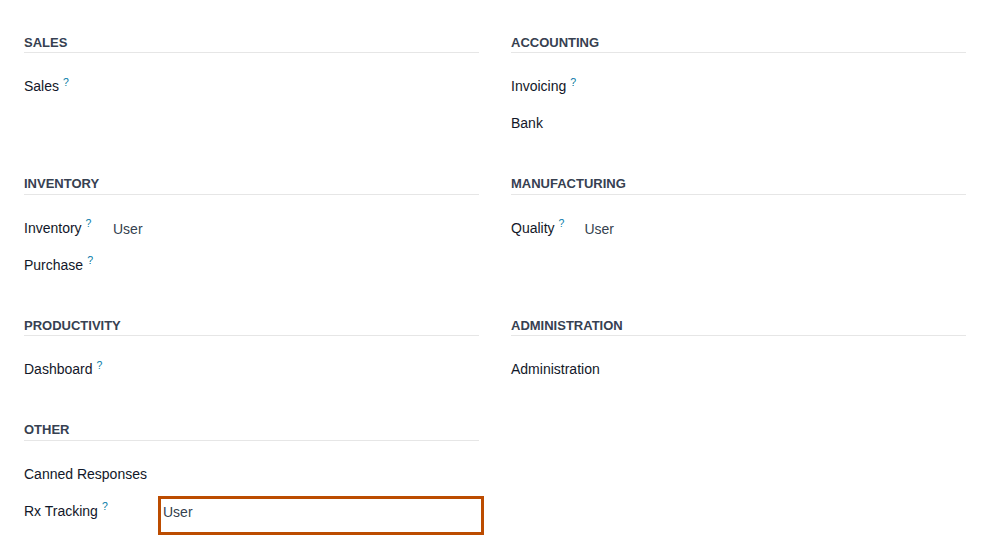
The access levels
| Access level (as the user form shows it) | Includes | Given automatically to | What it is for |
|---|---|---|---|
| Rx Tracking User | Inventory User; with Rx Tracking (DSCSA) - Suspect Product Investigations also Quality User | nobody | warehouse staff: scan serials, import supplier files, work discrepancies, returns, trace requests; read packages, documents and licenses |
| Rx Tracking Manager | Rx Tracking User | the administrator and OdooBot, at installation and again at every update of the core module | compliance manager: licenses, quarantine and release, return decisions, opening balance, legal holds, integrity checks, retention exports |
| DSCSA Owner Portal (3PL add-on) | Portal | nobody | a 3PL owner's employee on the owner portal. It isn't on the user form: it is granted with Grant Owner Portal Access (Give an owner's contacts the owner portal) |
| Odoo's Administration: Settings | the administrator | with Rx Tracking Manager and Inventory Administrator, opens the DSCSA (Rx Tracking) settings block and the two Settings menu items |
In developer mode, Settings ‣ Users & Companies ‣ Groups describes the two Rx Tracking groups as "Scan serials, view packages, licenses and DSCSA documents." (User) and "Manage licenses, quarantine and release lots, verify returns, answer trace requests, set legal holds." (Manager).
Known issue (PF-A04-09): the Manager description says managers answer trace requests. Users do too: an Rx Tracking User creates, searches and responds to a trace request; only Cancel Request is for managers.
Known issue (PF-W01-03): every update of Rx Tracking (DSCSA) makes the administrator and OdooBot Rx Tracking Manager again. If your procedure keeps the administrator out of DSCSA work, clear the right again after each update.
Menus each role sees
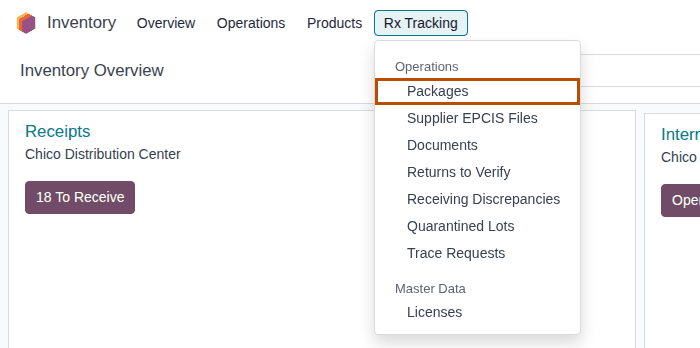
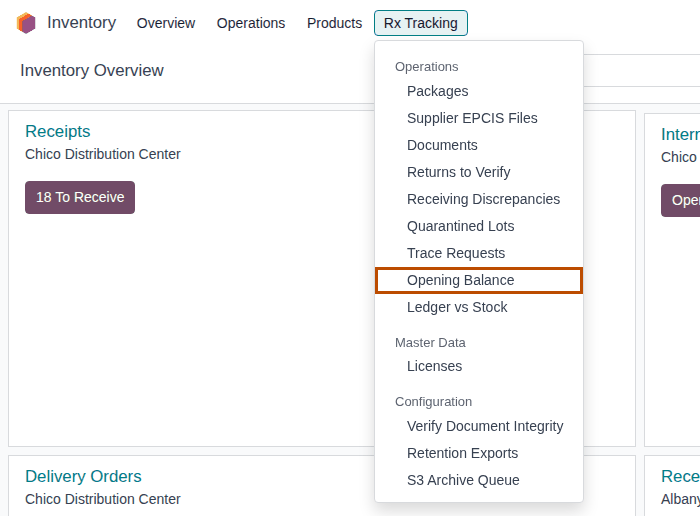
Everything is in one dropdown, Inventory ‣ Rx Tracking. Staff without an Rx Tracking right don't see it at all.
| Menu item (section) | Rx Tracking User | Rx Tracking Manager | Also needs |
|---|---|---|---|
| Packages, Supplier EPCIS Files, Documents, Returns to Verify, Receiving Discrepancies, Quarantined Lots, Trace Requests (Operations) | yes | yes | |
| Suspect Investigations (Operations, Suspect Product add-on) | yes | yes | |
| Opening Balance, Ledger vs Stock (Operations) | no | yes | |
| Licenses (Master Data) | yes, read only | yes | |
| Verify Document Integrity, Retention Exports, S3 Archive Queue (Configuration) | no | yes | |
| Settings (Configuration) | no | yes | Administration: Settings; the DSCSA block inside also needs Inventory Administrator |
| Every item of the 3PL block (3PL add-on): Operations, Reports, Configuration | yes (records read only where a manager must act) | yes | |
| Settings (in the 3PL ‣ Configuration section) | no | no | Administration: Settings; the 3PL block inside also needs Rx Tracking Manager |
As an Rx Tracking User, the dropdown has the Operations and Master Data sections:
As an Rx Tracking Manager without Administration: Settings, it adds Opening Balance, Ledger vs Stock and the Configuration section, without Settings:
Known issue (PF-W02-01): Inventory ‣ Rx Tracking ‣ Settings (in the Configuration section) is shown to a Manager with Administration: Settings, but opens a settings page without the DSCSA (Rx Tracking) block unless the person is also Inventory Administrator. See The DSCSA (Rx Tracking) block isn't in the settings.
Known issue (PF-A09-09): Ledger vs Stock per Owner (in the 3PL ‣ Reports section) is open to every Rx Tracking User, and its Our Own Stock filter lists the same differences as Ledger vs Stock, which only managers see.
Actions each role can take
A button a role can't use is not shown to it. The same check runs on the server, so an import, an API call or a link refuses the action too, with a message that names the role ("Only DSCSA users can …", "Only a DSCSA manager can …").
| Area | Rx Tracking User | Rx Tracking Manager only |
|---|---|---|
| Products and partners | set a partner's DSCSA Role and Small Business Dispenser (also needs a right to edit contacts); read licenses | tick or clear DSCSA Product (also needs a right to edit products); create, change and delete unverified licenses; Mark verified, Record re-verification |
| Receiving | Scan Serials, remove a scanned package, Import EPCIS, cancel a supplier file, record a missing Transaction Statement, resolve discrepancies | Reopen a discrepancy; set Non-saleable return on a return to the supplier |
| Holds | read quarantined lots | Quarantine and Release a lot (lot form, and Quarantine Lot / Release Lot on an investigation) |
| Customer returns | receive a return with its serials | Verify for Resale, Reject and Destroy |
| Stock | scrap DSCSA units with their serials; apply a count that lowers the stock | apply a count that raises the stock; Opening Balance; Ledger vs Stock |
| Trace requests | create, Search, Respond, download the response | Cancel Request |
| Records | read documents, download their files | Legal Hold (place and release), Verify Integrity, Retention Exports and Export now, S3 Archive Queue (Retry, queue unarchived records) |
| 3PL setup (3PL add-on) | read owner profiles, facility licenses, jurisdictions, FDA annual reports, facility events and the gate log; record owner instructions | create and change owner profiles, record the owner's authorization, Grant Owner Portal Access; mark a jurisdiction verified, an FDA report submitted, a facility event reported; the 3PL settings (with Administration: Settings) |
| 3PL operations | owner orders, Attach Supplier Data, Record Owner Confirmation, send documents and notices to owners, Recall Consignees, create and check title transfers, owner reports and Export CSV | Validate a title transfer and link its invoice, Release Owner Hold, Publish to Buyer, a custody receipt, delete a draft owner order, Generate an owner export |
| Suspect investigations (Enterprise) | create and work investigations, Form FDA 3911, find trading partners, split per owner (3PL Quality bridge) | Quarantine Lot, Release Lot, delete an investigation |
| Barcode app (Enterprise) | scan DSCSA serials in the app (opening the Barcode app needs only Inventory User) |
Odoo's own rights still apply next to these:
| To do this | Also needed | Known issue |
|---|---|---|
| Create a product or edit its DSCSA tab | Inventory, Sales, Purchase or Invoicing Administrator (or Product Creation) | PF-W03-01 |
| Create a contact or edit its DSCSA tab | Contact Creation (shown on the user form in developer mode), or a Sales, Purchase or Inventory Administrator right | PF-W03-02 |
| Change the DSCSA settings | Administration: Settings and Inventory Administrator | PF-W02-01 |
| Open Moves History (Inventory ‣ Reporting), where Revert Inventory Adjustment is | Inventory Administrator |
- Nobody bypasses the gates. The trading-partner checks, the serial count and the posting of documents run for every user, the administrator included, and posted documents, the package ledger and trace-request logs refuse changes from everyone. See What is checked where.
- 3PL: every Rx Tracking user sees every owner's records; no setting limits a user to some owners.
- Suspect Product add-on: every Rx Tracking User is also a Quality user and sees the Quality app.
Known issue (PF-A11-02): an Rx Tracking Manager (and any Quality Administrator) can delete an investigation, including one whose FDA notification is recorded. Your procedure decides who may delete them; the software doesn't prevent it.
Working with DSCSA products without an Rx Tracking right
Sales, purchasing, inventory and accounting staff can work with DSCSA products without any Rx Tracking right. The checks still apply to them, because they run on the server for every user; what they can't do is see why a partner is refused, or fix it. This table is the source of the Who can fix it lines on the troubleshooting pages.
| Person (their Odoo rights) | Can do | Is refused, or doesn't see | Who fixes it |
|---|---|---|---|
| Salesperson (Sales User) | confirm orders of authorized customers; sell non-DSCSA products to anyone | confirming an order with DSCSA products for a customer or delivery address that is not an authorized trading partner; a customer's online payment of such an order; the partner's DSCSA tab and its reasons are hidden | an Rx Tracking Manager (licenses) or User with contact rights (the role) |
| Buyer (Purchase User) | confirm purchase orders from authorized vendors, title purchase orders (3PL) | confirming a purchase order with DSCSA products from a vendor that is not authorized | an Rx Tracking Manager |
| Inventory user (Inventory User) | open DSCSA transfers, validate receipts and deliveries whose serials an Rx Tracking user scanned, move stock between internal locations, read the package fields of transfers | Scan Serials and the DSCSA Packages tab are hidden; validating a DSCSA transfer without scans; scrapping DSCSA units; applying a count of DSCSA products | an Rx Tracking User |
| Inventory administrator | the GLN of each warehouse | the DSCSA (Rx Tracking) settings block | an administrator who is also Rx Tracking Manager |
| Product manager (a right to edit products) | edit products | ticking or clearing DSCSA Product | an Rx Tracking Manager |
| Contact editor (Contact Creation) | edit contacts | setting a partner's DSCSA Role or Small Business Dispenser (the fields are read only; an import is refused) | an Rx Tracking User |
| Accountant | vendor bills and customer invoices | linking the invoice of a done title transfer (3PL) | an Rx Tracking Manager |
| Point of Sale cashier | sell non-DSCSA products | a Point of Sale order of a DSCSA product leaves its delivery open | an Rx Tracking User scans and validates the delivery |
With 3PL switched on, the same staff also meet the owner rules: stock held for an owner can't be on your own sale or purchase orders.
For example, when the salesperson Jordan Patel confirms a quotation for Lakeview Apothecary, whose state license expired, Odoo shows an Invalid Operation dialog:
S00026 can't be confirmed: it contains DSCSA products ([DEMO-DPZ-20] Demoprazole 20 mg Delayed-Release Capsules, 30 count).
Lakeview Apothecary (dispenser) has no valid state license: license DEMO-CA-PHY-61177 expired on 2026-09-12.
On an order that also has non-DSCSA products, the message names only the DSCSA products; with only non-DSCSA products the order confirms. See Error: "… not an authorized trading partner" when you have no Rx Tracking right.
Known issue (PF-A01-09): sales and purchasing staff can't open the partner's DSCSA tab or its licenses, so they learn why a partner is refused only when they confirm. Ask an Rx Tracking user to check the partner first (Check whether a partner is an authorized trading partner).
Known issue (PF-W20-05): a Purchase User without an Inventory or Rx Tracking right can't cancel a confirmed purchase order, even one without DSCSA products: Cancel shows "You are not allowed to access 'DSCSA Package' (dscsa.package) records. …". Ask a colleague with Inventory User (or an administrator) to cancel it.
What portal users and link recipients can read
Portal users are your customers' and owners' employees; they never see the Inventory app. These rules decide what they can open.
| Reader | Reads | Doesn't read |
|---|---|---|
| Customer portal user (Portal) | the posted outbound DSCSA documents whose buyer is its own company (or one of its contacts), with the portal fields only: number, dates, references, the lot and NDC summary, the Transaction Statement and the T3 and EPCIS files | other customers' documents, inbound documents, drafts, and any other field of a document |
| Customer portal user, transfers | the transfers whose partner, or whose sale order's customer, is its own company | a transfer it only follows |
| Owner portal user (DSCSA Owner Portal, 3PL add-on) | the posted documents issued in its owner's name (that exact owner, not a parent or subsidiary owner), and the owner pages: stock, receipts, holds and discrepancies of that owner | other owners' records |
| A customer, for an owner's document (3PL add-on) | an owner document addressed to it only when the owner's documents are issued to the customer, or after a manager selected Publish to Buyer | an owner document issued to the owner only |
| Anyone with a document link (no sign-in) | the one document the link was made for, and its files | anything else |
| Internal users | not affected by these rules |
When a portal user opens a document they may not read, the portal shows its "Error 404 … We couldn't find the page you're looking for!" page, not an access message. A customer's own documents are listed on My account under DSCSA Documents (the customer portal handout); an owner's on the owner portal (the owner portal handout).
A portal user's program that asks the server for another field of a document is refused with "The fields FIELDS of DSCSA documents are not available in the customer portal." Portal access is granted on the backend: Give a customer portal access to its DSCSA documents and Give an owner's contacts the owner portal.
- An owner whose profile is archived still reads its records until a manager revokes its portal access.
- In a database with several companies, portal users see only the records of their own company's companies.
Known issue (PF-A06-01): when someone posts a chatter message on an owner's document with the document's buyer as a recipient, the email's View button opens the document for the buyer, even if the owner's documents are issued to the owner only and nobody selected Publish to Buyer. Don't message the buyer from an owner document that is issued to the owner only.
Known issue (PF-A12-02): uninstalling the 3PL add-on removes the owner rules, so buyers then see owner documents that were issued to the owner only. See Update or uninstall the modules.